1. Interface
1.1 Overview of Interfaces
An interface is a collection of functions. It can also be regarded as a data type, and it is more abstract than an abstract class.Class 。
An interface only describes the methods it should have, without concrete implementation. The concrete implementation is done by the interface's implementation class (equivalent to a subclass of the interface). This separates the definition of functionality from its implementation, optimizing program design.
1.2 Interface Format & Usage
1.2.1 Format of an Interface
Unlike defining a class,classthe difference is that when defining an interface, you need to use theinterfacekeyword.
The file in which the interface is defined is still a.javafile. Although the declaration uses theinterfacekeyword, after compilation it still produces a.classfile. This allows us to regard an interface as a special class that only contains feature declarations.
Definition format:public interface 接口名 {
抽象方法1;
抽象方法2;
抽象方法3;
}
1.2.2 Usage of Interfaces
All methods in an interface are abstract methods. Directly using `new` on an interface to call methods is meaningless, and Java does not allow this.
The relationship between a class and an interface is an implementation relationship, i.e., a class implements an interface. The action of implementation is similar to inheritance, but the keyword is different; implementation usesimplements。
After other classes (implementation classes) implement an interface, it is equivalent to declaring:"I should have the functionality of this interface."The implementation class still needs to override the methods to implement the specific functionality.
Format:
class 类 implements 接口 {
    重写接口中方法
}
After a class implements an interface, the class inherits the abstract methods from the interface. At this point, the class needs to override these abstract methods to complete the concrete logic.
1.2.3 Case Code 1
Example
1.3 Characteristics of Members in an Interface
-
1. Variables can be defined in an interface, but they must be modified with fixed modifiers: `public static final`. Therefore, variables in an interface are also called constants, and their values cannot be changed. We will explain the `final` keyword later.
-
2. Methods can be defined in an interface, and methods also have fixed modifiers: `public abstract`.
-
3. An interface cannot create objects.
-
4. A subclass must override all abstract methods of the interface before it can be instantiated. Otherwise, the subclass is an abstract class.
1.3.1 Case Code 2
Example
1.4 Relationship Between Interfaces and Classes
- A: Between classes: inheritance relationship. A class can directly inherit only one parent class, but supports multi-level inheritance.
- B: Between classes and interfaces: only implementation relationship. A class can implement multiple interfaces.
- C: Between interfaces: only inheritance relationship. An interface can inherit multiple interfaces.
1.4.1 Case Code 3
Example
1.5 The Idea of Interfaces
Earlier we learned the code representation of interfaces. Now let's learn the idea behind interfaces, and then explain with examples from daily life.
For example: We all know that a computer has many ports, and these ports can have corresponding devices plugged into them. Why can these devices be plugged in? The main reason is that these devices conformed to the usage rules of the port when they were produced; otherwise, they could not be plugged into the port, let alone be used. It turns out that the existence of these ports allows us to use more devices.
The emergence of interfaces facilitates later use and maintenance. One side uses the interface (such as a computer), and the other side implements the interface (devices plugged into the port). For example, a laptop uses this rule (interface), and computer peripherals implement this rule (interface).
Interfaces are widely used in the collection framework:
Collection 接口

    List 接口

       ArrayList 实现类

       LinkedList 实现类

    Set 接口
1.6 Advantages of Interfaces
- 1. The relationship between a class and an interface is implementation, and it is multiple implementation. A class can implement multiple interfaces. The relationship between classes is inheritance. Inheritance in Java is single inheritance; a class can only have one parent class. This breaks the limitation of inheritance.
- 2. Provide rules to the outside world (USB interface).
- 3. Reduce the coupling of the program (it enables modular development; once rules are defined, each person implements their own module, improving development efficiency).
1.7 Differences Between Interfaces and Abstract Classes
1. Commonality:Both continuously abstract out methods that are abstract and have no concrete implementation, and neither can be instantiated (objects cannot be created).
2. Differences
1: Relationship with classes
(1) The relationship between a class and an interface is implementation, and it is multiple implementation; a class can implement multiple interfaces. The relationship between a class and an abstract class is inheritance. Inheritance in Java is single inheritance and multi-level inheritance; a class can only inherit one parent class, but it can have a grandparent class.
(2) Difference 2: Members
a.成员变量
    抽象类可以有成员变量,也可以有常量
    接口只能有常量,默认修饰符public static final

b.成员方法
    抽象类可以有抽象方法,也可以有非抽象方法
    接口只能有抽象方法,默认修饰符 public abstract

c.构造方法
    抽象类有构造方法,为子类提供
    接口没有构造方法
1.8 Athlete Case Study
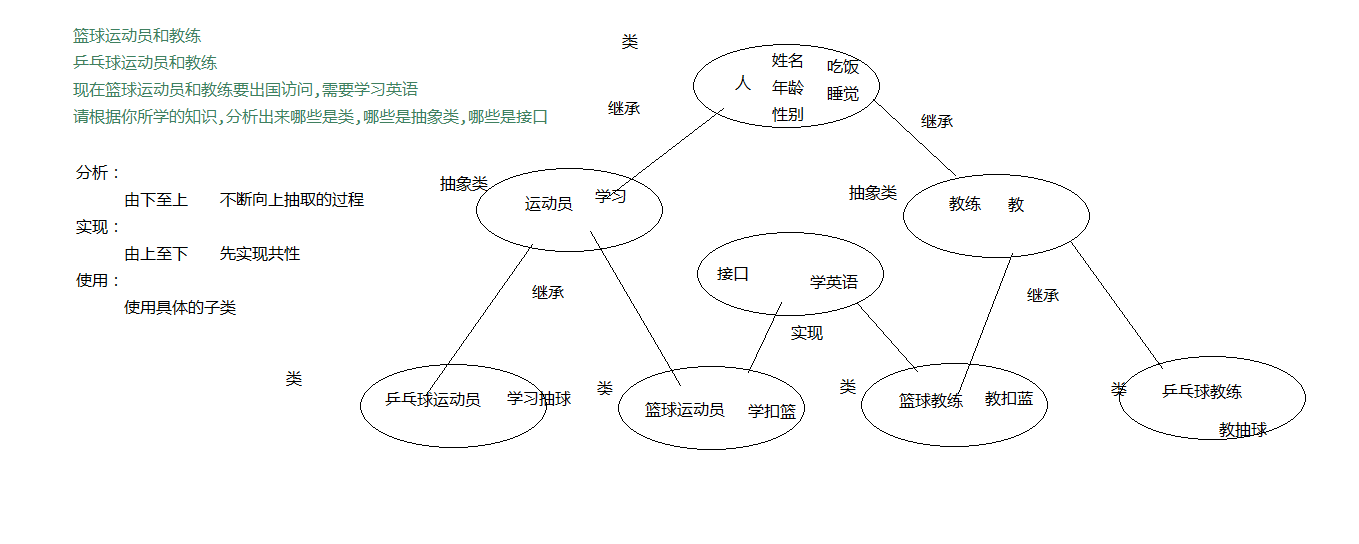
1.8.1 Case Code 4
Example
2. Polymorphism
2.1 Overview of Polymorphism
Polymorphism is the third major characteristic of object-oriented programming, after encapsulation and inheritance.
Real-world things often exhibit multiple forms. For example, a student is a type of person. A specific student, Zhang San, is both a student and a person, thus presenting two forms.
Java, as an object-oriented language, can also describe multiple forms of one thing. For example, if the Student class inherits from the Person class, then a Student object is both a Student and a Person.
2.2 Definition and Usage Format of Polymorphism
The definition format of polymorphism: in fact, it is that a reference variable of the parent class points to a child class object.
父类类型  变量名 = new 子类类型();
变量名.方法名();
A: Format for polymorphism with ordinary classes
父类 变量名 = new 子类();
Such as:
class Fu {}
class Zi extends Fu {}
//类的多态使用
Fu f = new Zi();
B: Format for polymorphism with abstract classes
抽象类 变量名 = new 抽象类子类();
Such as:
abstract class Fu {
    public abstract void method();
}
class Zi extends Fu {
    public void method(){
        System.out.println(“重写父类抽象方法”);
    }
}
//类的多态使用
Fu fu= new Zi();
C: Format for polymorphism with interfaces
接口 变量名 = new 接口实现类();
Such as:
interface Fu {
    public abstract void method();
}
class Zi implements Fu {
    public void method(){
        System.out.println(“重写接口抽象方法”);
    }
}
//接口的多态使用
Fu fu = new Zi();
2.2.1 Case Code
Example
2.3 Characteristics of Polymorphic Members
A: Polymorphic member variables
When a member variable with the same name appears in both the parent and child classes, and polymorphism calls this variable:
- Compile time: it checks whether the class to which the reference variable belongs contains the called member variable. If not, compilation fails.
- Runtime: it also calls the member variable of the class to which the reference variable belongs.
Simple memory aid: both compilation and runtime reference the left side of the equals sign. Compilation and runtime both look at the left.
B: Polymorphic member methods
- Compile time: refer to the class to which the reference variable belongs; if the class does not have the called method, compilation fails.
- Runtime: refer to the class to which the object pointed to by the reference variable belongs, and execute the member method of the class to which the object belongs.
In short: compilation looks at the left, runtime looks at the right.
2.3.1 Case Code Six
Example
2.4 Upcasting and Downcasting in Polymorphism
Type casting in polymorphism is divided into two types: upcasting and downcasting:
A: Upcasting: when a subclass object is assigned to a parent class reference, it is upcasting. Polymorphism itself is the process of upcasting.
Usage format:
父类类型 变量名 = new 子类类型();
For example:
Person p = new Student();
B: Downcasting: a subclass object that has already been upcast can use the forced type conversion format to convert a parent class reference into a subclass reference. This process is downcasting. If a parent class object is created directly, it cannot be downcast.
Usage format:
Subclass type variable name = (Subclass type) Parent class type variable;
For example:
Student stu = (Student) p; // 变量p 实际上指向 Student 对象
Example
2.5 Advantages and Disadvantages of Polymorphism
Example
Original address: https://www.cnblogs.com/yoke/p/7453864.html