Skills Tutorial
Skills are essentially operating manuals that teach AI to do things in a fixed process. Once written, they can be called repeatedly like functions.
We can think of Skills asHow to do a certain type of thing professionallyThis "how-to" is packaged into a reusable, automatically triggered capability module.
Skills exist as Markdown files. They don't execute functions; instead, through on-demand, progressive loading, they achieve efficient and reusable knowledge transfer.

The biggest difference between Skills and traditional Prompts is: on-demand loading + progressive disclosure (only stuffing the thick SOP into the context when needed, saving a lot of tokens).
| Comparison Item | Ordinary Prompt | Skills Mechanism |
|---|---|---|
| Must be redescribed every time | Yes | No (described only once) |
| Context Length Usage | Fully loaded every time | Progressive loading (only reads the full content when triggered) |
| Consistency | Depends on the quality of each prompt | High (fixed SOP + templates) |
| Reusability | Manual copy and paste | Automatic matching / slash commands / project sharing |
| Maintenance Method | Every prompt change requires resending | Modify the SKILL.md file; takes effect globally/for the project |
For example, when we usually write articles, before Skills, we had to repeat the following steps every time:
帮我总结文章 → 翻译 → 改成公众号风格 → 加标题 → 输出 Markdown
With Skills:
You only need one sentence:
使用「技术文章转公众号」Skill
The AI will automatically execute according to the steps you set.
Imagine AI as aA smart but inexperienced new graduate intern:
- Ordinary Prompt= You have to teach him how to do things from scratch every time (teach once today, retrain tomorrow)
- Rule / Memory= You post a "company code of conduct" at his workstation (always in effect, but only governs attitude and format)
- MCP / Tools= You install a bunch of software and APIs on his computer (he can call external tools, but doesn't know when to use them or how to combine them)
- Skills= You directly give him a whole set"Job Training Package"(PDF + flowchart + SOP + talk script templates + common scripts), and tell him: "When the boss asks you to do this kind of thing, follow the methods in this folder."
Mainstream clients that currently support Skills:
| Ranking | Tool Name | Whether Skills are free to use | Recommended Users | Default Path for Skill Storage | Notes |
|---|---|---|---|---|---|
| 1 | Claude Code | Yes (official) | Everyone | ~/.claude/skills | Standard setter, most comprehensive ecosystem |
| 2 | Cursor | Yes | Most commonly used for coding | ~/.cursor/skills | Almost seamlessly compatible with Claude Skills |
| 3 | Trae / OpenCode | Yes | Value for money seekers | Depends on tool settings | More users in China |
| 4 | VS Code + Plugin | Partial support | Already deeply using VS Code | Configure in plugin settings | Rapidly catching up |
| 5 | Coze / other Chinese platforms | Partial support | Prefer web version | Platform comes with a skill marketplace | Some require membership |
The difference between Skills and MCP:Skills are used forKnowledge reuse, MCP is used forCapability expansion。
Skills
Knowledge reuse
- Knowledge sharing: experience, best practices, workflows
- Based on simple Markdown files, anyone can create them
- Progressive loading, high token efficiency
- No server or backend setup needed
- Suitable for Web / Desktop / CLI
MCP
Capability expansion
- Functional expansion: connecting APIs, databases, external tools
- Requires coding skills and server-side configuration
- Loads all tool definitions at startup
- Strong integration with external systems
- Higher token consumption and complexity
The Core Structure of a Skill
The core of Skills is:A folder + a SKILL.md file。
The SKILL.md file contains:
- Metadata (at least a name and description)
- Instructions telling AI how to complete a specific task
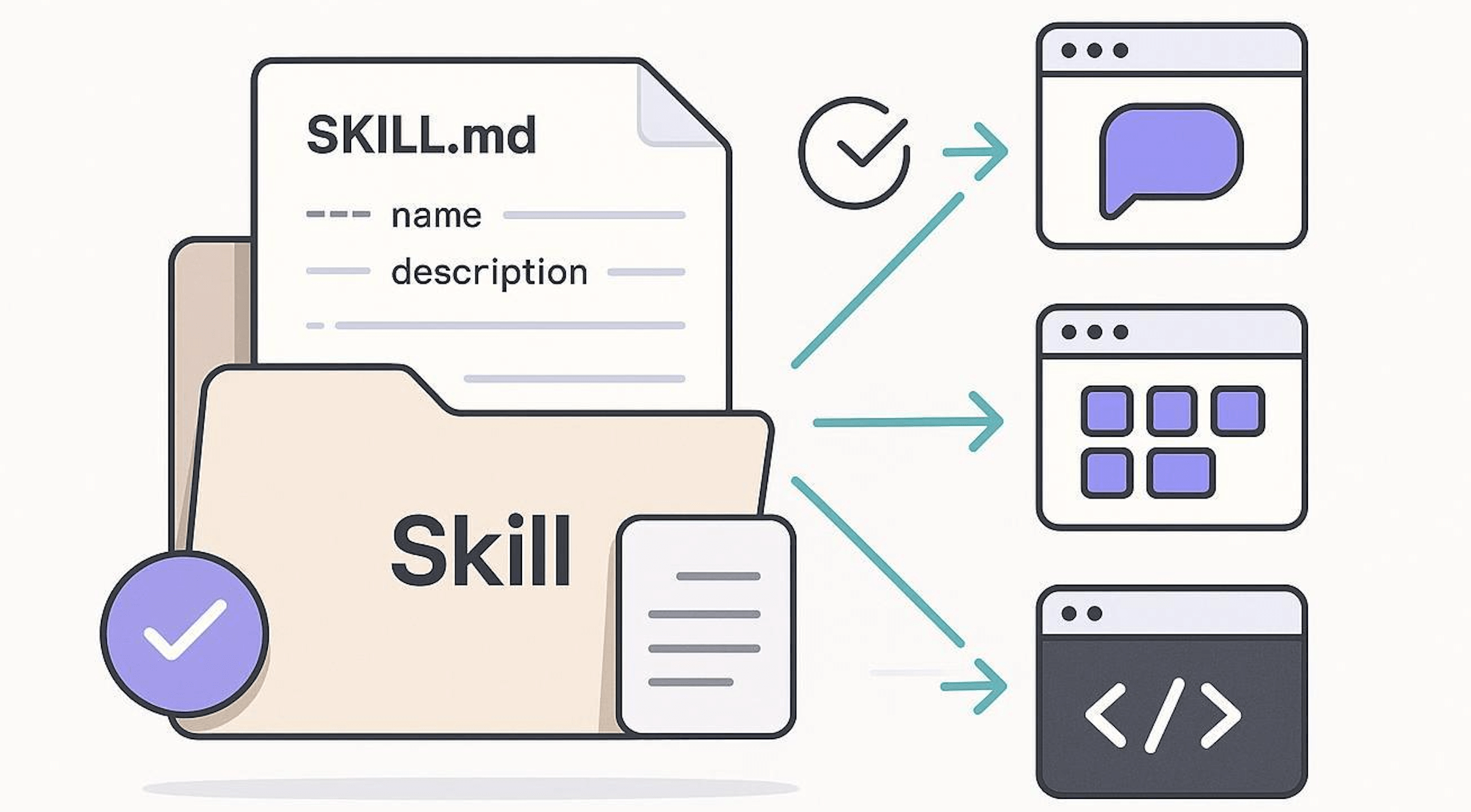
A Skill is essentially a Markdown file (file name fixed as SKILL.md)
my-skill/
└── SKILL.md   (唯一必需)
Basic SKILL.md template:
---
name: pdf-processing
description: 从 PDF 中提取文本和表格,填写表单,并合并文档
---

# PDF 处理

## 使用场景
当需要对 PDF 文件进行操作时使用,例如:

- 提取 PDF 文本或表格数据
- 填写 PDF 表单
- 合并多个 PDF 文件

## 提取文本
- 使用 `pdfplumber` 提取文本型 PDF 内容
- 扫描版 PDF 需配合 OCR 工具

## 填写表单
- 读取 PDF 表单字段
- 按输入数据填充并生成新文件
Minimal required example:
---
name: skill-name
description: 说明该 Skill 的功能以及适用场景
---
Example with optional fields:
---
name: pdf-processing
description: 从 PDF 中提取文本和表格,填写表单,并合并文档
license: Apache-2.0
metadata:
  author: example-org
  version: "1.0"
---
| Field | Required | Description |
|---|---|---|
| name | Yes | Skill name, up to 64 characters, can only use lowercase letters, numbers, and-, and cannot start or end with-the beginning or end |
| description | Yes | Description of functionality and usage scenarios, up to 1024 characters, cannot be empty |
| license | no | License name or pointer to the license file bundled with the Skill |
| compatibility | no | Environment and dependency description (products, system packages, network permissions, etc.), up to 500 characters |
| metadata | no | Custom key-value pairs for extending metadata (e.g., author, version) |
| allowed-tools | no | List of allowed tools (space-separated, experimental feature) |
If you need reference materials, reference examples, or execution scripts, you can use the directory structure of a more complex Skill:
my-skill/
├── SKILL.md      # 必需:指令 + 元数据
├── scripts/      # 可选:可执行代码
├── references/   # 可选:文档资料
└── assets/       # 可选:模板、资源

How Skills Work
Skills use progressive loading to efficiently manage context:
- Discovery:At startup, AI only loads the name and description of each Skill, retaining only the most basic identification information.
- Activation:When a task matches a Skill's description, AI loads the complete SKILL.md instructions into context.
- Execution:AI executes according to the instructions, loading reference files or running code on demand.
This design keeps AI fast while enabling it to fetch more information on demand.
Claude Code Skills
Next, let's take Claude Code as an example to create a simple Skill.
Claude Code looks up and loads Skills in the following order (the more specific the location, the higher the priority):
| Level | Path | Effective Scope |
|---|---|---|
| Enterprise | Configured via the admin console (managed settings) | All users in the organization |
| Personal | ~/.claude/skills/<skill-name>/SKILL.md |
All your projects |
| Project | .claude/skills/<skill-name>/SKILL.md |
Only the current project |
| Plugin | <plugin>/skills/<skill-name>/SKILL.md |
Environments where this plugin is enabled |
Each Skill is a folder, and the folder name is the Skill identifier (kebab-case, lowercase + hyphens, recommended).
Minimal structure:
~/.claude/skills/
  └── code-comment-expert/          # 技能文件夹名
      └── SKILL.md                  # 唯一必填文件(必须全大写 + .md 小写)
Complete SKILL.md format:
---                                 #  YAML frontmatter 开始(顶格)
name: code-comment-expert           # 必填:技能名(也是 /slash 命令名)
description: >-                     # 必填:最关键一行!Claude 靠它判断是否加载
  为代码添加专业、清晰的中英双语注释。
  适合缺少文档、可读性差、需要分享审查的代码。
  常见触发场景:加注释、注释一下、加文档、explain this、improve readability

trigger_keywords:                   # 强烈推荐(大幅提升自动触发率)
  - 加注释
  - 注释
  - 加文档
  - explain code
  - document
  - comment this
  - readability

version: 1.0                        # 可选
author: yourname                    # 可选
---                                 # ← YAML 结束

# 这里开始是正文(Markdown)—— Claude 真正执行时的指令

你现在是「专业代码注释专家」。

## 核心原则
- 只在缺少注释或可读性明显不足处添加
- 优先使用英文 JSDoc / TSDoc 风格
- 复杂逻辑 / 非明显意图处额外加一行中文解释
- 注释精炼,每行不超过 80 字符
- 绝不修改原有逻辑

## 输出格式(严格遵守)
1. 先输出完整修改后的代码块(用 ```语言 包裹)
2. 再用 diff 形式展示只改动注释的部分
3. 最后说明加了哪些注释、理由

现在直接开始处理用户提供的代码,不要闲聊。
Advanced File Structure (Recommended When Skills Become Complex)
When a Skill exceeds 500–800 lines, or requires templates/scripts/reference materials, the following organization is recommended:
~/.claude/skills/react-component-review/
  ├── SKILL.md                  # 核心指令 + 元数据(建议控制在 400 行内)
  │
  ├── templates/                # 常用模板(Claude 按需读取)
  │   ├── functional.tsx.md
  │   └── class-component.md
  │
  ├── examples/                 # 优秀/反例(给 Claude 看标准)
  │   ├── good.md
  │   └── anti-pattern.md
  │
  ├── references/               # 规范、规则、禁用词表
  │   ├── hooks-rules.md
  │   └── naming-convention.md
  │
  └── scripts/                  # 可执行脚本(需开启 code execution)
      ├── validate-props.py
      └── check-cycle-deps.sh
Example of referencing in SKILL.md:
Markdown需要给出标准函数组件时,参考 templates/functional.tsx.md 的结构。

如果违反 Hooks 规则,对照 references/hooks-rules.md 第 3–5 条说明。

如需校验 propTypes,可执行 scripts/validate-props.py "{代码片段}"。
After Claude sees the path reference, it loads the corresponding file on demand, rather than stuffing everything into the context at once, greatly saving tokens.
Your First Skill
Let's temporarily forget the complex creation process and start withusing a ready-made Skillto experience the convenience it brings.
Create a Skill Directory
Skills are stored in~/.claude/skills/(personal global) or under the project directory.claude/skills/(project-specific).
This section tests under the project directory. First, create a directory claude-test:
mkdir claude-test
Enter that directory, create the skills directory and files:
mkdir -p .claude/skills/python-naming-standard
Write the Configuration File SKILL.md
Create SKILL.md in the directory. This is the brain of the Skill, telling Claude when to use it.
---
name: Python 内部命名规范技能
description: 当用户要求重构、审查或编写 Python 代码时,请参考此规范。
---

## 指令
1. 所有的内部辅助函数必须以 `_internal_` 前缀命名。
2. 如果发现不符合此规则的代码,请自动提出修改建议。
3. 在执行 `claude commit` 前,必须检查此规范。

## 参考示例
- 正确:`def _internal_calculate_risk():`
- 错误:`def _calculate_risk():`
Field requirements:
- name: Must use only lowercase letters, numbers, and hyphens (max 64 characters)
- description: Brief description of the Skill and when to use it (max 1024 characters)
After creation, the file structure is as follows:
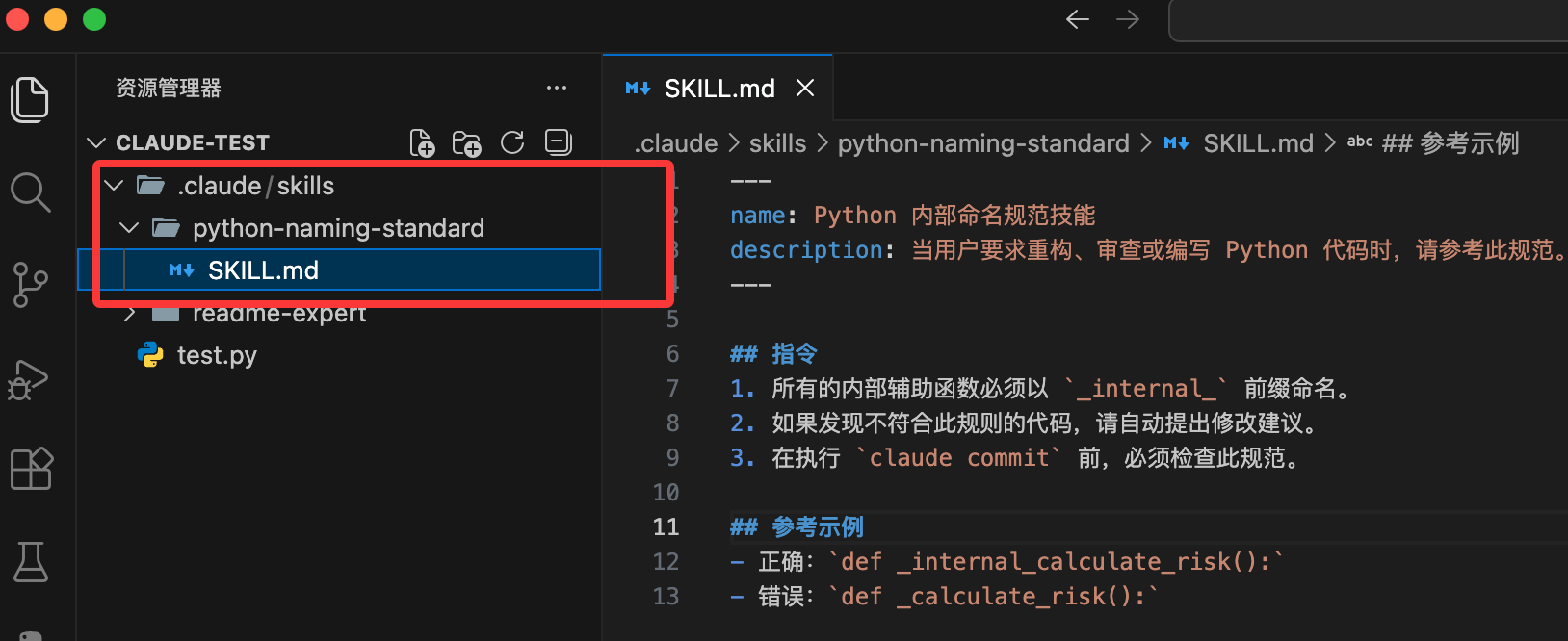
Your project should now look like this:
my-project/
├─ src/
│  └─ test.py              # 项目源码
├─ .claude/
│  ├─ skills/
│  │  └─ hello-world/
│  │     ├─ skill.md       # Skill 定义(YAML + Instructions,机器可执行)
│  │     └─ README.md      # Skill 说明(人类阅读,可选)
│  └─ config.yml           # Claude 项目级配置(可选)
├─ .gitignore
└─ README.md               # 项目整体说明
Next, run the following command in the terminal to start Claude Code:
claude
Enter the task:
Help me write a function that calculates user discounts.
Claude will scan the installed Skills, find that your request involves "Python code writing", and match python-naming-standard.
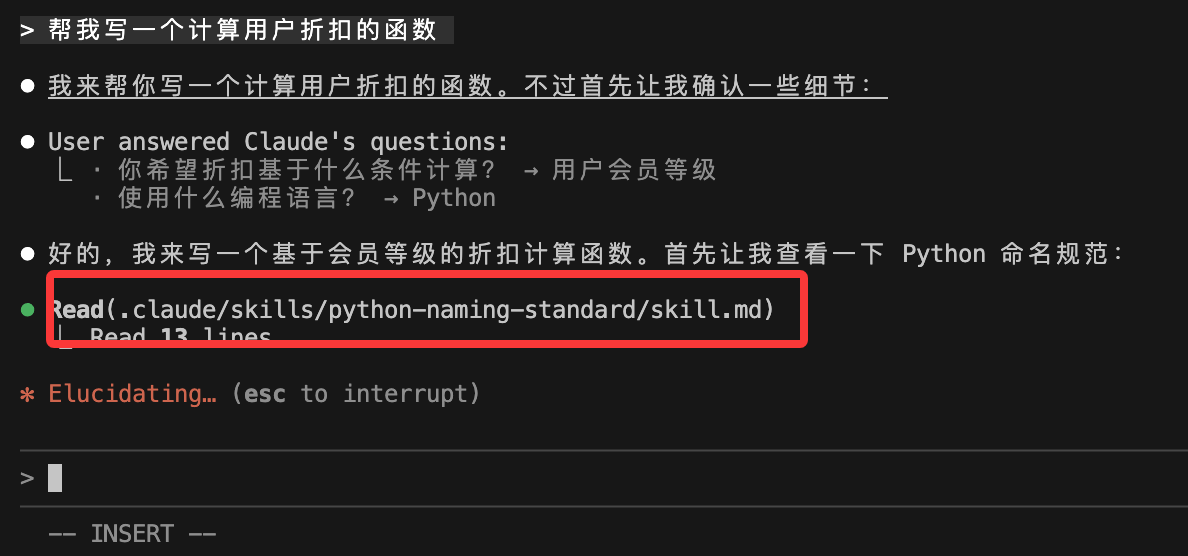
It will generate the following code based on the requirements in SKILL.md:
def _internal_get_discount(user_score):
    # 计算逻辑...
    return discount
Add Resource Files (Optional)
Additionally, we can.claude/skills/add the following directories under:
Add in the same folder:
examples/: Stores example files.references/: Stores reference documents.scripts/: Stores executable scripts (e.g., Python for processing PDFs).
Then reference them in SKILL.md:
查看示例 commit:./examples/good-commit.txt
运行脚本:使用工具执行 ./scripts/process.py
Agent Skills Related Resources Compilation
| Resource Description | Link |
|---|---|
| Skill aggregation entry | https://skills.sh/ |
| Skills Marketplace (Chinese interface) | https://skillsmp.com/zh |
| Tencent's Skills Marketplace | https://skillhub.tencent.com/ |
| Agent Skills official standard site | https://agentskills.io |
| Anthropic official engineering article (Agent Skills practical concepts) | https://www.anthropic.com/engineering/equipping-agents-for-the-real-world-with-agent-skills |
| VS Code Copilot Agent Skills documentation | https://code.visualstudio.com/docs/copilot/customization/agent-skills |
| Anthropic official Skills GitHub repository | https://github.com/anthropics/skills |
| Claude skills curated list (Awesome series) | https://github.com/ComposioHQ/awesome-claude-skills |
| Software development automation workflow Skills collection | https://github.com/obra/superpowers |
| A Skill that automatically generates Skills (official example) | https://github.com/anthropics/skills/tree/main/skills/skill-creator |
Recommended Skills:
| Skill | Core function | Installation command |
|---|---|---|
| find-skills (vercel-labs) | Skill search and recommendation center | npx skills add vercel-labs/skills |
| vercel-react-best-practices | React / Next performance optimization standards | npx skills add vercel-labs/agent-skills --skill vercel-react-best-practices |
| frontend-design (anthropics) | High-quality UI design capability | npx skills add anthropics/skills --skill frontend-design |
| web-design-guidelines | Web accessibility and UX standards | npx skills add vercel-labs/agent-skills --skill web-design-guidelines |
| remotion-best-practices | React video production best practices | npx skills add remotion-dev/skills --skill remotion-best-practices |
| brainstorming (superpowers) | Structured thinking and planning capability | npx skills add obra/superpowers --skill brainstorming |
| agent-browser | Browser automation control | npx skills add vercel-labs/agent-browser |
| browser-use | High-performance browser interaction | npx skills add browser-use/browser-use |
| supabase-postgres-best-practices | Supabase / PostgreSQL optimization | npx skills add supabase/agent-skills --skill supabase-postgres-best-practices |
| azure-cost-optimization | Azure cloud cost optimization | npx skills add microsoft/github-copilot-for-azure --skill azure-cost-optimization |
| cloudflare/skills | Workers and edge computing practices | npx skills add cloudflare/skills |
| redis/agent-skills | Redis advanced patterns and anti-patterns | npx skills add redis/agent-skills |
| vercel-composition-patterns | React composition pattern standards | npx skills add vercel-labs/agent-skills --skill vercel-composition-patterns |
| vercel-react-native-skills | React Native official best practices | npx skills add vercel-labs/agent-skills --skill vercel-react-native-skills |
| sleek-design-mobile-apps | Modern mobile app design guide | npx skills add sleekdotdesign/agent-skills --skill sleek-design-mobile-apps |
| ui-skills | Designer-level UI and interaction practices | npx skills add ibelick/ui-skills |
| pdf (anthropics) | PDF generation and parsing capability | npx skills add anthropics/skills --skill pdf |
| seo-audit | SEO audit and optimization | npx skills add coreyhaines31/marketingskills --skill seo-audit |
| skill-creator | Custom Skill building capability | npx skills add anthropics/skills --skill skill-creator |
| code-review-expert | Professional-level code review capability | npx skills add sanyuan0704/code-review-expert |