HTML <tfoot> valignProperty
Example
Vertically align the content in the <tfoot> element to the bottom:
<table border="1"
width="100%">
<tr>
<th>Month</th>
<th>Savings</th>
</tr>
<tr>
<td>January</td>
<td>$100</td>
</tr>
<tr>
<td>February</td>
<td>$80</td>
</tr>
<tfoot valign="bottom">
<tr>
<td>Sum</td>
<td>$180</td>
</tr>
</tfoot>
</table>
<tr>
<th>Month</th>
<th>Savings</th>
</tr>
<tr>
<td>January</td>
<td>$100</td>
</tr>
<tr>
<td>February</td>
<td>$80</td>
</tr>
<tfoot valign="bottom">
<tr>
<td>Sum</td>
<td>$180</td>
</tr>
</tfoot>
</table>
Try it Yourself »
Browser Support


All major browsers support the valign attribute.
Definition and Usage
HTML5 does not support the <tfoot> valign attribute. Please use CSS instead.
The valign attribute specifies the vertical alignment of the content in a <tfoot> element.
Syntax
<tfoot valign="top|middle|bottom|baseline">
Property value
| Value | Description |
|---|---|
| top | Align the content to the top. |
| middle | Aligns the content to the center (default value). |
| bottom | Align the content to the bottom. |
| baseline | Aligns to the baseline. The baseline is an imaginary line. In a line of text, most letters are based on the baseline. The baseline value sets all table data in the row to share the same baseline. The effect of this value is often the same as the bottom value. However, if the text font sizes differ, the baseline effect will be better. See the illustration below. |
When text has different font sizes, the bottom vs. baseline diagram:
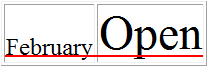 valign="bottom"
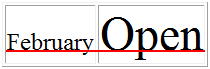 valign="baseline"
HTML <tfoot> tagother extensions