Swift Generics
Swift provides generics so that you can write flexible and reusable functions and types.
The Swift standard library is built with generic code.
Swift's Array and Dictionary types are generic collections.
You can create an Int array, a String array, or even an array of any other Swift type data.
The following example is a non-generic function exchange used to swap two Int values:
Example
The above program execution output is:
交换前数据: 100 和 200
交换后数据: 200 和 100
The above example only applies to swapping variables of the integer Int type. If you want to swap two String values or Double values, you have to write a corresponding function again, such as swapTwoStrings(_:_:) and swapTwoDoubles(_:_:), as shown below:
String and Double Value Swap Functions
From the above code, their functional code is the same, only the types are different. In this case, we can use generics to avoid writing repetitive code.
Generics use a placeholder type name (represented here by the letter T) to replace the actual type name (such as Int, String, or Double).
func swapTwoValues<T>(_ a: inout T, _ b: inout T)
swapTwoValues is followed by the placeholder type name (T), enclosed in angle brackets (<T>). These angle brackets tell Swift that T is a placeholder type name within the definition of the swapTwoValues(_:_:) function, so Swift will not look for an actual type named T.
The following example is a generic function exchange used to swap two Int and String values:
Example
The above program execution output is:
交换前数据:  100 和 200
交换后数据: 200 和 100
交换前数据:  A 和 B
交换后数据: B 和 A
Generic Types
Swift allows you to define your own generic types.
Custom classes, structures, and enums work with any type, just like the usage of Array and Dictionary.
Next, we will write a generic collection type named Stack (stack). A stack only allows new elements to be added at the end of the collection (called pushing), and elements can only be removed from the end as well (called popping).
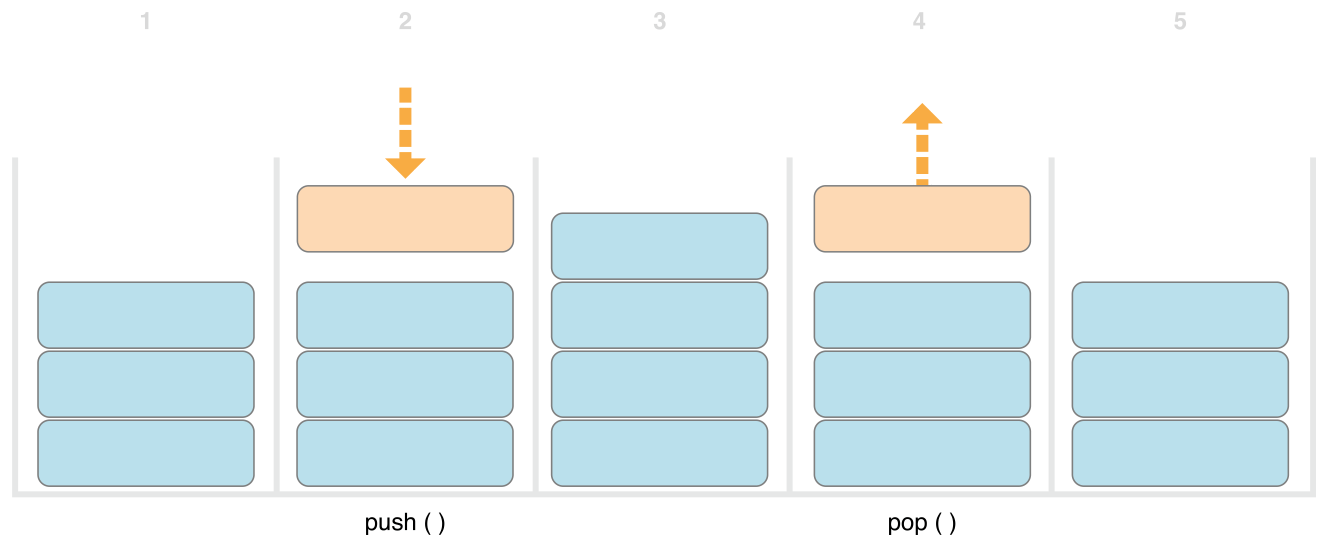
The image is explained from left to right as follows:
- Three values are in the stack.
- A fourth value is pushed onto the top of the stack.
- Now there are four values in the stack, with the most recently pushed value at the top.
- The value at the top of the stack is removed, or popped.
- After removing one value, the stack now has only three values again.
The following example is a non-generic version of the stack, taking an Int stack as an example:
Int Stack
This structure uses an Array property named items in the stack to store values. Stack provides two methods: push(_:) and pop(), used to push values into the stack and remove values from the stack. These methods are marked as mutating because they need to modify the structure's items array.
The IntStack structure above can only be used for the Int type. However, you can define a generic Stack structure so that it can handle values of any type.
Below is the generic version of the same code:
Generic Stack
The instance execution result is:
字符串元素入栈:
["google", "example"]
出栈元素: example
整数元素入栈:
[1, 2]
Stack is basically the same as IntStack, with the placeholder type parameter Element replacing the actual Int type.
In the above example, Element is used as a placeholder in the following three places:
- Creatingitemsproperty, usingElementan empty array of the type to initialize it.
- Specifypush(_:)the only parameter of the methoditemmust be of typeElementtype.
- Specifypop()the return value type of the method must beElementtype.
Extending a Generic Type
When you extend a generic type (using the extension keyword), you do not need to provide a type parameter list in the extension definition. More conveniently, the type parameter list declared in the original type definition is available in the extension, and the parameter names from the original type are used as references to the type parameters in the original definition.
The following example extends the generic type Stack, adding a read-only computed property named topItem, which returns the element at the top of the current stack without removing it from the stack:Generics
In the example, the topItem property returns an optional value of type Element. When the stack is empty, topItem returns nil; when the stack is not empty, topItem returns the last element in the items array.
The above program execution output is:
字符串元素入栈:
栈中的顶部元素是:example.
["google", "example"]
We can also specify an associated type by extending an existing type.
For example, Swift's Array type already provides an append(_:) method, a count property, and a subscript that accepts an Int index value to retrieve its elements. These three features all meet the requirements of the Container protocol, so you can extend Array simply by declaring that Array adopts the protocol.
The following example only creates an empty extension:
extension Array: Container {}
Type Constraints
Type constraints specify that a type parameter must inherit from a specified class, or conform to a particular protocol or protocol composition.
Type Constraint Syntax
You can write a type constraint after a type parameter name, separated by a colon, as part of the type parameter chain. The basic syntax for such type constraints on generic functions is shown below (same as the syntax for generic types):
func someFunction<T: SomeClass, U: SomeProtocol>(someT: T, someU: U) {
    // 这里是泛型函数的函数体部分
}
This function has two type parameters. The first type parameter, T, has a type constraint requiring T to be a subclass of SomeClass; the second type parameter, U, has a type constraint requiring U to conform to the SomeProtocol protocol.
Example
Generics
The index subscript starts from 0.
The above program execution output is:
example 的索引为 3
Associated Types
In Swift, the associatedtype keyword is used to set up associated type instances.
The following example defines a Container protocol, which defines an associated type ItemType.
The Container protocol only specifies three features that any type conforming to the Container protocol must provide. A type that conforms to the protocol can also provide additional features while satisfying these three conditions.
// Container 协议
protocol Container {
    associatedtype ItemType
    // 添加一个新元素到容器里
    mutating func append(_ item: ItemType)
    // 获取容器中元素的数
    var count: Int { get }
    // 通过索引值类型为 Int 的下标检索到容器中的每一个元素
    subscript(i: Int) -> ItemType { get }
}

// Stack 结构体遵从 Container 协议
struct Stack<Element>: Container {
    // Stack<Element> 的原始实现部分
    var items = [Element]()
    mutating func push(_ item: Element) {
        items.append(item)
    }
    mutating func pop() -> Element {
        return items.removeLast()
    }
    // Container 协议的实现部分
    mutating func append(_ item: Element) {
        self.push(item)
    }
    var count: Int {
        return items.count
    }
    subscript(i: Int) -> Element {
        return items[i]
    }
}

var tos = Stack<String>()
tos.push("google")
tos.push("example")
tos.push("taobao")
// 元素列表
print(tos.items)
// 元素个数
print( tos.count)
The above program execution output is:
["google", "example", "taobao"]
3
Where Clauses
Type constraints can ensure that a type conforms to the constraints defined by a generic function or class.
You can define constraints on parameters in the parameter list through a where clause.
You can write a where statement immediately after the type parameter list, followed by one or more constraints on associated types and/or one or more equality relationships between types and associated types.
Example
The following example defines a generic function named allItemsMatch, used to check whether two Container instances contain the same elements in the same order.
If all elements match, it returns true; otherwise, it returns false.
Generics
The output of the above program execution is:
Match all elementsOther Extensions