LangChain Integration with DeepSeek
This chapter explains how to integrate and use the DeepSeek chat model in LangChain.
Through thelangchain-deepseekextension package, developers can quickly access the large language model services provided by DeepSeek.
DeepSeek models support both the official hosted API and local or third-party inference deployment through platforms such as Ollama, Fireworks, and Together.
In addition to the official API interface, we can also use theCoding Plan/Token Planpackage to directly access mainstream large models such as DeepSeek, Kimi, GLM, Doubao, MiniMax, etc., without purchasing each vendor's APIs separately.
DeepSeek Introduction
DeepSeek is an open-source large language model series that supports capabilities such as chat, reasoning, and code generation.
In LangChain, DeepSeek is mainly called through theChatDeepSeekclass.
Integration Information:
| Item | Description |
|---|---|
| Class Name | ChatDeepSeek |
| Package | langchain-deepseek |
| Status | Beta (Test Version) |
| JavaScript Support | Yes |
| Python Support | Yes |
Model Capability Support:
| Feature | Supported? |
|---|---|
| Tool Calling | ✅ Supported |
| Structured Output | ✅ Supported |
| Image Input | ❌ Not Supported |
| Audio Input | ❌ Not Supported |
| Video Input | ❌ Not Supported |
| Token Streaming Output | ✅ Supported |
| Native Async Calling | ✅ Supported |
| Token Usage Statistics | ✅ Supported |
| Logprobs | ❌ Not Supported |
The DeepSeek API uses an API format compatible with OpenAI/Anthropic. By modifying the configuration, you can use the OpenAI/Anthropic SDK to access the DeepSeek API, or use software compatible with the OpenAI/Anthropic API.
| Parameter | Value |
|---|---|
| base_url (OpenAI) | https://api.deepseek.com |
| base_url (Anthropic) | https://api.deepseek.com/anthropic |
| api_key | Click the link to applyAPI key |
| model* | deepseek-v4-flashdeepseek-v4-prodeepseek-chat(Will be deprecated on 2026/07/24)deepseek-reasoner(Will be deprecated on 2026/07/24) |
Install langchain-deepseek
Before using it, you need to install DeepSeek's LangChain integration package:
pip install -qU langchain-deepseek
Configure DeepSeek API Key
You need to first register a DeepSeek account and create an API Key. If you don't have one yet, you need to go tohttps://platform.deepseek.com/api_keysto create an API key.
It is usually recommended to usepython-dotenvto read the.envconfiguration file in the current directory.
pip install python-dotenv
Create the.envfile in the current project directory:
.env File Configuration:
OPENAI_API_KEY="sk-xxxxxxxxxxxxxxxx"
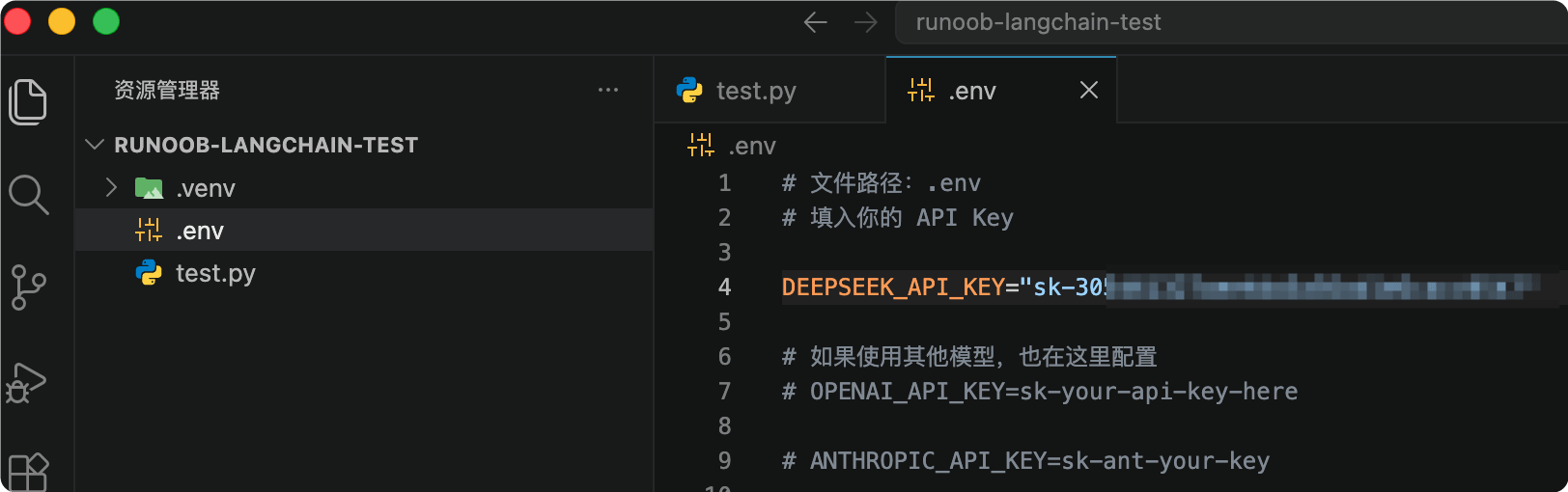
Python Reads the .env File:
Complete Example
from dotenv import load_dotenv
# Load the .env file in the current directory
load_dotenv()
# Get API Key
api_key = os.getenv("DEEPSEEK_API_KEY")
print(api_key)
Specify the .env File Path:If the .env file is not in the current directory, you can manually specify the path:
Example
load_dotenv(dotenv_path="./config/.env")
Configure LangSmith (Optional)
If you need to enable LangChain call chain tracing and debugging, you can configure the LangSmith API Key:
Example
os.environ["LANGSMITH_API_KEY"] = getpass.getpass(
"Enter your LangSmith API key: "
)
Create ChatDeepSeek Model
After installation, you can useChatDeepSeekto initialize the model:
Example
from dotenv import load_dotenv
from langchain_deepseek import ChatDeepSeek
# Load .env
load_dotenv()
# Get API KEY
api_key = os.getenv("DEEPSEEK_API_KEY")
# Create model
llm = ChatDeepSeek(
api_key=api_key,
model="deepseek-v4-flash",
temperature=0,
max_tokens=None,
timeout=None,
max_retries=2
)
# Call model
response = llm.invoke("Hello, please introduce LangChain")
print(response.content)
Parameter Description:
| Parameter | Description |
|---|---|
| api_key | Set your applied API key, e.g., "sk-xxx" |
| model | Specify the model name, e.g., deepseek-v4-flash |
| temperature | Controls randomness; the lower the value, the more stable the result |
| max_tokens | Limit the maximum number of generated tokens |
| timeout | Request timeout |
| max_retries | Maximum number of retries after failure |
You can also use theinit_chat_model()function to call:
Example
from dotenv import load_dotenv
# Load the .env file in the current directory
load_dotenv()
from langchain.chat_models import init_chat_model
# Specified model, returns a fixed model
model = init_chat_model("deepseek:deepseek-v4-flash", temperature=0.7)
response = model.invoke("Introduce the Python Tutorial")
print(response.content)
Call DeepSeek Model
The following example demonstrates how to send chat messages to the DeepSeek model:
Note: In my test here, I wrote the API Key in the test file:
llm = ChatDeepSeek(
    api_key="sk-xxx",  # 设置你的 DeepSeek API Key
    model="deepseek-v4-flash"
)
In actual production environments, please set it in the.envfile.
Example
llm = ChatDeepSeek(
api_key="sk-xxx", # Set your DeepSeek API Key
model="deepseek-v4-flash",
temperature=0,
max_tokens=None,
timeout=None,
max_retries=2
)
messages = [
(
"system",
"You are a helpful assistant that translates English to Chinese."
),
(
"human",
"I love programming."
),
]
ai_msg = llm.invoke(messages)
print(ai_msg.content)
The above code translates English into Chinese. After running, the model will return the translated result:
I like programming.
Supported DeepSeek Models:
| Model | Purpose | Features |
|---|---|---|
| deepseek-v4-flash | General-purpose chat model | Supports Tool Calling and structured output |
| deepseek-v4-pro | Reasoning model (deepseek-v4-pro) | Stronger reasoning capabilities, but does not support Tool Calling |
LangChain + DeepSeek Complete Test Example
The following demonstrates a complete runnable LangChain + DeepSeek example.
Create Test File
Create the test.py file:
Complete Example
from langchain_core.messages import HumanMessage, SystemMessage
# =========================
# Configure DeepSeek API Key
# =========================
apiKey = "sk-xxx" # Set your DeepSeek API Key
# =========================
# Create DeepSeek model
# =========================
llm = ChatDeepSeek(
api_key=apiKey,
model="deepseek-v4-flash",
temperature=0.7,
max_tokens=1024,
timeout=60,
max_retries=3
)
# =========================
# Construct chat messages
# =========================
messages = [
SystemMessage(
content="You are a professional Python teacher."
),
HumanMessage(
content="Please explain what LangChain is, and provide a simple example."
)
]
# =========================
# Call model
# =========================
response = llm.invoke(messages)
# =========================
# Output result
# =========================
print("AI Reply:")
print(response.content)
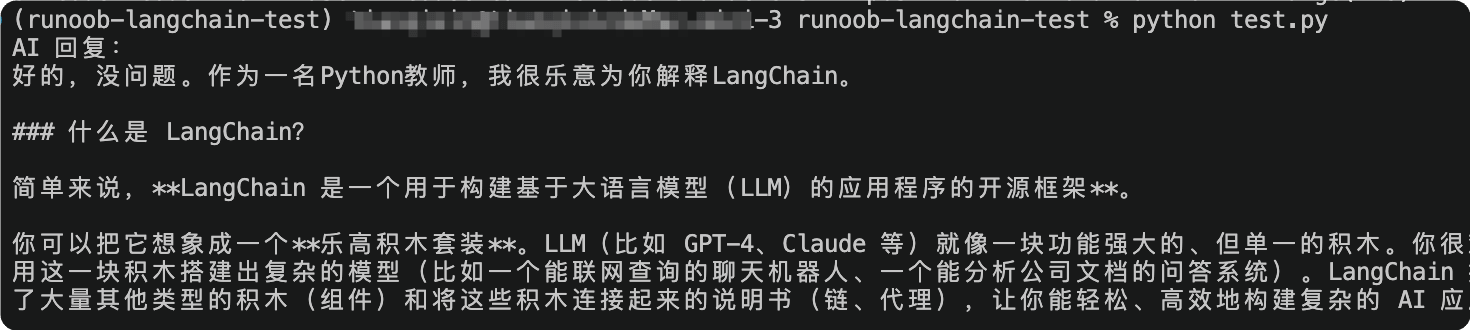
Execute in the terminal:
python test.py
The output is as follows:
Code Explanation:
| Code | Purpose |
|---|---|
| ChatDeepSeek | LangChain's DeepSeek chat model class |
| SystemMessage | System prompt, used to set the AI's identity |
| HumanMessage | User input message |
| llm.invoke() | Call the DeepSeek model |
| response.content | Get the AI's returned content |
Use the deepseek-v4-pro Reasoning Model
LangChain supports DeepSeek streaming output, requiring the deepseek-v4-pro inference model:
Example
from langchain_core.messages import HumanMessage, SystemMessage
# =========================
# Configure DeepSeek API Key
# =========================
apiKey = "sk-xxx" # Set your DeepSeek API Key
# =========================
# Create DeepSeek model
# =========================
llm = ChatDeepSeek(
api_key=apiKey,
model="deepseek-v4-pro",
temperature=0.7,
max_tokens=1024,
timeout=60,
max_retries=3
)
for chunk in llm.stream("Please introduce Python"):
print(chunk.content, end="", flush=True)
Use PromptTemplate
Dynamically generate Prompt with PromptTemplate:
Example
from langchain_core.prompts import ChatPromptTemplate
# =========================
# Configure DeepSeek API Key
# =========================
apiKey = "sk-xxx" # Set your DeepSeek API Key
# =========================
# Create DeepSeek model
# =========================
llm = ChatDeepSeek(
api_key=apiKey,
model="deepseek-v4-pro",
temperature=0.7,
max_tokens=1024,
timeout=60,
max_retries=3
)
prompt = ChatPromptTemplate.from_template(
"Please explain in detail: {topic}"
)
chain = prompt | llm
response = chain.invoke({
"topic": "Transformer"
})
print(response.content)
Common Errors
| Error | Cause | Solution |
|---|---|---|
| 401 Unauthorized | API Key error | Check DEEPSEEK_API_KEY |
| ModuleNotFoundError | Dependencies not installed | Re-run pip install |
| Rate Limit | Request frequency too high | Reduce request frequency |
| Timeout Error | Request timeout | Increase timeout parameter |
Recommended Project Structure
Project Structure
│
├── app.py
├── requirements.txt
├── .env
├── prompts/
├── data/
└── vector_db/
requirements.txt Example
Example
langchain-deepseek
python-dotenv
Reference Documentation
- LangChain DeepSeek documentation: https://python.langchain.com/docs/integrations/chat/deepseek/
- DeepSeek official website: https://www.deepseek.com/
- LangChain official website: https://www.langchain.com/
- LangSmith: https://smith.langchain.com/