Go language variables
Variables originate from mathematics; in computer languages, they are abstract concepts that can store calculation results or represent values.
Variables can be accessed through their variable names.
Go variable names are composed of letters, digits, and underscores, and the first character cannot be a digit.
The general form of declaring a variable is to use the var keyword:
var identifier type
Multiple variables can be declared at once:
var identifier1, identifier2 type
Example
import "fmt"
func main() {
var a string = "Example"
fmt.Println(a)
var b, c int = 1, 2
fmt.Println(b, c)
}
The output of the above example is:
Example
1 2
Variable declaration
First, specify the variable type. If it is not initialized, the variable defaults to its zero value.。
var v_name v_type
v_name = value
The zero value is the value set by the system by default when the variable has not been initialized.
Example
import "fmt"
func main() {
// Declare a variable and initialize it
var a = "EXAMPLE"
fmt.Println(a)
// Without initialization, it is the zero value
var b int
fmt.Println(b)
// The zero value of bool is false
var c bool
fmt.Println(c)
}
The execution result of the above example is:
EXAMPLE
0
false
Numeric types (including complex64/128) are0
-
The boolean type isfalse
-
The string is""(empty string)
The following types are:nil:
var a *int
var a []int
var a map[string] int
var a chan int
var a func(string) int
var a error // error 是接口
Example
import "fmt"
func main() {
var i int
var f float64
var b bool
var s string
fmt.Printf("%v %v %v %q\n", i, f, b, s)
}
The output is:
0 0 false ""
Second, the variable type is determined by the value itself.
var v_name = value
Example
import "fmt"
func main() {
var d = true
fmt.Println(d)
}
The output is:
true
Third, if a variable has already been declared using var, then using it again:=to declare the variable will produce a compile error. Format:
v_name := value
For example:
var intVal int
intVal :=1 // 这时候会产生编译错误,因为 intVal 已经声明,不需要重新声明
Simply use the following statement:
intVal := 1 // 此时不会产生编译错误,因为有声明新的变量,因为 := 是一个声明语句
intVal := 1Equal to:
var intVal int
intVal =1
You can abbreviate var f string = "Example" as f := "Example":
Example
import "fmt"
func main() {
f := "Example" // var f string = "Example"
fmt.Println(f)
}
The output is:
Example
Multiple variable declaration
//类型相同多个变量, 非全局变量
var vname1, vname2, vname3 type
vname1, vname2, vname3 = v1, v2, v3

var vname1, vname2, vname3 = v1, v2, v3 // 和 python 很像,不需要显示声明类型,自动推断

vname1, vname2, vname3 := v1, v2, v3 // 出现在 := 左侧的变量不应该是已经被声明过的,否则会导致编译错误


// 这种因式分解关键字的写法一般用于声明全局变量
var (
    vname1 v_type1
    vname2 v_type2
)
Example
import "fmt"
var x, y int
var ( // This factored keyword syntax is generally used to declare global variables
a int
b bool
)
var c, d int = 1, 2
var e, f = 123, "hello"
// This form without the declaration syntax can only appear inside a function body
//g, h := 123, "hello"
func main(){
g, h := 123, "hello"
fmt.Println(x, y, a, b, c, d, e, f, g, h)
}
The execution result of the above example is:
0 0 0 false 1 2 123 hello 123 hello
Value types and reference types
All basic types such as int, float, bool, and string are value types. Variables of these types directly point to values stored in memory:
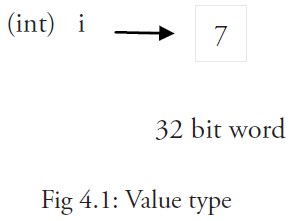
When using the equals sign=When you assign the value of one variable to another variable, such as:j = iin fact, it copies the value of i in memory:
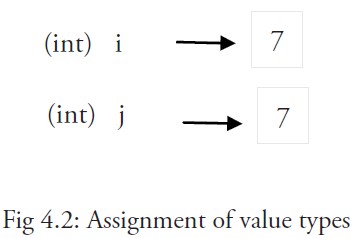
You can get the memory address of variable i through &i, for example: 0xf840000040 (the address may be different each time).
Value-type variables are usually stored on the stack, especially when they are local variables. When the value of a value-type variable needs to be used outside the function scope, Go allocates it to heap memory.
Memory addresses may differ depending on the machine, and even the same program may have different memory addresses after being executed on different machines. This is because each machine may have a different memory layout, and location allocation may also differ.
More complex data usually requires multiple words, and such data is generally stored using reference types.
A reference-type variable r1 stores the memory address (a number) where the value of r1 is located, or the position of the first word in that memory address.
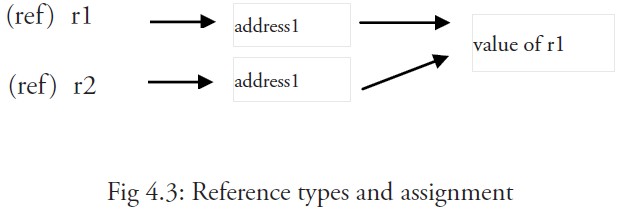
This memory address is called a pointer, and this pointer is actually stored in some other value.
The multiple words pointed to by a pointer of the same reference type can be at consecutive memory addresses (contiguous memory layout), which is also the most computationally efficient form of storage; alternatively, these words can be scattered in memory, with each word indicating the memory address of the next word.
When the assignment statement r2 = r1 is used, only the reference (address) is copied.
If the value of r1 is changed, then all references to this value will point to the modified content. In this example, r2 will also be affected.
Short form, using the := assignment operator
We know that the variable type can be omitted during variable initialization and automatically inferred by the system. Including the var keyword in the declaration statement is somewhat redundant, so we can abbreviate it as a := 50 or b := false.
The types of a and b (int and bool) will be automatically inferred by the compiler.
This is the preferred form for using variables, but it can only be used inside a function body, and cannot be used for declaring and assigning global variables. Using the operator := can efficiently create a new variable, which is called an initialization declaration.
Notes
In the same code block, we cannot use an initialization declaration again for a variable with the same name. For example, a := 20 is not allowed, and the compiler will report an error: no new variables on left side of :=, but a = 20 is allowed, because this assigns a new value to the same variable.
If you use variable a before defining it, you will get a compile error: undefined: a.
If you declare a local variable but do not use it in the same code block, you will also get a compile error, such as variable a in the following example:
Example
import "fmt"
func main() {
var a string = "abc"
fmt.Println("hello, world")
}
Attempting to compile this code will result in an error.a declared but not used。
In addition, simply assigning a value to a is not enough; this value must be used, so use
fmt.Println("hello, world", a)Will remove the error.
But global variables are allowed to be declared without being used.
var a, b, c int
Multiple variables can be assigned on the same line, such as:
var a, b int
var c string
a, b, c = 5, 7, "abc"
The above line assumes that variables a, b, and c have already been declared; otherwise, it should be used like this:
a, b, c := 5, 7, "abc"
The values on the right are assigned to the variables on the left in the same order, so the value of a is 5, the value of b is 7, and the value of c is "abc".
This is called parallel or simultaneous assignment.
If you want to swap the values of two variables, you can simply usea, b = b, athe types of the two variables must be the same.
The blank identifier _ is also used to discard values, such as the value 5 in: _, b = 5, 7 is discarded.
_ is actually a write-only variable; you cannot get its value. This is done because in the Go language you must use all declared variables, but sometimes you do not need to use all the return values obtained from a function.
Parallel assignment is also used when a function returns multiple return values. For example, here val and error err are obtained simultaneously by calling the Func1 function: val, err = Func1(var1).
other extensions