Go language break statement
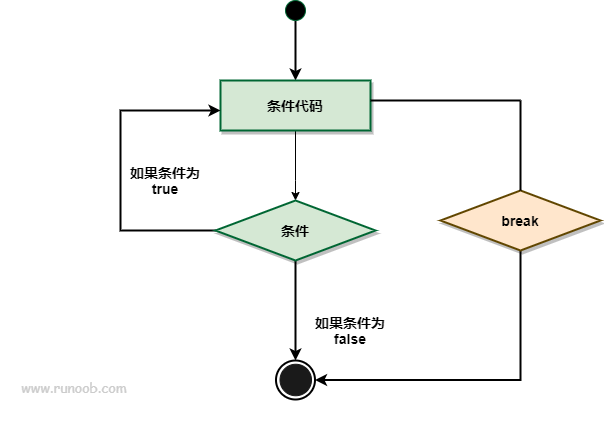
In Go language, the break statement is used to terminate the execution of the current loop or switch statement, and jump out of the code block of that loop or switch statement.
The break statement can be used in the following aspects:.
- It is used to break out of the loop in a loop statement, and start executing the statements after the loop.
- The break statement in a switch statement is used to jump out of the statement after executing one case.
- break can be applied in select statements.
- In multiple loops, a label can be used to mark the loop to break out of.
Syntax
The break syntax format is as follows:
break
The break statement flow chart is as follows:
Example
Using break in a for loop:
Example
import "fmt"
func main() {
for i := 0; i < 10; i++ {
if i == 5 {
break // Break out of the loop when i equals 5
}
fmt.Println(i)
}
}
Output result:
0
1
2
3
4
Break out of the loop when variable a is greater than 15:
Example
import "fmt"
func main() {
/* Define local variables */
var a int = 10
/* for loop */
for a < 20 {
fmt.Printf("The value of a is : %d\n", a);
a++
if a > 15 {
/* Use the break statement to break out of the loop when a is greater than 15 */
break
}
}
}
In the above example, when the value of a is greater than 15, the break statement is executed and the entire loop is terminated. The execution result is:
a 的值为 : 10
a 的值为 : 11
a 的值为 : 12
a 的值为 : 13
a 的值为 : 14
a 的值为 : 15
The following example has multiple loops and demonstrates the difference between using labels and not using labels:
Example
import "fmt"
func main() {
// without a label
fmt.Println("---- break ----")
for i := 1; i <= 3; i++ {
fmt.Printf("i: %d\n", i)
for i2 := 11; i2 <= 13; i2++ {
fmt.Printf("i2: %d\n", i2)
break
}
}
// using a label
fmt.Println("---- break label ----")
re:
for i := 1; i <= 3; i++ {
fmt.Printf("i: %d\n", i)
for i2 := 11; i2 <= 13; i2++ {
fmt.Printf("i2: %d\n", i2)
break re
}
}
}
The execution result of the above example is:
---- break ----
i: 1
i2: 11
i: 2
i2: 11
i: 3
i2: 11
---- break label ----
i: 1
i2: 11
Using break in a switch statement:
Example
func main() {
day := "Tuesday"
switch day {
case "Monday":
fmt.Println("It's Monday.")
case "Tuesday":
fmt.Println("It's Tuesday.")
break // Break out of the switch statement
case "Wednesday":
fmt.Println("It's Wednesday.")
}
}
Output result:
It's Tuesday.
Using break in a select statement:
Example
import (
"fmt"
"time"
)
func main() {
ch1 := make(chan int)
ch2 := make(chan int)
go func() {
time.Sleep(2 * time.Second)
ch1 <- 1
}()
go func() {
time.Sleep(1 * time.Second)
ch2 <- 2
}()
select {
case <-ch1:
fmt.Println("Received from ch1.")
case <-ch2:
fmt.Println("Received from ch2.")
break // Break out of the select statement
}
}
Output result:
Received from ch2.
In Go language, the application of the break statement in a select statement is relatively special. Due to the characteristics of the select statement, the break statement cannot directly be used to break out of the select statement itself, because the select statement is non-blocking and it will always wait for all communication operations to be ready. If you need to end the execution of the select statement early, you can use return or goto statements to achieve the same effect.
The following example demonstrates the case of using return in a select statement to end execution early:
Example
import (
"fmt"
"time"
)
func process(ch chan int) {
for {
select {
case val := <-ch:
fmt.Println("Received value:", val)
// Execute some logic
if val == 5 {
return // Terminate the execution of the select statement early
}
default:
fmt.Println("No value received yet.")
time.Sleep(500 * time.Millisecond)
}
}
}
func main() {
ch := make(chan int)
go process(ch)
time.Sleep(2 * time.Second)
ch <- 1
time.Sleep(1 * time.Second)
ch <- 3
time.Sleep(1 * time.Second)
ch <- 5
time.Sleep(1 * time.Second)
ch <- 7
time.Sleep(2 * time.Second)
}
In the above example, the process function uses a select statement in an infinite loop to wait for data on channel ch. When data is received, some logic is executed. When the received value equals 5, return is used to terminate the execution of the select statement early.
Output result:
No value received yet.
No value received yet.
Received value: 1
No value received yet.
Received value: 3
No value received yet.
Received value: 5
By using return, we can terminate execution early in the select statement and return to the caller's code.
It should be noted that using the return statement will immediately terminate the execution of the current function, so please decide based on actual needs which way to use to end execution early in the select statement.
other extensions