Go language arrays
The Go language provides an array type data structure.
An array is a sequence of numbered and fixed-length data items of the same unique type, which can be any primitive type such as integers, strings, or custom types.
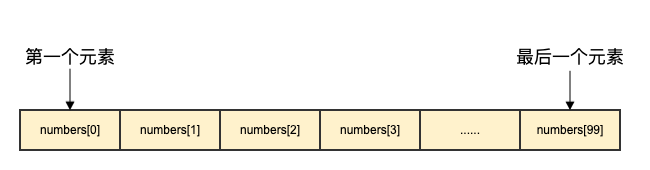
Compared to declaringnumber0, number1, ..., number99variables, use array formnumbers[0], numbers[1] ..., numbers[99]which is more convenient and easier to expand.
Array elements can be read (or modified) by index (position). The index starts from 0, the first element has index 0, the second has index 1, and so on.
Declaring arrays
Declaring an array in the Go language requires specifying the element type and the number of elements. The syntax format is as follows:
var arrayName [size]dataTypewhere,arrayNameis the name of the array,sizeis the size of the array,dataTypeis the data type of the elements in the array.
The following defines an array balance of length 10 and type float32:
var balance [10]float32
Initializing arrays
The following demonstrates array initialization:
The following example declares an integer array named numbers with a size of 5. At the time of declaration, each element in the array is default-initialized according to its data type. For integer types, the initial value is 0.
var numbers [5]int
You can also use an initialization list to initialize the elements of an array:
var numbers = [5]int{1, 2, 3, 4, 5}
The above code declares an integer array of size 5 and initializes its elements to 1, 2, 3, 4, and 5 respectively.
Additionally, you can also use:=Use short declaration syntax to declare and initialize an array:
numbers := [5]int{1, 2, 3, 4, 5}
The above code creates an integer array named numbers, sets its size to 5, and initializes the values of its elements.
Note:In the Go language, the size of an array is part of its type, so arrays of different sizes are incompatible. That is to say[5]intand[10]intare different types.
The following defines an array balance of length 5 and type float32, and initializes the elements of the array:
var balance = [5]float32{1000.0, 2.0, 3.4, 7.0, 50.0}
We can also quickly initialize an array at the time of declaration using literals:
balance := [5]float32{1000.0, 2.0, 3.4, 7.0, 50.0}
If the array length is uncertain, you can use...Instead of the length of the array, the compiler will infer the length of the array on its own based on the number of elements:
var balance = [...]float32{1000.0, 2.0, 3.4, 7.0, 50.0}
或
balance := [...]float32{1000.0, 2.0, 3.4, 7.0, 50.0}
If the length of the array is set, we can also initialize elements by specifying indices:
//  将索引为 1 和 3 的元素初始化
balance := [5]float32{1:2.0,3:7.0}
Initializing an array{}The number of elements in cannot be greater than[]the number in.
If you ignore[]If no array size is set in the numbers, the Go language will set the size of the array based on the number of elements:
balance[4] = 50.0
The above example reads the fifth element. Array elements can be accessed (or modified) by index (position). Indices start at 0, with the first element at index 0, the second at index 1, and so on.

Accessing array elements
Array elements can be read by index (position). The format is the array name followed by square brackets, with the index value inside the square brackets. For example:
var salary float32 = balance[9]
The above example reads the value of the 10th element of the array balance.
The following demonstrates an example of complete array operations (declaration, assignment, access):
Example 1
import "fmt"
func main() {
var n [10]int /* n is an array of length 10 */
var i,j int
/* initialize elements for array n */
for i = 0; i < 10; i++ {
n[i] = i + 100 /* set the element to i + 100 */
}
/* output the value of each array element */
for j = 0; j < 10; j++ {
fmt.Printf("Element[%d] = %d\n", j, n[j] )
}
}
The execution result of the above example is as follows:
Element[0] = 100
Element[1] = 101
Element[2] = 102
Element[3] = 103
Element[4] = 104
Element[5] = 105
Element[6] = 106
Element[7] = 107
Element[8] = 108
Element[9] = 109
Example 2
import "fmt"
func main() {
var i,j,k int
// Declare the array and quickly initialize it at the same time
balance := [5]float32{1000.0, 2.0, 3.4, 7.0, 50.0}
/* output array elements */ ...
for i = 0; i < 5; i++ {
fmt.Printf("balance[%d] = %f\n", i, balance[i] )
}
balance2 := [...]float32{1000.0, 2.0, 3.4, 7.0, 50.0}
/* output the value of each array element */
for j = 0; j < 5; j++ {
fmt.Printf("balance2[%d] = %f\n", j, balance2[j] )
}
// initialize the elements with indices 1 and 3
balance3 := [5]float32{1:2.0,3:7.0}
for k = 0; k < 5; k++ {
fmt.Printf("balance3[%d] = %f\n", k, balance3[k] )
}
}
The execution result of the above example is as follows:
balance[0] = 1000.000000
balance[1] = 2.000000
balance[2] = 3.400000
balance[3] = 7.000000
balance[4] = 50.000000
balance2[0] = 1000.000000
balance2[1] = 2.000000
balance2[2] = 3.400000
balance2[3] = 7.000000
balance2[4] = 50.000000
balance3[0] = 0.000000
balance3[1] = 2.000000
balance3[2] = 0.000000
balance3[3] = 7.000000
balance3[4] = 0.000000
More content
Arrays are very important to the Go language. Below we will introduce more content about arrays:
| content | Description |
|---|---|
| Multidimensional arrays | The Go language supports multi-dimensional arrays. The simplest multi-dimensional array is a two-dimensional array. |
| Passing arrays to functions | You can pass array arguments to functions |