Flask Deployment
After development is complete, the Flask application needs to be deployed to a production environment so that real users can access it.
This chapter covers the key steps and considerations from development to production.
Development Server vs Production Server
Important: Flask's built-in development server (flask run) is only suitable for development environments. It lacks the security, stability, and performance required for production. Production environments must use a professional WSGI server.
| Features | Flask Development Server | Production WSGI Server (Gunicorn/Waitress) |
|---|---|---|
| Concurrency Handling | Single-threaded (default) | Multi-process/Multi-thread/Coroutine |
| Security | Debug mode allows code execution in the browser | No debugging features, secure and controllable |
| Performance | Unoptimized | Optimized for high concurrency |
| Applicable scenarios | Local development and debugging | Production environment |
Deployment checklist
Before deployment, ensure that all of the following have been completed:
Example
import os
app.config.update(
# 1. Disable Debug mode (required!)
DEBUG=False,
# 2. Read secret key from environment variables (never hardcode it)
SECRET_KEY=os.environ.get("FLASK_SECRET_KEY", ""),
# 3. Configure Session Cookie security options
SESSION_COOKIE_SECURE=True, # Only transmit over HTTPS
SESSION_COOKIE_HTTPONLY=True, # Block JavaScript access
SESSION_COOKIE_SAMESITE="Lax", # Prevent CSRF attacks
)
Complete checklist:
| Check Item | Description | Risk Level |
|---|---|---|
| DEBUG = False | Disable debug mode to prevent code leakage | Critical |
| SECRET_KEY random and secret | Session and flash rely on key signing | Critical |
| SECRET_KEY is read from environment variables | No hardcoding, don't commit to Git | Critical |
| Read database passwords from environment variables | Sensitive information not in code | Critical |
| SESSION_COOKIE_SECURE = True | Only send cookies over HTTPS | High |
| Error pages don't expose stack trace information | Use custom errorhandler | Medium |
Deploying with Waitress (Windows/macOS/Linux)
WaitressIt is a pure Python WSGI server, cross-platform, and easy to install:
(.venv) $ pip install waitress
Example
from waitress import serve
from app import create_app
app = create_app()
if __name__ == "__main__":
# Start production server
serve(app, host="0.0.0.0", port=8000, threads=4)
# host="0.0.0.0" allows external access
# threads=4 uses 4 threads to handle concurrent requests
Start:
(.venv) $ python run.py
Serving on http://0.0.0.0:8000
Deploying with Gunicorn (Linux/macOS)
GunicornIt is the most popular Python WSGI server on Linux, with excellent performance:
(.venv) $ pip install gunicorn
Start Gunicorn (specify the application directly on the command line):
# 基本用法:4 个 worker 进程
$ gunicorn -w 4 -b 0.0.0.0:8000 "app:create_app()"

# 参数说明:
# -w 4       : 启动 4 个 worker 进程(通常设为 CPU 核心数 × 2 + 1)
# -b 0.0.0.0:8000 : 监听所有网络接口的 8000 端口
# "app:create_app()" : 模块名:工厂函数(与 flask --app 语法相同)
Gunicorn worker type selection:
| Worker Type | Applicable scenarios | Command |
|---|---|---|
| sync (default) | CPU-intensive, low concurrency | gunicorn -w 4 app:app |
| gevent | IO-intensive, high concurrency long connections | gunicorn -k gevent -w 4 app:app |
| gthread | Medium concurrency, requires thread support | gunicorn --threads=2 -w 4 app:app |
Gunicorn does not support Windows. If you deploy on Windows, please useWaitress。
Use Nginx reverse proxy
In production, Nginx is typically used as a reverse proxy in front of the WSGI server:
- Nginx handles static files (CSS, JS, images) with much higher efficiency than Python
- Nginx provides HTTPS termination (SSL termination)
- Nginx performs load balancing, distributing requests to multiple backend workers
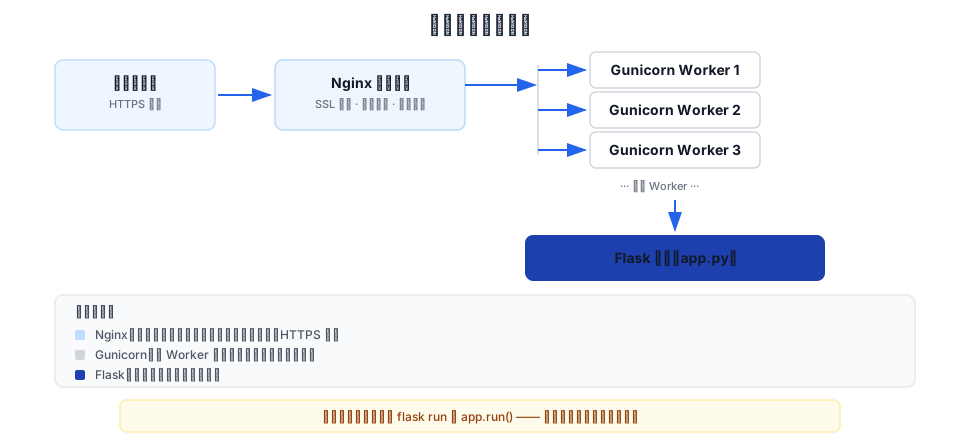
A minimal example Nginx configuration:
Example
server {
listen 80;
server_name example.com www.example.com;
# Static files are handled directly by Nginx
location /static/ {
alias /var/www/example/static/;
expires 30d; # Browser cache for 30 days
}
# Other requests are forwarded to Gunicorn
location / {
proxy_pass http://127.0.0.1:8000;
proxy_set_header Host $host;
proxy_set_header X-Real-IP $remote_addr;
proxy_set_header X-Forwarded-For $proxy_add_x_forwarded_for;
}
}
Enable configuration and reload Nginx:
$ sudo ln -s /etc/nginx/sites-available/example /etc/nginx/sites-enabled/
$ sudo nginx -t          # 检查配置语法
$ sudo systemctl reload nginx
Use systemd to manage services (Linux)
Create a systemd service file so that the Flask application starts on boot and automatically restarts after a crash:
Example
[Unit]
Description=EXAMPLE Flask Application
After=network.target
[Service]
User=www-data
WorkingDirectory=/var/www/example
# Automatically load environment variables from .env file on startup
EnvironmentFile=-/var/www/example/.env
# Start the application with Gunicorn
ExecStart=/var/www/example/.venv/bin/gunicorn -w 4 -b 127.0.0.1:8000 "app:create_app()"
# Automatically restart after a crash
Restart=always
RestartSec=5
[Install]
WantedBy=multi-user.target
Start and manage services:
$ sudo systemctl daemon-reload        # 重载配置文件
$ sudo systemctl enable example        # 设置开机自启
$ sudo systemctl start example         # 启动服务
$ sudo systemctl status example        # 查看服务状态
$ sudo journalctl -u example -f        # 实时查看日志
WSGI Server Quick Reference
| Server | Platform | Features | Installation |
|---|---|---|---|
| Werkzeug (built-in) | All platforms | Development only, supports hot reload and debugger | Bundled with Flask |
| Waitress | All platforms | Pure Python, preferred on Windows | pip install waitress |
| Gunicorn | Linux/macOS | Good performance, the preferred choice on Linux, and a mature ecosystem | pip install gunicorn |
| uWSGI | Linux/macOS | Full-featured, complex configuration | pip install uwsgi |
Tutorial Summary
Congratulations on completing all the content of the Flask introductory tutorial!
Let's review what you've learned:
| Chapter | Core Skills |
|---|---|
| Understanding Flask | Understand Flask's positioning and ecosystem |
| Environment Preparation | Create virtual environment, install dependencies |
| First Application | Create a minimal application and use flask run |
| Routing System | URL mapping, variable rules, url_for, HTTP methods |
| Request and Response | Read request data and construct various types of responses |
| Template Rendering | Jinja2 syntax, template inheritance, XSS protection |
| Static Files | Manage static assets such as CSS/JS/images |
| Session and Cookie | User session persistence, Flash messages |
| Configuration Management | Multi-environment configuration, environment variable loading |
| Blueprint | Modular code organization, factory pattern |
| Error Handling | Custom error pages, logging |
| Database Integration | SQLite operations, using the g object to manage connections |
| Testing | test_client, pytest test routes and APIs |
| Deployment | Gunicorn/Waitress + Nginx + systemd |
Recommended directions for further learning:
- Flask-SQLAlchemy: More powerful database integration
- Flask-Login: User authentication and permission management
- Flask-WTF: Form processing and CSRF protection
- Flask-Migrate: Database migration management
- Flask-RESTfulorFlask-RESTX: Building RESTful API
- DockerContainerized deployment to further improve portability