Electron Core Concepts
Electron is essentially a multi-process desktop application framework that combinesChromium (Rendering Layer)andNode.js (System Layer)and, through an independent process model, enables UI display, logic control, and secure communication.
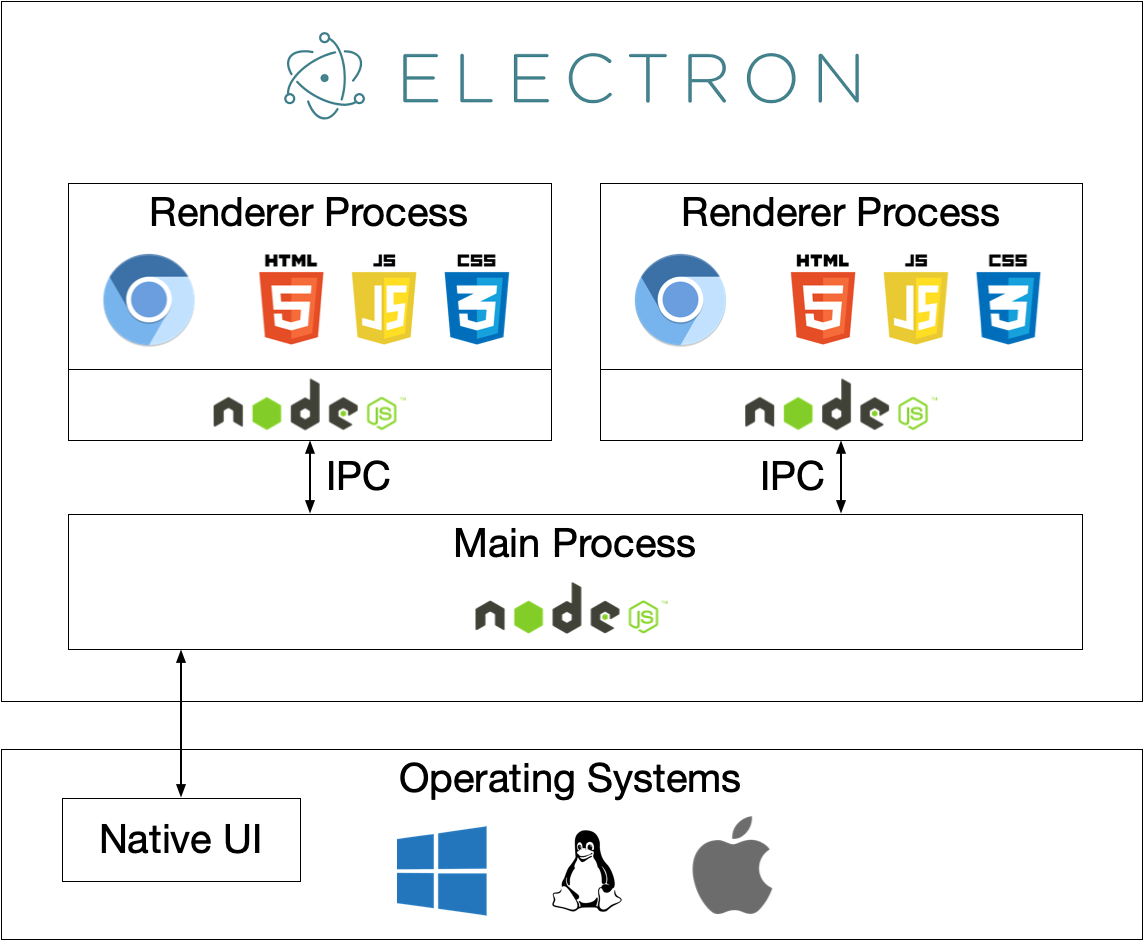
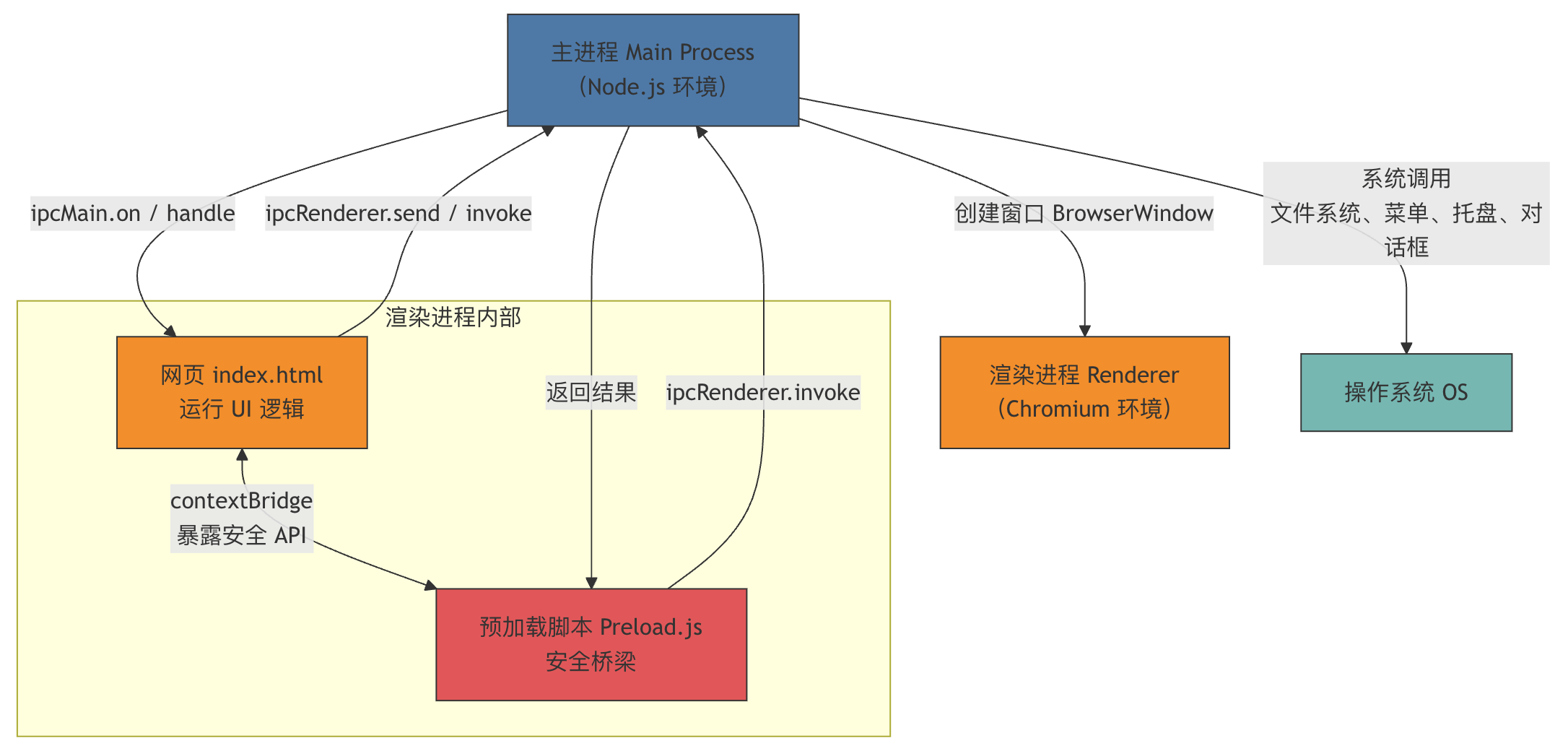
The following is the Electron core architecture, showing the relationship among the main process, renderer process, IPC communication, and Preload.
Main Process (A):
- Runs on Node.js, controls windows and interacts with the system.
- Use BrowserWindow to create the renderer process.
Renderer Process (B):
- Each window independently runs HTML/CSS/JS to display the interface.
Preload Script (B2):
- Runs before the renderer process loads, connecting the main process and the web page layer.
- Safely expose APIs through contextBridge.
IPC Communication (dashed arrows):
- The main process and renderer process communicate bidirectionally via ipcMain and ipcRenderer.
Operating System (C):
- The main process can access system features, such as files, tray, notifications, etc.
Main Process
The main process is the "command center" of the Electron application, running in a Node.js environment.
It is responsible for creating windows, managing the application lifecycle, calling system APIs, and communicating with the renderer process.
After the application starts, the system first runs the main process script (usuallymain.js)。
Responsibilities of the main process
- Launching and exiting the application
- Create and destroy BrowserWindow (windows)
- Registering menus, tray, global shortcuts
- Call operating system functions (file system, notifications, dialogs)
- Listen for events sent by the renderer process
Main process lifecycle
The lifecycle of the main process matches the application lifecycle, starting fromappModule start:
Example
app.whenReady().then(() => {
const win = new BrowserWindow({ width: 800, height: 600 });
win.loadFile('index.html');
});
app.on('window-all-closed', () => {
if (process.platform !== 'darwin') app.quit();
});
app.whenReady(): Triggered after Electron initialization is complete.window-all-closed: Triggered when all windows are closed.app.quit(): Exits the entire application.- Common special case on macOS: when the user closes all windows, the program remains running in the background.
app Module in Detail
appModule used to control the entire application lifecycle:
app.on('ready'): Triggered when Electron initialization is complete.app.quit(): Exit the application.app.getPath('userData'): Get system paths.app.setAppUserModelId(id): Set the Windows taskbar ID.app.isPackaged: Determine whether the current build is packaged.
BrowserWindow Window Management
Main process viaBrowserWindowCreate a visible window:
Example
width: 1024,
height: 768,
resizable: true,
webPreferences: {
preload: './preload.js',
nodeIntegration: false
}
});
width,height: Window sizeresizable: Whether it can be resized-
webPreferences: Used to configure renderer process behaviorpreload: Preload scriptnodeIntegration: Whether to allow the renderer process to use Node.js
Native features such as menus, tray, dialogs, etc.
Electron provides multiple modules to access system functions:
- Menu / MenuItem: Custom menu bar
- Tray: Create a system tray icon
- Dialog: Invoke system file picker, alert dialog
- Notification: Native notifications
shell: Open external links or files, for example:
const { dialog } = require('electron');
dialog.showOpenDialog({ properties: ['openFile', 'multiSelections'] });
Renderer Process
The renderer process is responsible for displaying the interface and runs in a Chromium environment.
eachBrowserWindowEach has an independent renderer process.
Characteristics of the renderer process
- Based on Chromium, runs HTML/CSS/JS
- DefaultCannot directly access Node.js APIs(For security reasons)
- Can use web technology stacks: Vue, React, Svelte, etc.
- Each window corresponds to an independent thread, and they do not affect each other.
Multiple Windows and Multiple Renderer Processes
Each Electron window (BrowserWindow) will start an independent renderer process:
Closing one window does not affect other windows, similar to the browser's multi-tab model.
This makes the application safer and more reliable during crash recovery.
Loading and Displaying Web Pages
The content of the renderer process is loaded by the main process:
win.loadFile('index.html');    // 加载本地页面
// 或者
win.loadURL('https://example.com'); // 加载远程网页
Limitations in the Renderer Process
- For security reasons, Node.js modules cannot be used directly (such as
fs、path)。 - It is not recommended to perform high-load calculations in the renderer process (it will freeze the UI).
- Interacting with the system requires IPC communication or APIs exposed via preload.
Inter-Process Communication (IPC)
One of Electron's core mechanisms isCommunication between the main process and the renderer process, calledIPC(Inter-Process Communication)。
ipcMain and ipcRenderer
ipcMain: Used in the main process to receive messages.ipcRenderer: Used in the renderer process to send messages.
One-way communication example:
Example
const { ipcMain } = require('electron');
ipcMain.on('ping', (event, arg) => {
console.log(arg); // Output "hello from renderer"
});
// renderer.js
const { ipcRenderer } = require('electron');
ipcRenderer.send('ping', 'hello from renderer');
Example of bidirectional communication (main process sends data back):
ipcMain.on('getVersion', (event) => {
  event.reply('getVersionResponse', app.getVersion());
});
Renderer side receives:
ipcRenderer.on('getVersionResponse', (event, version) => {
  console.log(version);
});
invoke/handle pattern (recommended approach)
Electron provides a more concise way for asynchronous requests:
Main process:
ipcMain.handle('get-app-path', () => app.getPath('userData'));
Renderer process:
const result = await ipcRenderer.invoke('get-app-path');
console.log(result);
This approach is similar tofetchRequests, avoiding multiple layers of callbacks.
Best Practices for Message Passing
- UsageExplicit channel name(such as
"user:getData")。 - Avoid passing complex objects (JSON is recommended).
- Data from the renderer process should be validated for source and type.
- Try to use
invoke/handleImplement structured communication.
Preload scripts (Preload Scripts)
The preload script runs before the renderer process is created, between the main process and the web page.
Its role is to safely "bridge" Node.js features to the renderer page.
The Role and Significance of preload
- Can access Node.js APIs (because of the isolated context)
- Can safely expose a small number of APIs to the renderer page
- Commonly used for file reading/writing, system path retrieval, application information passing, etc.
// preload.js
const { contextBridge, ipcRenderer } = require('electron');

contextBridge.exposeInMainWorld('electronAPI', {
  getAppVersion: () => ipcRenderer.invoke('getVersion')
});
Renderer process uses:
// index.html
<script>
  window.electronAPI.getAppVersion().then(v => {
    console.log('App version:', v);
  });
</script>
contextBridge Secure Communication
contextBridgeis a secure API provided by Electron, used for:
- Only expose the required functions (whitelist mechanism)
- Prevent malicious web pages from accessing the Node.js environment
- In
contextIsolation: trueCan still communicate securely in the mode
Usage in Sandbox Mode
If sandbox is enabled (sandbox: true), the renderer process completely cannot use Node.js.
At this point, preload is the only bridge, responsible for:
- Receive renderer-side calls
- Forward to the main process via IPC
- Return results to the web page side
Summary
| Module | Function | Runtime Environment |
|---|---|---|
| Main Process (Main) | Controlling application lifecycle, windows, system interfaces | Node.js |
| Renderer Process | Display UI, execute front-end logic | Chromium |
| IPC | Implement communication between the main process and the renderer process | Bidirectional pipe |
| Preload | Safely bridging Node and Web | middle layer |
other extensionsOne-sentence understanding:
The main process is like the "control room", the renderer process is like "the staff of each window",
IPC is the "walkie-talkie", and Preload is the "filtered secure channel".