XML DOM Node List
The node list is returned by the getElementsByTagName() method and the childNodes property.

Try it - Example
The following example uses an XML filebooks.xml。
FunctionloadXMLDoc(), located in external JavaScript, used to load the XML file.
Get text from the first <title> element
This example uses the getElementsByTagName() method to get the text from the first <title> element in "books.xml".
Traverse nodes using the length property
This example uses the node list and the length property to traverse all the <title> elements in "books.xml".
Get the element's attributes
This example uses the attribute list to obtain the attributes from the first <book> element in "books.xml".
DOM Node List (Node List)
When properties or methods such as childNodes or getElementsByTagName() are used, a node list object is returned.
The node list object represents a list of nodes, in the same order as in the XML.
Nodes in the node list are accessed using index numbers starting from 0.
The following image represents "books.xml" The node list of <title> elements in:
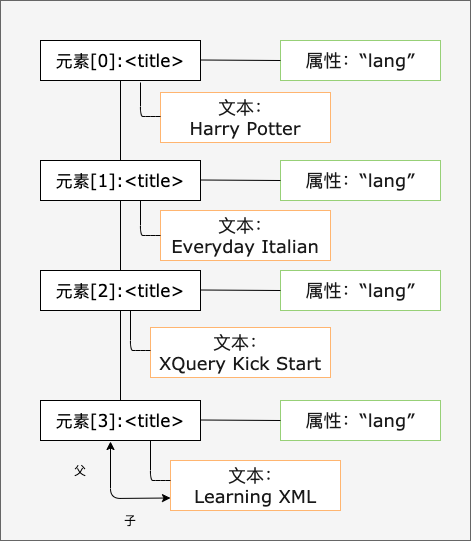
The following code snippet usesloadXMLDoc()put "books.xmlLoad into xmlDoc, and return the node list of title elements in "books.xml":
x=xmlDoc.getElementsByTagName("title");
After the above statement executes, x is a node list object.
The following code snippet returns the text from the first <title> element in the node list (x):
After the statements above are executed, txt = "Everyday Italian".
Node List Length
The NodeList object keeps itself updated. If elements are removed or added, the list automatically updates.
The length property of the node list is the number of nodes in the list.
The following code snippet usesloadXMLDoc()put "books.xmlLoad into xmlDoc, and return the number of <title> elements in "books.xml":
x=xmlDoc.getElementsByTagName('title').length;
After the above statement executes, x = 4.
The length of the node list can be used to traverse all the elements in the list.
The following code snippet uses the length property to traverse the list of <title> elements:
Example
Output:
Harry Potter
XQuery Kick Start
Learning XML
Try it Yourself »
Example explanation:
- UsageloadXMLDoc()put "books.xmlload into xmlDoc
- Set the x variable to hold the node list of all title elements
- Output the values from the text nodes of all <title> elements
DOM Attribute List (Named Node Map)
The attributes property of an element node returns a list of attribute nodes.
This is called a Named Node Map; apart from some differences in methods and properties, it is similar to a node list.
The attribute list keeps itself updated. If attributes are removed or added, this list automatically updates.
The following code snippet usesloadXMLDoc()put "books.xml" Loaded into xmlDoc, and returns the attribute node list of the first <book> element in "books.xml":
x=xmlDoc.getElementsByTagName('book')[0].attributes;
After the above code executes, x.length equals the number of attributes, and x.getNamedItem() can be used to return the attribute node.
The following code snippet displays the value of the "category" attribute of a book, and the number of its attributes:
Example
Output:
1
Try it Yourself »
Example explanation:
- UsageloadXMLDoc()put "books.xmlload into xmlDoc
- Set the x variable to hold a list of all the attributes of the first <book> element
- Output the value from the "category" attribute.
- Output the length of the attribute list.