XML DOM - Navigation Node
You can navigate between nodes by using the relationships between nodes.
Navigating DOM Nodes
Accessing nodes in the node tree through the relationships between nodes is usually called "navigating nodes."
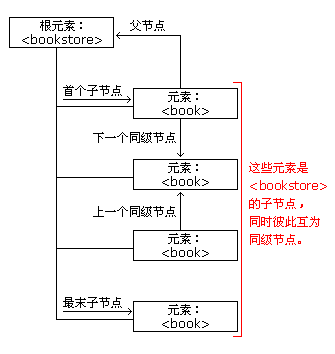
In the XML DOM, node relationships are defined as properties of nodes:
- parentNode
- childNodes
- firstChild
- lastChild
- nextSibling
- previousSibling
The image below illustratesbooks.xmlA portion of the node tree, and illustrates the relationships between nodes:
DOM - Parent Nodes
Every node has only one parent node. The following code navigates to the parent node of <book>:
Example
Try it Yourself »
Example explanation:
- UsageloadXMLDoc()put "books.xml" Loading into xmlDoc
- Get the first <book> element
- Output the node name of the parent node of "x"
Avoiding Empty Text Nodes
Firefox and some other browsers treat empty whitespace or line breaks as text nodes, while Internet Explorer does not.
This creates a problem when using the following properties: firstChild, lastChild, nextSibling, previousSibling.
To avoid navigating to empty text nodes (spaces and line breaks between element nodes), we use a function to check the node type:
function get_nextSibling(n)
{
  y=n.nextSibling;
  while (y.nodeType!=1)
  {
    y=y.nextSibling;
  }
  return y;
}
The function above allows you to use get_nextSibling(node) insteadnode.nextSibling Property.
Code explanation:
The element node type is 1. If a sibling node is not an element node, move to the next node until an element node is found. In this way, the same result can be obtained in both Internet Explorer and Firefox.
Getting the First Child Element
The following code displays the first element of the first <book>:
Example
Output:
Try it Yourself »
Example explanation:
- UsageloadXMLDoc()put "books.xml" Loading into xmlDoc
- Use the get_firstChild function on the first <book> element to get the first child node (which is an element node)
- Output the node name of the first child node (which is an element node)

More Examples
lastChild()
This example uses the lastChild() method and a custom function to get the last child node of a node
nextSibling()
This example uses the nextSibling() method and a custom function to get the next sibling node of a node
previousSibling()
This example uses the previousSibling() method and a custom function to get the previous sibling node of a node
other extensions