Prototype Pattern
Prototype Pattern is used to create duplicate objects while ensuring performance. This type of design pattern belongs to creational patterns, and it provides one of the best ways to create objects.
This pattern implements a prototype interface, which is used to create a clone of the current object. This pattern is used when directly creating an object is relatively costly. For example, an object needs to be created after an expensive database operation. We can cache the object, return its clone on the next request, and update the database when needed, thereby reducing database calls.
summary
Prototype Pattern
intent: Use prototype instances to specify the kinds of objects to create, and create new objects by copying these prototypes.
Mainly Solves: Dynamically create and delete prototypes at runtime.
When to Use
- The system should be independent of the creation, composition, and representation of products.
- The class to instantiate needs to be specified at runtime, for example through dynamic loading.
- Avoid creating a factory class hierarchy parallel to the product class hierarchy.
- Instances of a class can only have a few different state combinations; cloning a prototype is more convenient than manual instantiation.
How to Solve
Quickly generate an instance identical to the prototype object by using an existing prototype object.
Key code
- Implement the clone operation:
- In Java, implement
CloneableInterface, overrideclone()method. - In .NET, use
ObjectClassMemberwiseClone()The method implements shallow copy, or deep copy via serialization.
- In Java, implement
- Isolate the coupling between class object users and concrete types, requiring "volatile classes" to have stable interfaces.
Application example
- Cell Division
- In Java
Object.clone()Methods
Advantages
- Performance Improvement
- Avoid constructor constraints
Disadvantages
- Equipping a class with clone methods requires comprehensive consideration of the class's functionality, which may be difficult for existing classes, especially when dealing with indirect objects that do not support serialization or references containing circular structures.
- Must Implement
CloneableInterface.
Use Case
- Resource Optimization
- When class initialization consumes a large amount of resources (such as data, hardware resources).
- Scenarios with high performance and security requirements
- Through
newWhen creating an object requires complex data preparation or access permissions. - An object requires multiple modifiers
- When an object needs to be provided to other objects for access and may be modified by various callers.
- It is often used together with the factory method pattern, through
clonecreating objects, which are then provided to callers by the factory method.
Notes
Unlike directly instantiating a class to create a new object, the Prototype Pattern generates new objects by copying existing objects. Shallow copy is achieved by implementingCloneablewhile deep copy is achieved by implementingSerializablereading binary streams.
Structure
The prototype pattern includes the following main roles:
Prototype Interface: Defines an interface for cloning itself, usually including a
clone()method.Concrete Prototype: A concrete class that implements the prototype interface and is responsible for the actual cloning operation. This class needs to implement the
clone()method, usually using shallow copy or deep copy to copy itself.Client: Use prototype instances to create new objects. The client calls the prototype object's
clone()method to create new objects instead of directly using constructors.
Implementation
We will create an abstract classShapeand extendsShapeConcrete classes of the class. The next step is to define the classShapeCache, this class stores shape objects in aHashtableand returns their clones when requested.
PrototypePatternDemoClass usageShapeCacheclass to getShapeObject.
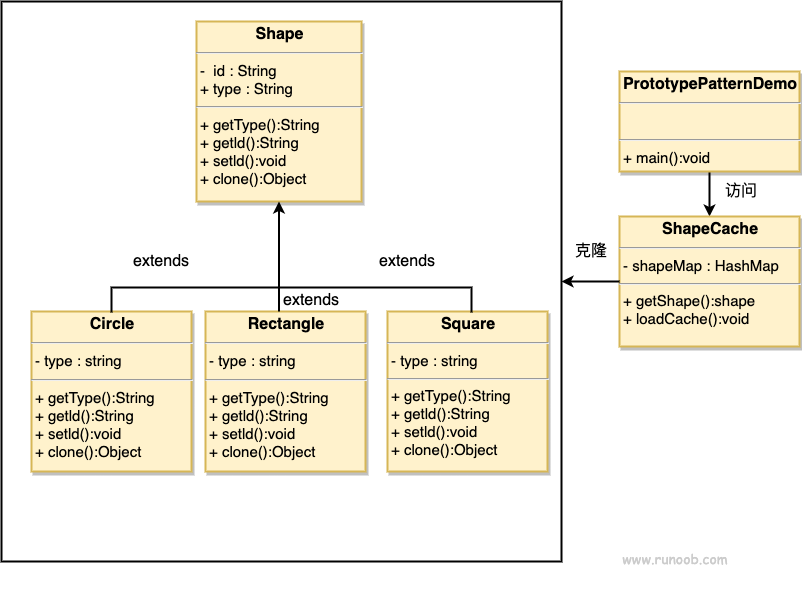
Step 1
Create an abstract class thatCloneableimplements the interface.
Shape.java
Step 2
Create entity classes that extend the above abstract class.
Rectangle.java
Square.java
Circle.java
Step 3
Create a class that retrieves entity classes from a database and stores them in aHashtableIn.
ShapeCache.java
Step 4
PrototypePatternDemoUsageShapeCacheclass to get the prototype stored inHashtablethe clone of the shape inside.
PrototypePatternDemo.java
Step 5
Run the program, output result:
Shape : Circle
Shape : Square
Shape : Rectangle
other extensions