DeepSeek Harness Development First Tool: defineTool
Tools are functions used by an Agent to get things done. After the model sees the tool definition, it decides whether to call it.
In this chapter, we will use defineTool to write our first tool, greet, and have the model actually call it.
What is a tool?
A tool is a clearly described function that includes a name, description, parameters, and output format.
When generating a response, the model can make calls based on this information.
In dsh, tools are registered to the tool registry via ctx.tools.register.
The Complete Structure of defineTool
defineTool is a DSL for defining tools. It takes an object that describes all the information about the tool.
| Fields | Function | Description |
|---|---|---|
| name | Tool name | The model uses it to initiate calls. |
| description | Tool description | Tells the model what this tool does. |
| parameters | input parameter schema | Typed definition: defineTool infers and validates args from it. |
| output.schema | Return value schema | Declares the canonical value type returned by execute. |
| output.render | Result formatting | Converts canonical values into model-oriented content. |
| execute | Tool implementation | Actually executes the logic and returns canonical values. |
Create a greet tool.
Replace scratch-plugin/src/my-plugin.ts with the following content.
Example
import type { Context } from '@deepseek-ai/cordis'
import { defineTool } from '@deepseek-ai/dsh-tools'
export const name = 'greet-tool'
// Requires tools service: prerequisite for registering tools.
export const inject = ['tools']
export function apply(ctx: Context) {
// Register a tool named greet
ctx.tools.register(defineTool({
// Tool name: the model will invoke the tool by this name
name: 'greet',
// Tool description: tell the model when to use it
description: 'Greet someone by name.',
// Input parameter schema: defineTool will infer and validate args
parameters: {
name: { type: 'string', required: true, description: 'The name to greet' },
},
// Output definition
output: {
// Normalize value type: return value of execute
schema: { type: 'string' },
// render: convert canonical values into model-oriented content
render: (_args, value) => [{ type: 'text', text: value }],
},
// Tool implementation: actually execute logic
async execute(args) {
// Return a canonical value; here it is a string
return `Hello, ${args.name}!`
},
}))
}
inject makes Cordis wait for the tool registry to be ready.
defineTool derives and validates args based on parameters.
execute returns the canonical value declared by output.schema.
output.render then converts the canonical value into model-facing content.

Run and invoke
If the development command is not running, restart it:
pnpm dsh web --patch ./scratch-plugin/cordis.yml
Open http://127.0.0.1:3080, enter:
Use the greet tool to greet EXAMPLE.
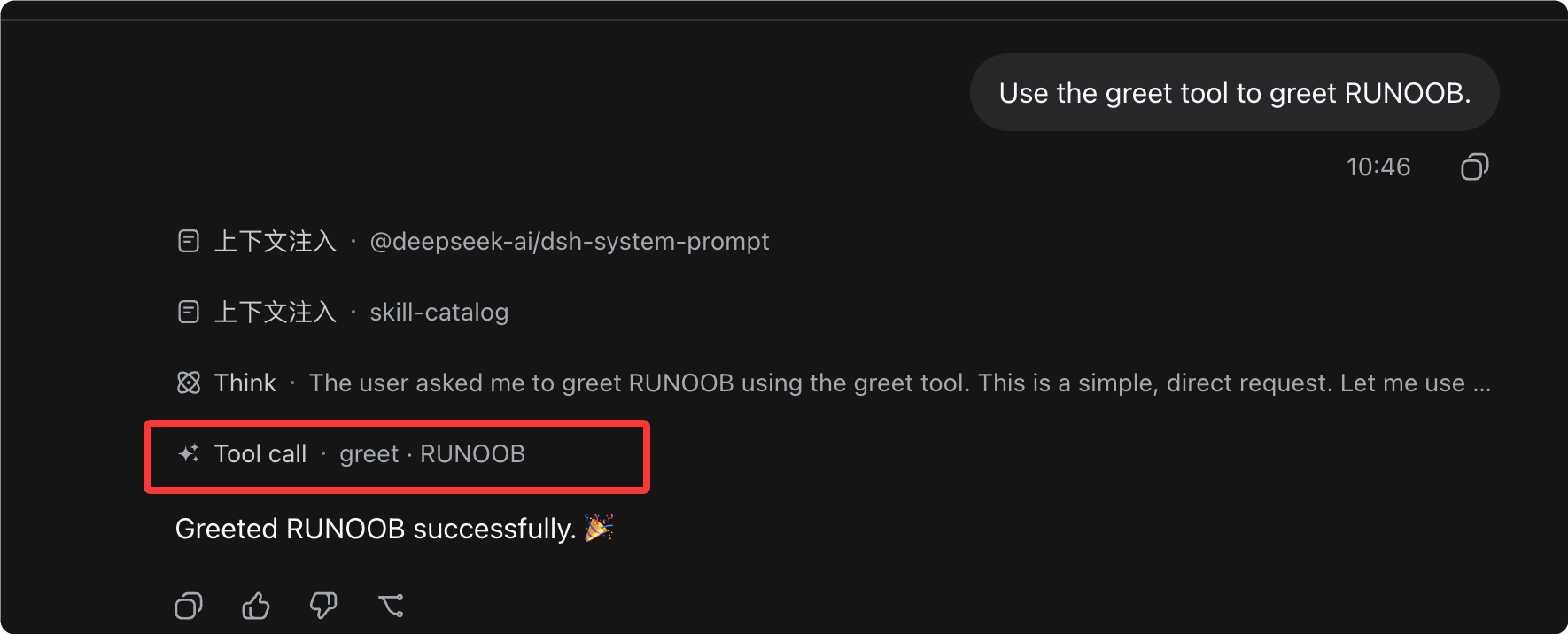
The model can call greet and receive the tool result Hello, EXAMPLE!.

Key point: the schema automatically flows into the prompt.
The tool's name, description, parameters, and output are automatically assembled into the model prompt.
The model "knows" such a tool exists and will call it at the right time.
You don't need to hand-write function signatures for the model. The schema is the interface the model sees.
Canonical value(canonical value) is the value returned by execute and declared in output.schema.
It is decoupled from "model-facing content": the same canonical value can be turned into different formats through different render functions.
Tip: to see more complex tool examples (nested schemas, background work, policy hooks), refer to the official tool writing guide.
Summary and self-test
defineTool describes the tool with a schema, ctx.tools.register registers it, and the model calls it directly after seeing the schema.
other extensions1. What does defineTool's execute return?
2. What is the purpose of output.render?
3. How does the model know to call greet?