Linear data structure
In this chapter, we will introduce one of the most basic and commonly used types of data structures—Linear data structure。
Linear data structureJust like a row of people standing in line:
- Each person (element) has a clear before-and-after relationship
- Except for the first and last, each person has one predecessor and one successor
- The data elements have a one-to-one linear relationship
Imagine you are standing in line to buy coffee, or organizing books on a shelf.
These scenarios share a common feature: elements are arranged one after another, forming a line.
In computer science, such an ordered collection of data is a linear data structure.
The characteristic of a linear data structure is: except for the first and last elements, each element has one and only onepredecessorand asuccessor。
Common linear data structures:
- array: like a row of numbered lockers, each locker has a fixed position
- Linked list: like a chain of people holding hands, each person only remembers the people in front and behind
- Stack:Like a stack of plates, items can only be taken from and placed on the top
- QueueLike queueing to buy tickets, first come, first served
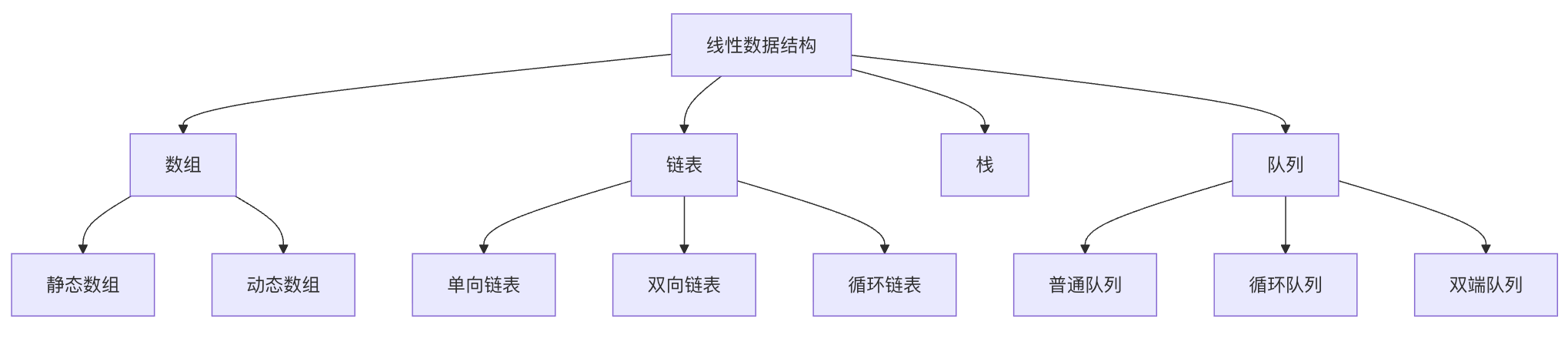
The figure below shows the taxonomy of linear data structures. Each structure has its specific application scenarios and performance characteristics:
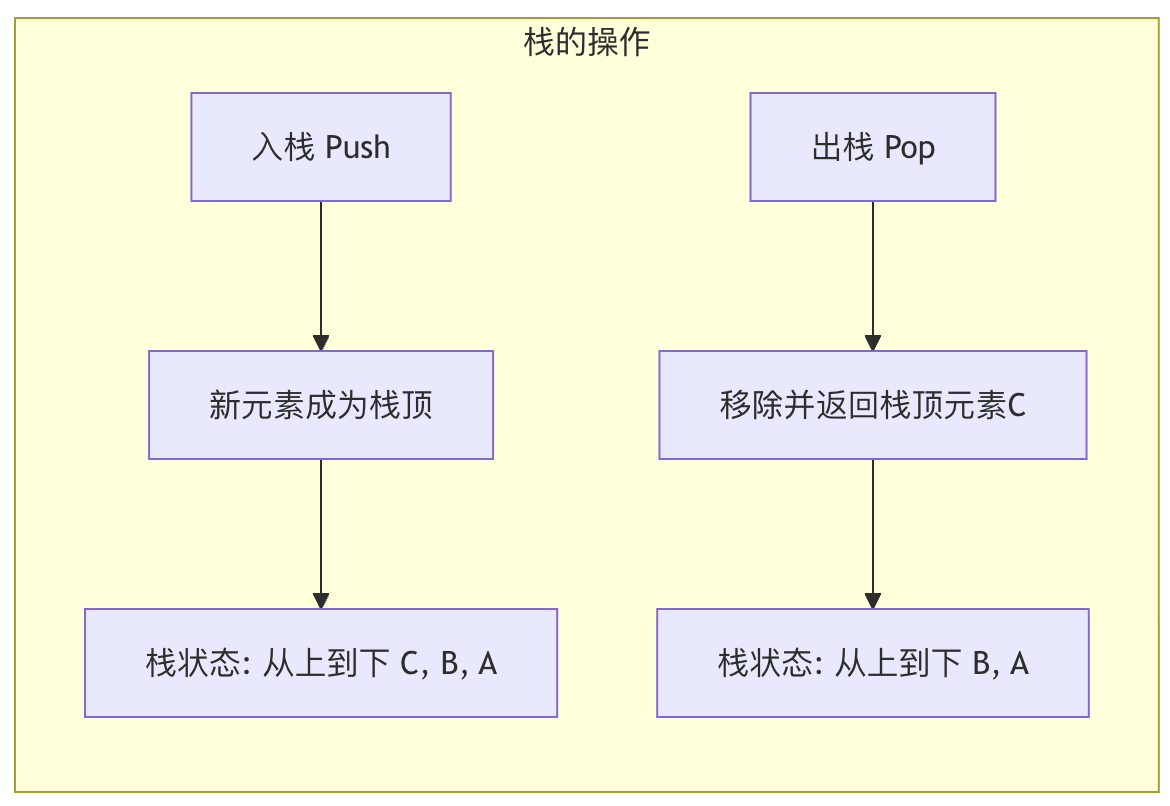
The figure below shows the basic operation process of a stack, which follows the LIFO (Last In, First Out) principle:

Array
Static Array
| Features | Description | Time complexity |
|---|---|---|
| Access Elements | Direct access via index | O(1) |
| Insert element | Need to shift subsequent elements | O(n) |
| Delete element | Need to shift subsequent elements | O(n) |
| Memory Allocation | Fixed size, pre-allocated | O(1) |
Dynamic Array
| Features | Description | Time complexity |
|---|---|---|
| Access Elements | Direct access via index | O(1) |
| Insert element | May require resizing and copying | Average O(1), worst case O(n) |
| Delete element | Need to shift subsequent elements | O(n) |
| Memory Allocation | Automatic Resizing | O(n) (when resizing) |
Linked List
Singly Linked List
| Operation | Description | Time complexity |
|---|---|---|
| Access Elements | Need to traverse from the beginning | O(n) |
| Head Insertion | Direct Insertion | O(1) |
| Tail Insertion | Need to traverse to the tail | O(n) |
| Middle Insertion | Need to find the position first | O(n) |
| Delete element | Need to find the position first | O(n) |
Doubly Linked List
| Operation | Description | Time complexity |
|---|---|---|
| Access Elements | Need to traverse from the head or tail | O(n) |
| Head Insertion | Direct Insertion | O(1) |
| Tail Insertion | Direct insertion (if there is a tail pointer) | O(1) |
| Middle Insertion | Need to find the position first | O(n) |
| Delete element | Need to find the position first | O(n) |
Stack
| Operation | Description | Time complexity |
|---|---|---|
| push | Add an element at the top of the stack | O(1) |
| pop | Remove the top element of the stack | O(1) |
| peek(view) | View the top element of the stack | O(1) |
| isEmpty(empty check) | Check whether the stack is empty | O(1) |
Queue
| Operation | Description | Time complexity |
|---|---|---|
| enqueue | Add an element at the tail of the queue | O(1) |
| dequeue | Remove the head element of the queue | O(1) |
| front (view the front of the queue) | View the head element of the queue | O(1) |
| isEmpty(empty check) | Check whether the queue is empty | O(1) |
Linear data structure comparison diagram
Array: a fixed apartment building for data
Arrays are the simplest and most straightforward linear data structure.
We can imagine it as a buildingAn apartment building with a fixed number of floors。
Basic concepts and characteristics
- Contiguous storageAn array occupies a contiguous block in memoryContiguousThe space is like rooms in an apartment building being right next to each other.
- Fixed size: The capacity (length) of an array must be determined at creation time and usually cannot be changed afterward, just as the number of rooms in an apartment building is fixed once it is built.
- Index access: Each element (room) has a unique number, called anIndexIn most programming languages, indexing starts from
0Starting from. You can directly and quickly access any element via its index, with a time complexity ofO(1)。
Core operations and code examples
Let's demonstrate arrays using Python (in Python we typically uselistto simulate, but note that Python'slistwhich is dynamic) core operations.
Example
apartment_building = ['Room 101 - Zhang San', 'Room 102 - Li Si', 'Room 103 - Wang Wu', 'Room 104 - vacant', 'Room 105 - vacant']
print("Apartment building residents:", apartment_building)
# 2. Access elements (by index)
# Access Room 102
tenant = apartment_building[1] # Index starts at 0, so 1 corresponds to the second element
print(f"The resident of Room 102 is: {tenant}")
# 3. Update elements
# A new resident Zhao Liu moved into Room 104
apartment_building[3] = 'Room 104 - Zhao Liu'
print("After Zhao Liu moved in:", apartment_building)
# 4. Insert elements (adding at the end is relatively efficient, simulating "expansion")
# Assume we are allowed to add a Room 106 at the end
apartment_building.append('Room 106 - Sun Qi')
print("After adding Room 106:", apartment_building)
# 5. Delete elements
# Wang Wu from Room 103 moved out
# Method 1: Mark as vacant (logical deletion)
# apartment_building[2] = 'Room 103 - vacant'
# Method 2: Remove the element; subsequent elements need to be shifted forward (physical deletion, relatively inefficient)
removed_tenant = apartment_building.pop(2) # Remove the element at index 2
print(f"{removed_tenant} has moved out.")
print("After Wang Wu moved out:", apartment_building)
Output:
寓楼住户情况: ['101室-张三', '102室-李四', '103室-王五', '104室-空置', '105室-空置']
102室的住户是:102室-李四
赵六入住后: ['101室-张三', '102室-李四', '103室-王五', '104室-赵六', '105室-空置']
加盖106室后: ['101室-张三', '102室-李四', '103室-王五', '104室-赵六', '105室-空置', '106室-孙七']
103室-王五 已搬走。
王五搬走后: ['101室-张三', '102室-李四', '104室-赵六', '105室-空置', '106室-孙七']
Advantages and Disadvantages
| Advantages | Disadvantages |
|---|---|
| High-speed random access: Any element can be accessed in constant time via its index. | Fixed size: Once a static array is created, its capacity is difficult to change. |
| High memory efficiency: Contiguous storage, no extra space needed to store relationships between elements. | High insertion/deletion cost: Inserting or deleting elements in the middle requires shifting many subsequent elements to maintain contiguity. |
Linked list: a treasure-hunting train for data
When the fixed size of arrays and the inefficiency of insertion/deletion become issues, linked lists come on the scene. A linked list is like a trainTrain, each carriage (node) carries cargo (data) and is connected to the next carriage via a coupler (pointer).
Basic concepts and types
Each node of the linked listnodeContains at least two parts:
- Data fieldStores the actual data value.
- Pointer field: Stores the address of the next node in memory.
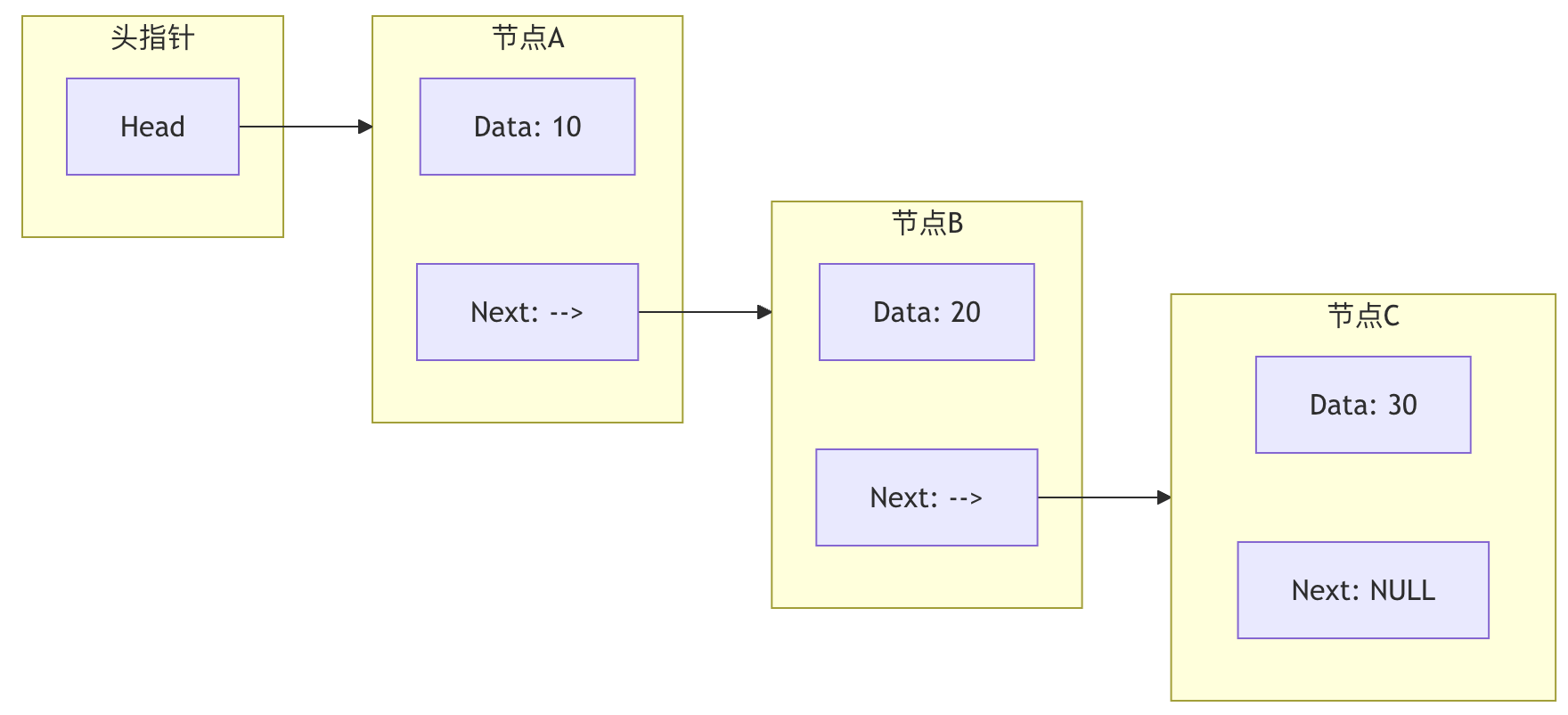
The figure above shows aSingly Linked Liststructure. The head pointer points to the first node, and each node'sNextpointer points to the next node, and the last node'sNextPoints toNULLMarks the end of the linked list.
Main types of linked lists:
- Singly Linked ListThe node only points to the next node.
- Doubly Linked List: Nodes point to both the previous and the next node, allowing bidirectional traversal.
- Circular linked list: The tail node points to the head node, forming a ring.
Core operations and code examples
Let's implement a simple singly linked list.
Example
"""Define the linked list node class"""
def __init__(self, data):
self.data = data # Data field
self.next = None # Pointer field, initially points to null
class LinkedList:
"""Define a singly linked list class"""
def __init__(self):
self.head = None # Linked list head pointer
def append(self, data):
"""Add a node at the end of the linked list"""
new_node = ListNode(data)
if not self.head: # If the linked list is empty, the new node becomes the head node
self.head = new_node
return
last_node = self.head
while last_node.next: # Traverse to the last node
last_node = last_node.next
last_node.next = new_node # Attach the new node to the end
def prepend(self, data):
"""Add a node at the head of the linked list"""
new_node = ListNode(data)
new_node.next = self.head
self.head = new_node
def delete(self, key):
"""Delete the first node with value key"""
current_node = self.head
# If the node to delete is the head node
if current_node and current_node.data == key:
self.head = current_node.next
current_node = None
return
prev_node = None
# Traverse to find the node to delete
while current_node and current_node.data != key:
prev_node = current_node
current_node = current_node.next
if current_node is None: # Not found
return
# Once found, bypass the node to connect
prev_node.next = current_node.next
current_node = None
def print_list(self):
"""Print all elements of the linked list"""
current_node = self.head
while current_node:
print(current_node.data, end=" -> ")
current_node = current_node.next
print("NULL")
# Test the linked list
print("=== Singly Linked List Operation Demo ===")
train = LinkedList()
train.append("Car 1 - Coal")
train.append("Car 2 - Wood")
train.prepend("Locomotive") # Add at the head
train.append("Car 3 - Steel")
print("Initial train:")
train.print_list() # Output: Locomotive -> Car 1 - Coal -> Car 2 - Wood -> Car 3 - Steel -> NULL
train.delete("Car 2 - Wood")
print("After unloading the wood:")
train.print_list() # Output: locomotive -> carriage1-coal -> carriage3-steel -> NULL
Output:
=== 单向链表操作演示 ===
初始列车:
车头 -> 车厢1-煤炭 -> 车厢2-木材 -> 车厢3-钢材 -> NULL
卸下木材后:
车头 -> 车厢1-煤炭 -> 车厢3-钢材 -> NULL
Advantages and Disadvantages
| Advantages | Disadvantages |
|---|---|
| Dynamic size: No need to pre-allocate fixed space; it can grow and shrink flexibly. | Memory overhead: Each node requires extra space to store a pointer. |
| Efficient insertion/deletion: When the position of a node is known, you only need to modify pointers without moving many elements. | Sequential access: Unlike arrays, elements cannot be accessed directly by index; you must traverse from the head. |
| Cache-unfriendly: Nodes are scattered in memory, which is not conducive to CPU cache prefetching. |
Stack: stacking plates for data
A stack is aLast-in, first-outA data structure, like stacked plates in a restaurant, you always take the top one (the last one put on).
Basic concepts and operations
The stack only allows operations at one end (calledStack top) to insert (Push) and delete (Pop) operations. The other end is calledStack bottom。
Core operations:
- push(data)Push data onto the top of the stack.
- pop()Pop and return the top element of the stack.
- peek() / top()View the top element of the stack without popping it.
- is_empty()Check whether the stack is empty.
Application scenarios and code examples
Stacks are extremely widely used in computer science, e.g., function call stacks, browser forward/back, expression evaluation, bracket matching, etc.
Example
"""Use list to implement stack"""
def __init__(self):
self.items = []
def push(self, item):
"""Push"""
self.items.append(item) # Use the end of the list as the stack top
def pop(self):
"""Pop, return None if stack is empty"""
if not self.is_empty():
return self.items.pop()
return None
def peek(self):
"""Peek at the top element"""
if not self.is_empty():
return self.items[-1]
return None
def is_empty(self):
"""Check whether the stack is empty"""
return len(self.items) == 0
def size(self):
"""Return the size of the stack"""
return len(self.items)
# Application example: bracket matching check
def is_balanced_parentheses(expression):
"""
Check whether the brackets in the expression match
For example: (()) is balanced, (() is unbalanced
"""
stack = Stack()
# Bracket matching mapping
matching_bracket = {')': '(', ']': '[', '}': '{'}
for char in expression:
if char in '([{': # If it is a left bracket, push onto stack
stack.push(char)
elif char in ')]}': # If it is a right bracket
if stack.is_empty():
return False # Stack empty, so there are too many right brackets
top_char = stack.pop()
if matching_bracket[char] != top_char: # Check whether they match
return False
# After the loop, the stack should be empty
return stack.is_empty()
# Test stack and bracket matching
print("\n=== Stack and Bracket Matching Demo ===")
plate_stack = Stack()
plate_stack.push("Plate 1")
plate_stack.push("Plate 2")
plate_stack.push("Plate 3")
print(f"Take out the top plate: {plate_stack.pop()}") # Output: Plate 3
print(f"Now the top plate is: {plate_stack.peek()}") # Output: Plate 2
# Test bracket matching
test_cases = ["((1+2)*3)", "({[ ]})", "((())", ")( )"]
for test in test_cases:
result = balanced if is_balanced_parentheses(test) else unbalanced
print(fThe brackets in expression '{test}' are {result}.)
Output:
=== 栈与括号匹配演示 ===
取出最上面的盘子: 盘子3
现在最上面的盘子是: 盘子2
表达式 '((1+2)*3)' 的括号是 平衡 的。
表达式 '({[ ]})' 的括号是 平衡 的。
表达式 '((())' 的括号是 不平衡 的。
表达式 ')( )' 的括号是 不平衡 的。
Queue: a queueing channel for data
A queue is afirst-in, first-outA data structure, like any place in life where you need to queue (e.g., supermarket checkout), people who arrive first get served first.
Basic concepts and operations
The queue allows operations at one end (calledtail) to insert (Enqueue) operations, and at the other end (calledhead) to delete (Dequeue) operation.
Core operations:
- enqueue(data)Add data to the tail of the queue.
- dequeue()Remove and return data from the head of the queue.
- front() / peek()View the head data of the queue without removing it.
- is_empty()Check whether the queue is empty.
Application scenarios and code examples
Queues are often used in scenarios where tasks need to be processed in order, such as: print job queues, message queues, breadth-first search, etc.
Example
class Queue:
"""Implement a queue using collections.deque"""
def __init__(self):
self.items = deque()
def enqueue(self, item):
"""Enqueue"""
self.items.append(item) # Add from the right (tail)
def dequeue(self):
"""Dequeue, return None if the queue is empty"""
if not self.is_empty():
return self.items.popleft() # Remove from the left (head)
return None
def front(self):
"""Peek at the head element"""
if not self.is_empty():
return self.items[0]
return None
def is_empty(self):
"""Check if the queue is empty"""
return len(self.items) == 0
def size(self):
"""Return the size of the queue"""
return len(self.items)
# Application example: simulating print tasks
print("\n=== Queue and Print Task Simulation ===)
printer_queue = Queue()
# Simulate three print tasks arriving
tasks = ["Alice's resume.pdf", "Bob's report.doc", "Charlie's chart.png"]
for task in tasks:
printer_queue.enqueue(task)
print(f"Task '{task}' has been added to the print queue.")
# Process print tasks
print("\nStart printing...)
while not printer_queue.is_empty():
current_task = printer_queue.dequeue()
print(f"Printing: {current_task}")
# Simulate print time
print("All print tasks have been completed.")
Output:
=== 队列与打印任务模拟 ===
任务 'Alice的简历.pdf' 已加入打印队列。
任务 'Bob的报告.doc' 已加入打印队列。
任务 'Charlie的图表.png' 已加入打印队列。

开始打印...
正在打印: Alice的简历.pdf
正在打印: Bob的报告.doc
正在打印: Charlie的图表.png
所有打印任务已完成。
Summary and Comparison
We have learned four basic linear data structures. The table below helps you quickly review and compare their core characteristics:
| Features | array | Linked list | Stack | Queue |
|---|---|---|---|---|
| Storage method | Contiguous memory | Scattered memory, connected via pointers | Implemented based on arrays or linked lists | Implemented based on arrays or linked lists |
| Access method | Random access (via index) | Sequential access (must traverse) | Limited to the top of the stack (LIFO) | Limited to the head of the queue (FIFO) |
| Insertion/Deletion Efficiency | Fast at the tail, slow in the middle/at the head (requires shifting elements) | Fast when the position is known (only need to change pointers) | Top-of-stack operations, O(1) | Enqueue at the tail, dequeue at the head, O(1) |
| Size | Fixed (static array) | Dynamic | Dynamic | Dynamic |
| Main Applications | Fast lookup, fixed collection | Frequent insertion/deletion, uncertain size | Function calls, backtracking, bracket matching | Task scheduling, buffering, BFS |
How to choose?
- requiresFast random accessand when the amount of data is known, choosearray。
- requiresFrequently insert or delete at arbitrary positionselements, and when the amount of data varies greatly, chooseLinked list。
- Need to implement"Undo"Function orReverse processingWhen in sequence, considerStack。
- Need to press"First come, first served"when processing tasks in order, useQueue。