CSS3 Background
CSS3 Backgrounds
CSS3 contains several new background properties that provide greater control over background elements.
In this chapter, you will learn about the following background properties:
- background-image
- background-size
- background-origin
- background-clip
You will also learn how to use multiple background images.
Browser Support
The numbers in the table indicate the first browser version number that supports the property.
The number immediately preceding -webkit-, -ms-, or -moz- is the first browser version number that supports the prefixed property.
| Property | |||||
|---|---|---|---|---|---|
| background-image (with multiple backgrounds) |
4.0 | 9.0 | 3.6 | 3.1 | 11.5 |
| background-size | 4.0 1.0 -webkit- |
9.0 | 4.0 3.6 -moz- |
4.1 3.0 -webkit- |
10.5 10.0 -o- |
| background-origin | 1.0 | 9.0 | 4.0 | 3.0 | 10.5 |
| background-clip | 4.0 | 9.0 | 4.0 | 3.0 | 10.5 |
CSS3 background-image Property
In CSS3, background images can be added via the background-image property.
Different background images are separated by commas, and among all the images, the first one is displayed at the topmost layer.
Example
Try it Yourself »
Different properties can be set for different images.
Example
Try it Yourself »
CSS3 background-size Property
background-size specifies the size of background images. Before CSS3, the size of a background image was determined by the actual size of the image.
In CSS3, you can specify background images, allowing you to redefine the size of background images in different contexts. You can specify sizes in pixels or percentages.
The size you specify is a percentage size relative to the width and height of the parent element.


Example 1
Reset background image:
Try it Yourself »
Example 2
Stretch the background image to completely fill the content area:
Try it Yourself »
CSS3 background-origin Property
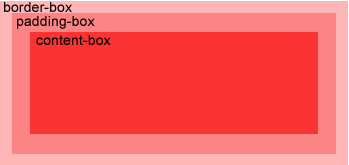
The background-origin property specifies the positioning area of background images.
Background images can be placed in the content-box, padding-box, and border-box areas.
Example
Position the background image within the content-box:
Try it Yourself »
CSS3 Multiple Background Images |
|
|
CSS3 allows you to add multiple background images to an element. |
Example
Set two background images on the body element:
Try it Yourself »
CSS3 background-clip property
In CSS3, the background-clip property specifies that the background is drawn starting from a specified position.
Example
Try it Yourself »
New background properties
| Sequence | Description | CSS |
|---|---|---|
| background-clip | Specifies the painting area of the background. | 3 |
| background-origin | Specifies the positioning area of the background image. | 3 |
| background-size | Specifies the size of the background image. | 3 |