CSS3 3D transformation
3D transformation
CSS3 allows you to use 3D transforms to format elements.
In this chapter, you will learn about some of these 3D transform methods:
- rotateX()
- rotateY()
Click on the elements below to see the difference between 2D transforms and 3D transforms:
2D rotate
3D rotate
Browser Support
The numbers in the table specify the first browser version that fully supports the property.
Numbers followed by -webkit-, -ms-, or -moz- specify the first browser version that worked with the prefixed property.
| Property | |||||
|---|---|---|---|---|---|
| transform | 36.0 12.0 -webkit- |
10.0 | 16.0 10.0 -moz- |
4.0 -webkit- | 23.0 15.0 -webkit- |
| transform-origin (three-value syntax) |
36.0 12.0 -webkit- |
10.0 | 16.0 10.0 -moz- |
4.0 -webkit- | 23.0 15.0 -webkit- |
| transform-style | 36.0 12.0 -webkit- |
11.0 | 16.0 10.0 -moz- |
4.0 -webkit- | 23.0 15.0 -webkit- |
| perspective | 36.0 12.0 -webkit- |
10.0 | 16.0 10.0 -moz- |
4.0 -webkit- | 23.0 15.0 -webkit- |
| perspective-origin | 36.0 12.0 -webkit- |
10.0 | 16.0 10.0 -moz- |
4.0 -webkit- | 23.0 15.0 -webkit- |
| backface-visibility | 36.0 12.0 -webkit- |
10.0 | 16.0 10.0 -moz- |
4.0 -webkit- | 23.0 15.0 -webkit- |
rotateX() method
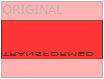
The rotateX() method rotates an element around its X-axis at a given degree.


Example
div
{
transform: rotateX(120deg);
-webkit-transform: rotateX(120deg); /*Safari and Chrome*/
}
Try it Yourself »
rotateY() method
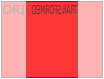
The rotateY() method rotates an element around its Y-axis at a given degree.
Example
div
{
transform: rotateY(130deg);
-webkit-transform: rotateY(130deg); /*Safari and Chrome*/
}
Try it Yourself »
Transform Properties
The following table lists all the transform properties:
| Property | Description | CSS |
|---|---|---|
| transform | Applies a 2D or 3D transform to an element. | 3 |
| transform-origin | Allows you to change the position of the transformed element. | 3 |
| transform-style | Specifies how nested elements are displayed in 3D space. | 3 |
| perspective | Specifies the perspective effect for 3D elements. | 3 |
| perspective-origin | Specifies the bottom position of a 3D element. | 3 |
| backface-visibility | Defines whether an element is visible when it is not facing the screen. | 3 |
3D transform methods
| Function | Description |
|---|---|
| matrix3d(n,n,n,n,n,n, n,n,n,n,n,n,n,n,n,n) |
Defines a 3D transform using a 4x4 matrix of 16 values. |
| translate3d(x,y,z) | Defines 3D transformations. |
| translateX(x) | Defines a 3D transformation using only values for the X-axis. |
| translateY(y) | Defines a 3D transformation using only values for the Y-axis. |
| translateZ(z) | Defines a 3D transformation using only values for the Z-axis. |
| scale3d(x,y,z) | Defines 3D scaling transformations. |
| scaleX(x) | Defines a 3D scale transformation by giving a value for the X-axis. |
| scaleY(y) | Defines a 3D scale transformation by giving a value for the Y-axis. |
| scaleZ(z) | Defines a 3D scale transformation by giving a value for the Z-axis. |
| rotate3d(x,y,z,angle) | Defines 3D rotation. |
| rotateX(angle) | Defines a 3D rotation along the X-axis. |
| rotateY(angle) | Defines a 3D rotation along the Y-axis. |
| rotateZ(angle) | Defines a 3D rotation along the Z-axis. |
| perspective(n) | Defines the perspective view of a 3D transformed element. |