C# switch statement
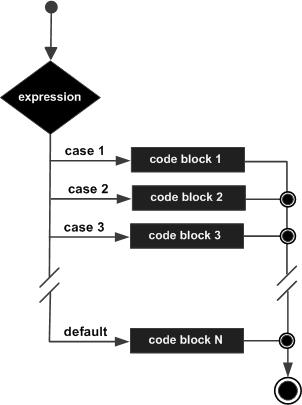
aswitchThe statement allows testing a variable against multiple values. Each value is called a case, and the variable being tested is checked against eachswitch casePerform a check.
Syntax
In C#switchThe syntax of the statement:
switch(expression){
    case constant-expression  :
       statement(s);
       break;
    case constant-expression  :
       statement(s);
       break;

    /* 您可以有任意数量的 case 语句 */
    default : /* 可选的 */
       statement(s);
       break;
}
switchStatements must follow the rules below:
- switchin the statementexpressionmust be an integral or enumeration type, or a class type that has a single conversion function to convert it to an integral or enumeration type.
- There can be any number of case statements in a switch. Each case is followed by a value to compare and a colon.
- of the caseconstant-expressionmust have the same data type as the variable in the switch, and must be a constant.
- When the variable being tested equals the constant in a case, the statements following the case will be executed until abreakuntil the statement.
- When encounteringbreakbreak statement is encountered, the switch terminates, and control flow jumps to the next line after the switch statement.
- Not every case needs to contain abreak. If a case statement is empty, it does not need to contain abreak, the control flow willResumesubsequent cases, until a break is encountered.
- C# does not allow execution to continue from one case section to the next case section. If a case statement has been executed, it must contain abreakor other jump statements.
- aswitchStatements can have an optionaldefaultstatement at the end of the switch. The default statement is used to execute a task when none of the above cases are true. The default also needs to contain abreakstatement, which is a good habit.
- C# does not support explicit fall-through from one case label to another. To make C# support explicit fall-through from one case label to another, you can use goto a switch-case or goto default.
Flowchart
Example
The following example is used to determine the current day of the week:
Example
using System;
namespace MyApplication
{
class Program
{
static void Main(string[] args)
{
int day = 4;
switch (day)
{
case 1:
Console.WriteLine("Monday");
break;
case 2:
Console.WriteLine("Tuesday");
break;
case 3:
Console.WriteLine("Wednesday");
break;
case 4:
Console.WriteLine("Thursday");
break;
case 5:
Console.WriteLine("Friday");
break;
case 6:
Console.WriteLine("Saturday");
break;
case 7:
Console.WriteLine("Sunday");
break;
}
}
}
}
namespace MyApplication
{
class Program
{
static void Main(string[] args)
{
int day = 4;
switch (day)
{
case 1:
Console.WriteLine("Monday");
break;
case 2:
Console.WriteLine("Tuesday");
break;
case 3:
Console.WriteLine("Wednesday");
break;
case 4:
Console.WriteLine("Thursday");
break;
case 5:
Console.WriteLine("Friday");
break;
case 6:
Console.WriteLine("Saturday");
break;
case 7:
Console.WriteLine("Sunday");
break;
}
}
}
}
The execution result varies depending on the date. The result I got when executing on this day is:
Thursday
The following example determines the student's grade, which includesdefaultStatement:
Example
using System;
namespace DecisionMaking
{
class Program
{
static void Main(string[] args)
{
/* local variable definition */
char grade = 'B';
switch (grade)
{
case 'A':
Console.WriteLine("Great!");
break;
case 'B':
case 'C':
Console.WriteLine("Good job");
break;
case 'D':
Console.WriteLine("You passed");
break;
case 'F':
Console.WriteLine("Better try again");
break;
default:
Console.WriteLine("Invalid grade");
break;
}
Console.WriteLine("Your score is {0}", grade);
Console.ReadLine();
}
}
}
namespace DecisionMaking
{
class Program
{
static void Main(string[] args)
{
/* local variable definition */
char grade = 'B';
switch (grade)
{
case 'A':
Console.WriteLine("Great!");
break;
case 'B':
case 'C':
Console.WriteLine("Good job");
break;
case 'D':
Console.WriteLine("You passed");
break;
case 'F':
Console.WriteLine("Better try again");
break;
default:
Console.WriteLine("Invalid grade");
break;
}
Console.WriteLine("Your score is {0}", grade);
Console.ReadLine();
}
}
}
When the above code is compiled and executed, it produces the following results:
做得好 您的成绩是 Bother extensions