C# for/foreach loop
aforA loop is a repetition control structure that allows you to write a loop that executes a specified number of times.
Syntax
In C#forThe syntax of the loop:
for ( init; condition; increment )
{
   statement(s);
}
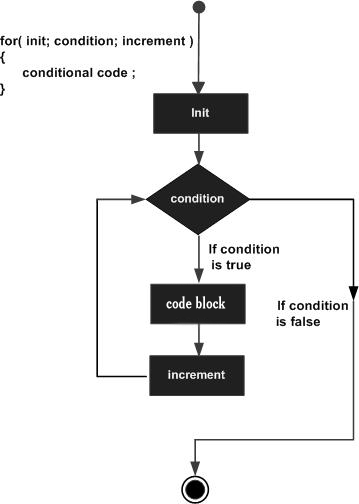
The following is the control flow of a for loop:
initIt is executed first, and only once. This step allows you to declare and initialize any loop control variables. You can also write no statement here, as long as a semicolon appears.
Next, it will evaluateconditionIf it is true, the loop body is executed. If it is false, the loop body is not executed, and control flow jumps to the next statement immediately after the for loop.
After the for loop body is executed, control flow jumps back to the aboveincrementStatement. This statement allows you to update the loop control variable. This statement can be left empty, as long as a semicolon appears after the condition.
condition is evaluated again. If it is true, the loop executes, and this process repeats continuously (loop body, then increment step value, then re-evaluate condition). When the condition becomes false, the for loop terminates.
Flowchart
Example
Example
namespace Loops
{
class Program
{
static void Main(string[] args)
{
/* for loop execution */
for (int a = 10; a < 20; a = a + 1)
{
Console.WriteLine("Value of a: {0}", a);
}
Console.ReadLine();
}
}
}
When the above code is compiled and executed, it produces the following results:
a 的值: 10
a 的值: 11
a 的值: 12
a 的值: 13
a 的值: 14
a 的值: 15
a 的值: 16
a 的值: 17
a 的值: 18
a 的值: 19
foreach
C# also supports the foreach loop, which can be used to iterate over an array or a collection object.
C#'s foreach loop can be used to traverse collection types such as arrays, lists, dictionaries, etc. It is a simplified version of the for loop, making code more concise and readable.
The following is the syntax of the foreach loop:
foreach (var item in collection)
{
    // 循环
}
collection is the collection to be traversed, and item is the element currently being traversed.
The following example has three parts:
- Output the elements in an integer array using a foreach loop.
- Output the elements in an integer array using a for loop.
- The foreach loop sets the counter for array elements.
Example
{
static void Main(string[] args)
{
int[] fibarray = new int[] { 0, 1, 1, 2, 3, 5, 8, 13 };
foreach (int element in fibarray)
{
System.Console.WriteLine(element);
}
System.Console.WriteLine();
// Similar to a foreach loop
for (int i = 0; i < fibarray.Length; i++)
{
System.Console.WriteLine(fibarray[i]);
}
System.Console.WriteLine();
// Set the calculator for elements in the collection
int count = 0;
foreach (int element in fibarray)
{
count += 1;
System.Console.WriteLine("Element #{0}: {1}", count, element);
}
System.Console.WriteLine("Number of elements in the array: {0}", count);
}
}
The output result is:
0
1
1
2
3
5
8
13

0
1
1
2
3
5
8
13

Element #1: 0
Element #2: 1
Element #3: 1
Element #4: 2
Element #5: 3
Element #6: 5
Element #7: 8
Element #8: 13
Number of elements in the array: 8
In the following example, we use foreach to traverse a list:
Example
using System.Collections.Generic;
class Program
{
static void Main(string[] args)
{
// Create a list of strings
List<string> myStrings = new List<string>();
// Add some string elements to the list
myStrings.Add("Google");
myStrings.Add("Example");
myStrings.Add("Taobao");
// Use a foreach loop to iterate through the elements in the list
foreach (string s in myStrings)
{
Console.WriteLine(s);
}
// Wait for the user to press any key to exit the program
Console.ReadKey();
}
}
When the above code is compiled and executed, it produces the following results:
Google
Example
Taobao
For more foreach content, please refer to:Usage of foreach iteration in C#
other extensions