C# Encapsulation
EncapsulationDefined as "enclosing one or more items in a physical or logical package." In object-oriented programming methodology, encapsulation is to prevent access to implementation details.
Abstraction and encapsulation are related features of object-oriented programming. Abstraction allows relevant information to be made visible, while encapsulation enables developersImplement the required level of abstraction。
C# encapsulation sets user access permissions according to specific needs, and throughAccess modifiersto implement.
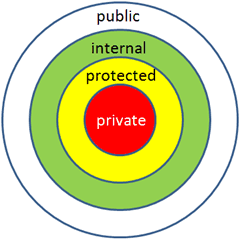
aAccess modifiersDefines the scope and visibility of a class member. C# supports the following access modifiers:
- public: all objects can access it;
- private: the object itself can access it within the object;
- protected: only objects of this class and its subclasses can access it;
- internal: objects in the same assembly can access it;
- protected internal: access is limited to the current assembly or types derived from the containing class.
Public access modifier
The Public access modifier allows a class to expose its member variables and member functions to other functions and objects. Any public member can be accessed by external classes.
The following example illustrates this:
Example
namespace RectangleApplication
{
class Rectangle
{
//Member variable
public double length;
public double width;
public double GetArea()
{
return length * width;
}
public void Display()
{
Console.WriteLine("Length: {0}", length);
Console.WriteLine("Width: {0}", width);
Console.WriteLine("Area: {0}", GetArea());
}
}// Rectangle ends
class ExecuteRectangle
{
static void Main(string[] args)
{
Rectangle r = new Rectangle();
r.length = 4.5;
r.width = 3.5;
r.Display();
Console.ReadLine();
}
}
}
When the above code is compiled and executed, it produces the following result:
长度: 4.5
宽度: 3.5
面积: 15.75
In the above example, the member variables length and width are declared aspublic, so they can be used by the function Main() with an instance of the Rectangle classrVisit.
Member functionDisplay()andGetArea()to directly access these variables.
Member functionDisplay()is also declared aspublic, so it can also beMain()using an instance of the Rectangle classrVisit.
Private access modifier
The Private access modifier allows a class to hide its member variables and member functions from other functions and objects. Only functions in the same class can access its private members. Even instances of the class cannot access its private members.
The following example illustrates this:
Example
namespace RectangleApplication
{
class Rectangle
{
// Private member variable
private double length;
private double width;
// Public method to get the length and width of a rectangle from user input
public void AcceptDetails()
{
Console.WriteLine("Please enter length:");
length = Convert.ToDouble(Console.ReadLine());
Console.WriteLine("Please enter width:");
width = Convert.ToDouble(Console.ReadLine());
}
// Public method for calculating the area of a rectangle
public double GetArea()
{
return length * width;
}
// Public method to display the rectangle's properties and area
public void Display()
{
Console.WriteLine("Length: {0}", length);
Console.WriteLine("Width: {0}", width);
Console.WriteLine("Area: {0}", GetArea());
}
}//end class Rectangle
class ExecuteRectangle
{
static void Main(string[] args)
{
// Create an instance of the Rectangle class
Rectangle r = new Rectangle();
// Get the length and width of the rectangle from user input through the public method AcceptDetails()
r.AcceptDetails();
// Display the rectangle's properties and area via the public method Display()
r.Display();
Console.ReadLine();
}
}
}
When the above code is compiled and executed, it produces the following result:
请输入长度:
5
请输入宽度:
3
长度: 5
宽度: 3
面积: 15
Description:
lengthandwidthDeclared as private member variables to prevent direct access and modification outside the class.AcceptDetailsThe method allows users to input the length and width of the rectangle; this is an example of operating private variables through public methods.GetAreaThe method is used to calculate the area of the rectangle, andDisplayThe method is used to display the properties and area of the rectangle.In
ExecuteRectangleIn the class, by creatingRectanglean instance of the class, and then calls its public methods to perform operations. In this way, the main program cannot directly access and modify the length and width of the rectangle; instead, it operates through the public interface provided by the class, achieving encapsulation.
Protected access modifier
The Protected access modifier allows subclasses to access the member variables and member functions of its base class. This helps implement inheritance. We will discuss this in detail in the chapter on inheritance. Discuss this in more detail.
Internal access modifier
The Internal access modifier allows a class to expose its member variables and member functions to other functions and objects in the current program. In other words, any member with the internal access modifier can be accessed by any class or method defined in the application in which that member is defined.
The following example illustrates this:
Example
namespace RectangleApplication
{
class Rectangle
{
//Member variable
internal double length;
internal double width;
double GetArea()
{
return length * width;
}
public void Display()
{
Console.WriteLine("Length: {0}", length);
Console.WriteLine("Width: {0}", width);
Console.WriteLine("Area: {0}", GetArea());
}
}//end class Rectangle
class ExecuteRectangle
{
static void Main(string[] args)
{
Rectangle r = new Rectangle();
r.length = 4.5;
r.width = 3.5;
r.Display();
Console.ReadLine();
}
}
}
When the above code is compiled and executed, it produces the following result:
长度: 4.5
宽度: 3.5
面积: 15.75
In the above example, please note the member functionGetArea()Declared without any access modifier. If no access modifier is specified, the default access modifier for class members is used, which isprivate。
Protected Internal access modifier
The Protected Internal access modifier allows access within the containing class, derived classes, or the assembly containing the class. This is also used to implement inheritance.
other extensions