C# break Statement
In C#breakThe statement has the following two usages:
WhenbreakWhen a statement appears inside a loop, the loop terminates immediately, and program flow continues with the next statement following the loop.
It can be used to terminateswitchA case in the statement.
If you are using nested loops (i.e., one loop nested inside another), the break statement stops the execution of the innermost loop, and then begins executing the next line of code after that block.
Syntax
In C#breakThe syntax of the statement:
break;
Flowchart
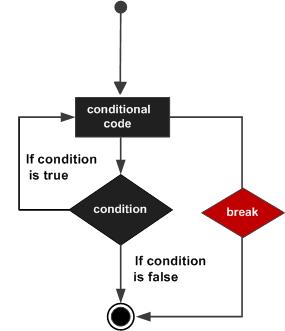
Example
Example
using System;
namespace Loops
{
class Program
{
static void Main(string[] args)
{
/* local variable definition */
int a = 10;
/* while loop execution */
while (a < 20)
{
Console.WriteLine("Value of a: {0}", a);
a++;
if (a > 15)
{
/* Use the break statement to terminate the loop */
break;
}
}
Console.ReadLine();
}
}
}
namespace Loops
{
class Program
{
static void Main(string[] args)
{
/* local variable definition */
int a = 10;
/* while loop execution */
while (a < 20)
{
Console.WriteLine("Value of a: {0}", a);
a++;
if (a > 15)
{
/* Use the break statement to terminate the loop */
break;
}
}
Console.ReadLine();
}
}
}
When the above code is compiled and executed, it produces the following results:
a 的值: 10 a 的值: 11 a 的值: 12 a 的值: 13 a 的值: 14 a 的值: 15other extensions