C# Array
, ..., numbers
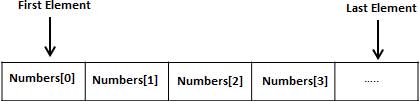
Declaring an array variable does not declare individual variables one by one, such as number0, number1, ..., number99; instead, you declare a variable like numbers, and then use numbers
All arrays consist of contiguous memory locations. The lowest address corresponds to the first element, and the highest address corresponds to the last element.
Declaring arrays
In C#, you can declare an array using the following syntax:
datatype[] arrayName;
where,
- datatypeUsed to specify the type of elements stored in the array.
- [ ]Specifies the rank (dimension) of the array. The rank specifies the size of the array.
- arrayNameSpecifies the name of the array.
For example:
double[] balance;
Initializing arrays
Declaring an array does not initialize the array in memory. When you initialize an array variable, you can assign values to the array.
Arrays are reference types, so you need to usenewKeyword to create an instance of an array.
For example:
double[] balance = new double[10];
Assign to array
You can assign a value to an individual array element by using the index number, for example:
double[] balance = new double[10];
balance[0] = 4500.0;
You can assign values to the array at the same time you declare the array, for example:
double[] balance = { 2340.0, 4523.69, 3421.0};
You can also create and initialize an array, for example:
int [] marks = new int[5] { 99, 98, 92, 97, 95};
In the above cases, you can also omit the size of the array, for example:
int [] marks = new int[] { 99, 98, 92, 97, 95};
You can also assign an array variable to another target array variable. In this case, the target and the source point to the same memory location:
int [] marks = new int[]  { 99,  98, 92, 97, 95};
int[] score = marks;
When you create an array, the C# compiler implicitly initializes each array element to a default value based on the array type. For example, all elements of an int array are initialized to 0.
Accessing array elements
Elements are accessed using an indexed array name. This is done by placing the index of the element in square brackets after the array name. For example:
double salary = balance[9];
Below is an example that uses the three concepts mentioned above, namely declaring, assigning, and accessing arrays:
Example
namespace ArrayApplication
{
class MyArray
{
static void Main(string[] args)
{
int [] n = new int[10]; /* n is an array with 10 integers */
int i,j;
/* Initialize the elements in array n */
for ( i = 0; i < 10; i++ )
{
n[ i ] = i + 100;
}
/* output the value of each array element */
for (j = 0; j < 10; j++ )
{
Console.WriteLine("Element[{0}] = {1}", j, n[j]);
}
Console.ReadKey();
}
}
}
When the above code is compiled and executed, it produces the following result:
Element[0] = 100
Element[1] = 101
Element[2] = 102
Element[3] = 103
Element[4] = 104
Element[5] = 105
Element[6] = 106
Element[7] = 107
Element[8] = 108
Element[9] = 109
UsageforeachLoops
In the previous example, we used a for loop to access each array element. You can also use a foreachstatement to traverse an array.
The following example uses foreach to traverse an array:
Example
namespace ArrayApplication
{
class MyArray
{
static void Main(string[] args)
{
int [] n = new int[10]; /* n is an array with 10 integers */
/* Initialize the elements in array n */
for ( int i = 0; i < 10; i++ )
{
n[i] = i + 100;
}
/* output the value of each array element */
foreach (int j in n )
{
int i = j-100;
Console.WriteLine("Element[{0}] = {1}", i, j);
}
Console.ReadKey();
}
}
}
When the above code is compiled and executed, it produces the following result:
Element[0] = 100
Element[1] = 101
Element[2] = 102
Element[3] = 103
Element[4] = 104
Element[5] = 105
Element[6] = 106
Element[7] = 107
Element[8] = 108
Element[9] = 109
C# array details
In C#, arrays are very important, and there are more details you need to understand. The following lists some important array-related concepts that C# programmers must be clear about:
| Concepts | Description |
|---|---|
| Multidimensional arrays | C# supports multidimensional arrays. The simplest form of a multidimensional array is the two-dimensional array. |
| Jagged array | C# supports jagged arrays, which are arrays of arrays. |
| Passing Arrays to Functions | You can pass a pointer to an array to a function by specifying the array name without an index. |
| Parameter array | This is often used to pass an unknown number of parameters to a function. |
| Array Class | Defined in the System namespace, it is the base class for all arrays and provides various properties and methods for arrays. |