C++ String
C++ provides the following two types of string representations:
- C-style string
- The string class type introduced by C++
C-style string
C-style strings originated in the C language and continue to be supported in C++. A string is actually a one-dimensional character array,nullCharacter\0terminated by a null character. Therefore, a null-terminated string contains the characters that make up the string.
The following declaration and initialization creates aEXAMPLEstring. Since a null character is stored at the end of the array, the size of the character array is larger than the wordEXAMPLEIt has one more character.
char site[7] = {'R', 'U', 'N', 'O', 'O', 'B', '\0'};
According to the array initialization rules, you can write the above statement as the following:
char site[] = "EXAMPLE";
The following is the memory representation of strings defined in C/C++:
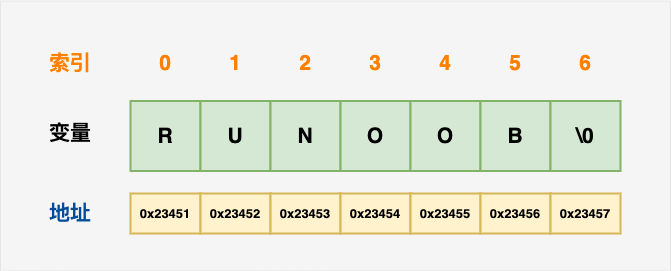
Actually, you don't need to putnullThe character is placed at the end of the string constant. When initializing the array, the C++ compiler will automatically\0it at the end of the string. Let's try to output the string above:
Example
When the above code is compiled and executed, it produces the following result:
Example: EXAMPLE
C++ has a large number of functions to manipulate null-terminated strings:
| Serial Number | Functions & Purpose |
|---|---|
| 1 | strcpy(s1, s2); Copies string s2 to string s1. |
| 2 | strcat(s1, s2); Concatenate string s2 to the end of string s1. Concatenating strings can also be+number, for example: string str1 = "example"; string str2 = "google"; string str = str1 + str2; |
| 3 | strlen(s1); Returns the length of string s1. |
| 4 | strcmp(s1, s2); If s1 and s2 are identical, return 0; if s1<s2, the return value is less than 0; if s1>s2, the return value is greater than 0. |
| 5 | strchr(s1, ch); Returns a pointer to the first occurrence of character ch in string s1. |
| 6 | strstr(s1, s2); Returns a pointer to the first occurrence of string s2 in string s1. |
The following example uses some of the functions mentioned above:
Example
When the above code is compiled and executed, it produces the following result:
strcpy( str3, str1) : example
strcat( str1, str2): examplegoogle
strlen(str1) : 12
String class in C++
The C++ standard library providesstringa class type that supports all the above operations and also adds many more features. We will learn about this class in the C++ standard library, but for now let's first look at the following example:
Now you may not yet fully understand this example, because so far we have not discussed classes and objects. So for now you can just briefly look at this example, and come back to understand it later after you grasp the concepts of object-oriented programming.
Example
When the above code is compiled and executed, it produces the following result:
str3 : example
str1 + str2 : examplegoogle
str3.size() :  12
other extensions