C++ namespace
Suppose there is a situation where there are two students named Zara in a class. To clearly distinguish between them, besides using their names, we have to use some additional information, such as their home addresses, or their parents' names, and so on.
The same situation also occurs in C++ applications. For example, you might write a function named xyz(), and the same function xyz() also exists in another available library. In this way, the compiler cannot determine which xyz() function you are using.
Therefore, it introducesnamespaceThis concept is specifically used to solve the above problem. It can serve as additional information to distinguish functions, classes, variables, etc. with the same name in different libraries. Using a namespace defines a context. Essentially, a namespace defines a scope.
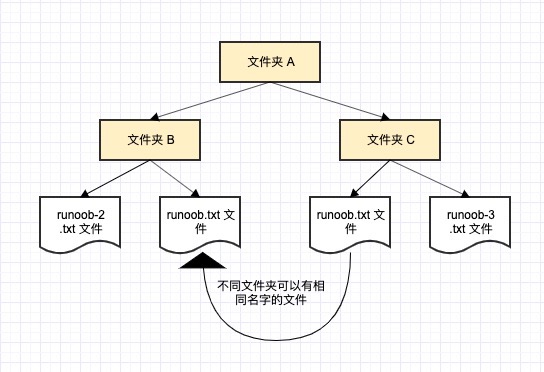
Let's take an example from a computer system: a folder (directory) can contain multiple folders. Within each folder, file names cannot be the same, but files in different folders can share the same name.
Define a namespace
The definition of a namespace uses the keywordnamespace, followed by the name of the namespace, as shown below:
To call a function or variable with a namespace, you need to prepend the namespace name before it, as shown below:
Let's take a look at how a namespace defines a scope for entities such as variables or functions:
Example
When the above code is compiled and executed, it produces the following result:
Inside first_space
Inside second_space
using directive
You can useusing namespacedirective, so that when using the namespace, you don't need to prepend the namespace name. This directive tells the compiler that the subsequent code will use names from the specified namespace.
Example
When the above code is compiled and executed, it produces the following result:
Inside first_space
The using directive can also be used to specify specific items in a namespace. For example, if you only intend to use the cout part of the std namespace, you can use a statement like the following:
using std::cout;
In the subsequent code, when using cout, you don't need to prefix it with the namespace name, butstdother items in the namespace still need to be prefixed with the namespace name, as shown below:
Example
When the above code is compiled and executed, it produces the following result:
std::endl is used with std!
usingThe names introduced by the directive follow the normal scope rules. The names are visible from the use of theusingdirective until the end of that scope. At this point, entities with the same name defined outside the scope are hidden.
Discontiguous namespaces
A namespace can be defined in several different parts, so a namespace is composed of several separately defined parts. The various components of a namespace can be scattered across multiple files.
Therefore, if a component of a namespace needs to request a name defined in another file, it still needs to declare that name. The following namespace definition can define a new namespace or add new elements to an existing namespace:
Nested namespaces
Namespaces can be nested. You can define another namespace within a namespace, as shown below:
You can use::operator to access members in a nested namespace:
In the above statement, if namespace_name1 is used, then elements in namespace_name2 within that scope are also available, as shown below:
Example
When the above code is compiled and executed, it produces the following result:
Inside second_spaceother extensions