Claude Code Slash / Commands
Slash/Commands are Claude Code interactive session'sshortcut control entry, by entering/instructions starting with /, you can quickly call functions, manage sessions, and customize workflows.
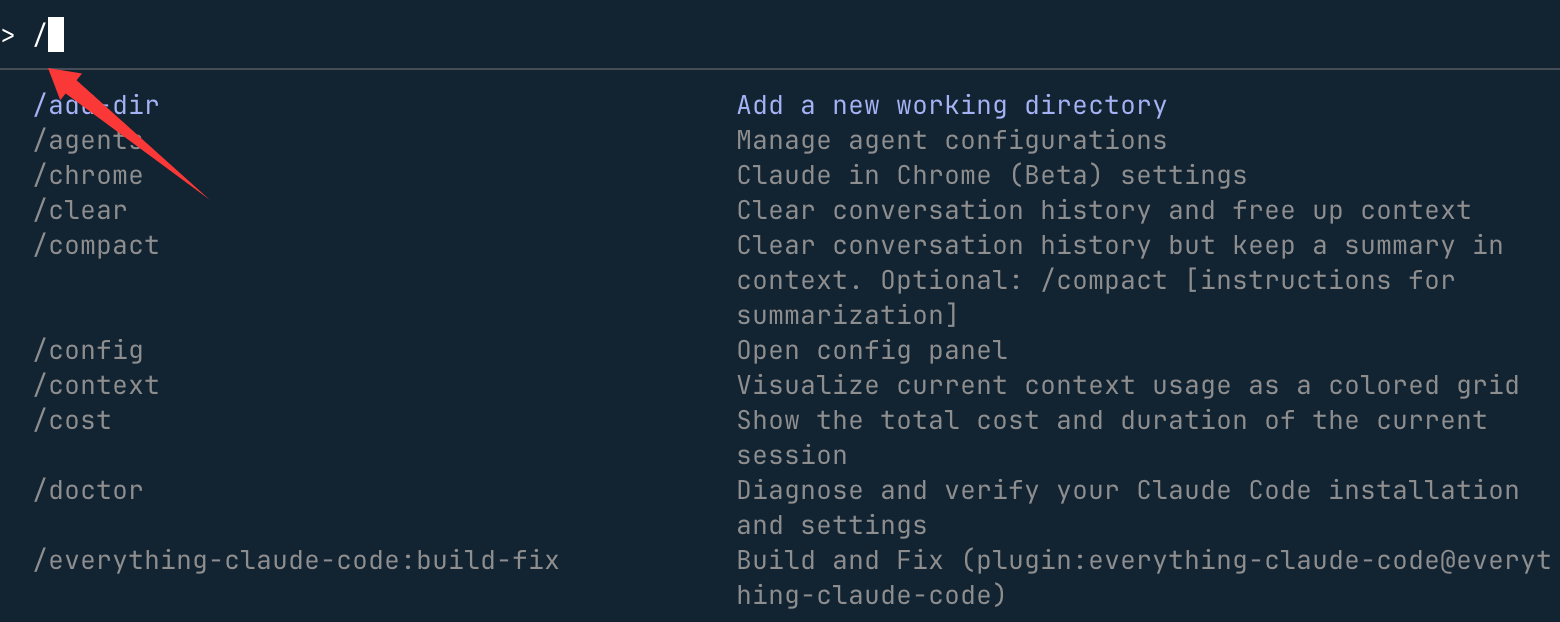
View all available commands:
/help
/helpIt will list all built-in commands, custom commands of the current project (Skills / Commands), and commands exposed by connected MCP servers.
Command types:
| Type | Trigger Method | Source | Storage Location | Applicable Scenarios |
|---|---|---|---|---|
| Built-in Commands | /command |
Installed with Claude Code | Internal implementation | System operations such as session management, configuration, integration |
| Built-in Skills | /skill-name |
Bundled with Claude Code | Internal implementation | Pre-built AI workflows such as code review, debugging, batch processing |
| Project Custom Skills Recommended | /skill-name |
User creates directory + SKILL.md | .claude/skills/<名称>/SKILL.md |
Team-shared reusable workflows, included in git; supports automatic triggering by Claude |
| Project Custom Commands Legacy format | /command |
User-created.mdFile |
.claude/commands/ |
Team-shared repetitive workflows, included in git |
| Personal Custom Skills | /skill-name |
User creates directory + SKILL.md | ~/.claude/skills/<名称>/SKILL.md |
Personal workflows common across projects |
| Personal Custom Commands | /command |
User-created.mdFile |
~/.claude/commands/ |
Personal workflows common across projects (legacy format) |
| MCP Commands | /mcp__服务器__命令 |
Automatically exposed by MCP server | Provided by MCP server | Call external tools such as GitHub, Slack, databases |
!Shell Commands |
!bash命令 |
Direct execution | — | Bypass AI processing and directly run terminal commands |
Command priority (when names are the same): Enterprise-level > Personal-level > Project-level > Built-in
/trigger, but Skills (.claude/skills/) is a new-generation format, supporting multi-file organization, automatic Claude triggering, and richer frontmatter control; Commands (.claude/commands/) is the legacy format, still fully compatible; for new projects, it is recommended to use Skills directly.I. Common Built-in Slash Commands
Built-in commands are core features that come with Claude Code, ready to use by direct input. Beginners should prioritize mastering these high-frequency command categories:
Basic Operation Commands
| Command | Purpose | Beginner Example |
|---|---|---|
/help |
View all available commands and descriptions (including MCP commands) | Input/helpQuickly look up command list |
/exit |
Exit the current interactive session | Don't want to keep chatting? Enter/exitto leave directly |
/clear |
Clear the current conversation history | Session too messy?/clearClear it all with one key |
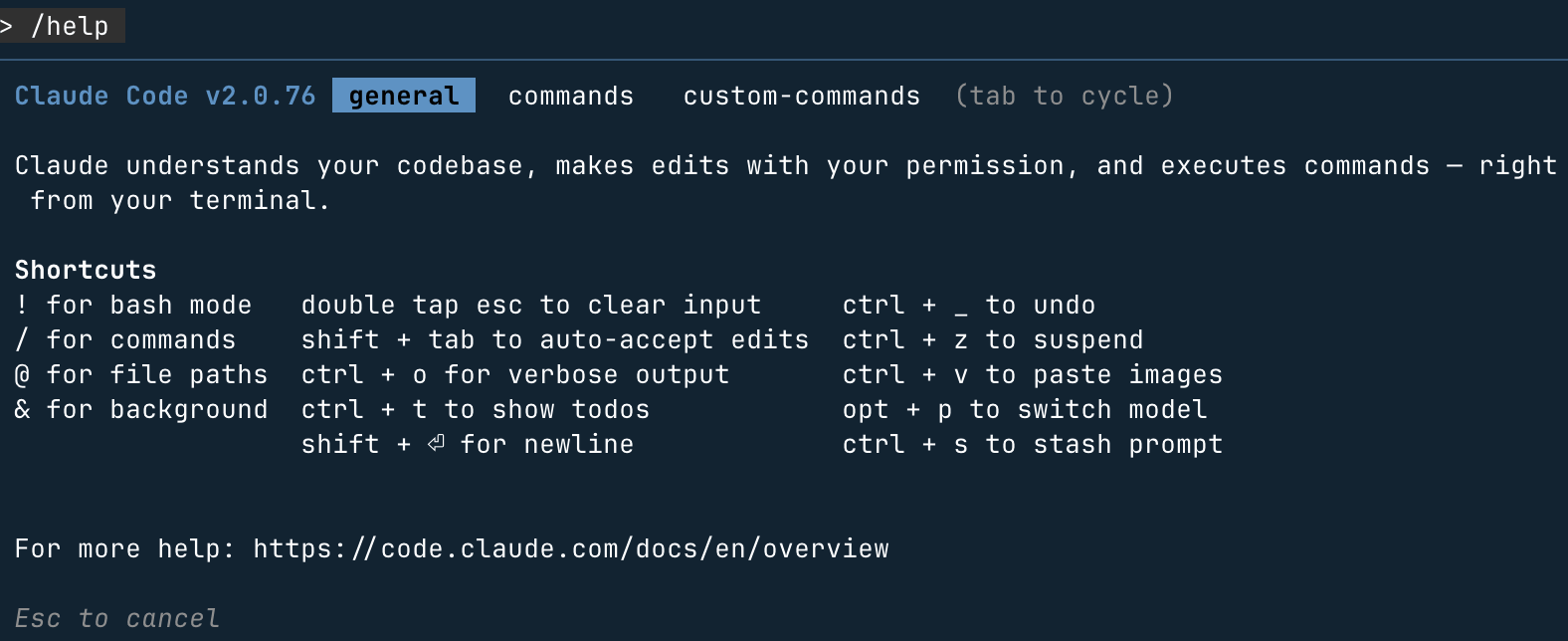
For example, we use the/helpcommand to view help information,Tabkey to switch menus,Escexit:
Session Management Commands
| Command | Syntax | Function Description | Usage Example | Notes |
|---|---|---|---|---|
/clear |
/clear |
Clear all conversation history and start a brand-new session | /clear |
Irrecoverable; it's recommended to/export |
/compact |
/compact [侧重点] |
Intelligently compress conversation history, preserving semantics and reducing Token usage | /compact 保留数据库设计部分 |
and/clearDifference: retains a semantic summary rather than completely clearing it |
/resume |
/resume [id或名称] |
Restore a previous session; without arguments, list all restorable sessions | /resume task-hub-backend |
Works best when used with/renamefor better results |
/rewind |
/rewind |
Undo recent operations, including file modifications and conversation content, restoring to the previous checkpoint; the new version adds an "undo code only" option that preserves conversation history | pressEscBring up the undo menu twice |
Suitable for rolling back when Agent execution results are unsatisfactory |
/rename |
/rename <名称> |
Name the current session for easier/resumeretrieval later |
/rename auth-module-refactor |
Recommended naming convention:Feature-Operation |
/export |
/export [文件名] |
Export the conversation to a file; if no filename is specified, copy to the clipboard | /export debug-session.md |
Supports Markdown format |
/copy NEW |
/copy |
Copy Claude's most recent reply to the clipboard; if it contains multiple code blocks, an interactive selector will pop up | /copy |
Much faster than manually selecting text |
/btw NEW |
/btw <问题> |
Quickly ask a temporary question without affecting the main task context; the answer won't pollute the main conversation flow | /btw Redis 的默认端口是多少? |
Suitable for quick lookups without disrupting the current task |
/exit |
/exit |
Safely exit the Claude Code REPL | /exit |
— |
Context and Memory
| Command | Syntax | Function Description | Usage Example | Notes |
|---|---|---|---|---|
/context |
/context |
Visualize context window usage, showing the proportion of each part (history/files/system prompt/Skills) | /context |
When approaching the limit, execute/compactor/clear |
/memory |
/memory |
Open editor to modifyCLAUDE.md(project-level and global-level), persisting project conventions across sessions |
/memory |
Changes take effect for all subsequent sessions |
/add-dir |
/add-dir <路径> |
Include additional directories in the working scope, suitable for monorepo or cross-directory operations | /add-dir ../packages/shared |
Can be called multiple times to add multiple directories |
/todos |
/todos |
List the TODO items Claude has recorded in the current session | /todos |
— |
/diff NEW |
/diff |
View the diff summary of all file changes in this session, making it easy to review what Claude modified | /diff |
and/rewindCombine: first/diffconfirm the changes, then decide whether to roll back |
Project and Configuration
| Command | Syntax | Function Description | Usage Example | Notes |
|---|---|---|---|---|
/init |
/init |
Analyze the project structure and automatically generateCLAUDE.md, writing the tech stack/build commands/code standards |
/init |
Essential first step for new projects |
/config |
/config |
Manage Claude Code global configuration through an interactive interface | /config |
— |
/status |
/status |
Open the settings status page to view the current configuration overview | /status |
— |
/hooks |
/hooks |
Interactively configure lifecycle Hooks (e.g., lint before commit, format after save) | /hooks |
Supports PreToolUse / PostToolUse / Notification / Stop |
/permissions |
/permissions |
View or update tool permissions (read files/write files/execute commands, etc.) | /permissions |
Restricting permissions can improve operational security |
/sandbox |
/sandbox |
Enable an isolated sandbox environment to execute Bash commands, preventing impact on the host system | /sandbox |
Suitable for testing uncertain scripts |
/doctor |
/doctor |
Diagnose installation status and check whether dependencies/configuration/network connections are normal | /doctor |
When encountering anomalies, run |
Model and Output
| Command | Syntax | Function Description | Usage Example | Notes |
|---|---|---|---|---|
/model |
/model [模型名] |
Switch the underlying AI model; without parameters, shows an interactive selection menu | /model claude-haiku-4-5-20251001 |
See the model comparison table below |
/plan |
/plan [任务描述] |
Enter plan mode; Claude first outputs an execution plan for confirmation before acting | /plan 重构认证模块并补充测试 |
Suitable for complex multi-step tasks, avoids going off track |
/output-style |
/output-style |
Set response format (code-first/explanation-first/concise mode, etc.) | /output-style |
— |
/theme |
/theme |
Switch terminal interface color scheme | /theme |
— |
/statusline |
/statusline |
Customize the content displayed in the terminal bottom status bar | /statusline |
— |
/vim |
/vim |
Enable Vim key bindings | /vim |
Suitable for Vim users |
/terminal-setup |
/terminal-setup |
InstallShift+EnterNewline binding, convenient for entering multi-line prompts |
/terminal-setup |
Recommended configuration for first use |
Available model comparison table (2026):
| Model identifier | Positioning | Applicable scenarios |
|---|---|---|
claude-sonnet-4-6 |
Balanced (default) | Daily development tasks; first choice for Pro/Max5 users |
claude-haiku-4-5-20251001 |
Fast and lightweight | Simple queries, saves tokens in custom commands |
claude-opus-4-6 |
High-capability flagship | Complex architecture planning, difficult code reasoning; Max20 users can use as default |
Code and Tools
| Command | Syntax | Description | Usage examples | Notes |
|---|---|---|---|---|
/review |
/review |
Perform structured code review on recently modified code, output improvement suggestions by priority | /review |
— |
/security-review |
/security-review |
Conduct a security-specific review of current changes (SQL injection/XSS/sensitive information leakage, etc.) | /security-review |
Must run before release |
/pr-comments |
/pr-comments |
Pull review comments for the PR associated with the current branch, handle directly in the terminal | /pr-comments |
Requires GitHub integration configuration |
/install-github-app |
/install-github-app |
Configure GitHub Actions integration; Claude automatically reviews new PRs | /install-github-app |
Generate.github/workflows/claude-code-review.yml |
/agents |
/agents |
View, create, and manage specialized subagents (DB expert/security expert/testing expert, etc.) | /agents |
— |
/bashes |
/bashes |
View currently running background Bash processes; can interrupt or view output | /bashes |
— |
/skills NEW |
/skills |
List all available Skills (built-in + project-level + personal-level), including descriptions and trigger methods | /skills |
When the context budget is insufficient, some Skills are excluded; use this command to confirm loading status |
Integration and Extension
| Command | Syntax | Description | Usage examples | Notes |
|---|---|---|---|---|
/mcp |
/mcp |
Manage MCP server connections (connect/disconnect/view available tools) | /mcp |
See Section 7 for detailed MCP commands |
/ide |
/ide |
Configure integration with IDEs such as VSCode / JetBrains | /ide |
— |
/plugin |
/plugin [子命令] |
Manage Claude Code plugins: install, uninstall, update, browse marketplace | /plugin install typescript-lsp |
The official plugin marketplace includes 36 curated plugins |
/teleport |
/teleport |
Migrate a session initiated on the claude.ai web client to the local terminal to continue (cloud → local direction) | /teleport |
Requires installing the GitHub App; only supports GitHub-hosted repositories |
/pluginSubcommand details:
| Subcommand | Function |
|---|---|
/plugin install <名称> |
Install a specified plugin |
/plugin list |
List all installed plugins |
/plugin update |
Update all installed plugins |
/plugin marketplace |
Browse the official plugin marketplace |
/plugin uninstall <名称> |
Uninstall a specified plugin |
Statistics and Account
| Command | Syntax | Description | Usage examples | Notes |
|---|---|---|---|---|
/cost |
/cost |
Display the current session's token consumption and estimated cost | /cost |
Visible to API-billed users; for subscription users, tokens are included in the plan |
/usage |
/usage |
View current plan usage, remaining quota, and rate limit status | /usage |
— |
/stats |
/stats |
Display historical usage data in chart form (daily tokens / number of sessions) | /stats |
— |
/release-notes |
/release-notes |
View the Claude Code latest version changelog | /release-notes |
— |
/bug |
/bug |
Package the current session context and submit a bug report to Anthropic | /bug |
— |
/login |
/login |
Log in or switch Anthropic account | /login |
Suitable for developers with multiple accounts |
/logout |
/logout |
Log out of the current account | /logout |
— |
/privacy-settings |
/privacy-settings |
Manage data usage preferences (whether conversations are allowed for model training, etc.) | /privacy-settings |
— |
/remote-env |
/remote-env |
Configure environment variables for remote sessions | /remote-env |
— |
II. Built-in SkillsNEW
Built-in Skills are preset AI workflows bundled with Claude Code. Unlike built-in commands, they load detailed prompts and are then executed by Claude through reasoning, producing richer analysis and operation results. They are also triggered with/trigger.
Built-in commands (e.g.,
/clear、/compact) execute fixed logic without AI reasoning and are extremely fast.Built-in Skills (e.g.,
/debug、/simplify) load prompts and are executed by Claude through reasoning, producing richer results; they are suitable for complex analysis tasks.| Command | Description | Use case |
|---|---|---|
/simplify |
Simplify specified code or text to improve readability and eliminate unnecessary complexity. | Refactor lengthy functions, simplify over-engineered code. |
/debug |
Perform systematic root-cause analysis on error messages or abnormal behavior, and provide fix ideas. | Locate hard-to-reproduce bugs. |
/batch |
Execute the same task on multiple files or targets in parallel (e.g., batch rename, batch add type annotations). | Large-scale repetitive code changes. |
/loop |
Repeatedly execute an operation in a loop until an exit condition is met (e.g., keep retrying tests until they pass). | Automated CI fix loop. |
/claude-api |
Quickly generate example code for calling the Anthropic API, with support for specifying model and task type. | Build Claude API integration prototypes. |
III. Command Prefix Syntax
| Prefix | Syntax | Description | Example | Comparison |
|---|---|---|---|---|
/ |
/command |
Trigger built-in commands, built-in Skills, or custom Skills/Commands. | /review |
— |
! |
!<bash命令> |
Directly execute shell commands, bypassing AI processing to save tokens. | !git status |
Equivalent to running directly in the terminal, but consumes fewer tokens than "help me check git status". |
@ |
@<file path> |
Inject file contents into the current context. | @src/api/users.ts |
More precise than manually pasting code, supports multiple files. |
!Prefix usage examples:
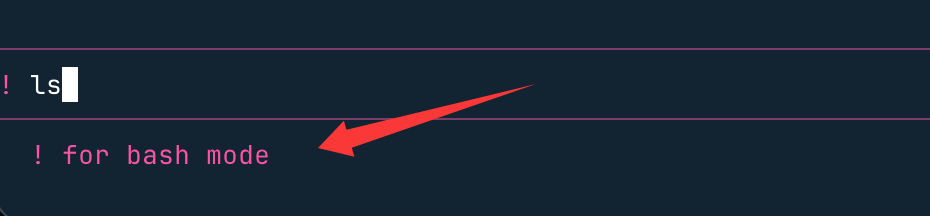
> ! ls
> !git log --oneline -10
> !npm test -- --coverage
> !cat logs/error.log | tail -50
@Prefix usage examples:
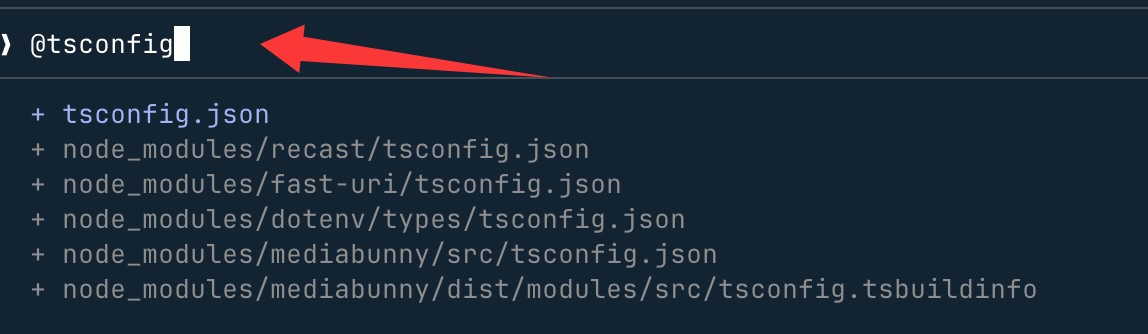
> 对比 @src/auth/v1.ts 和 @src/auth/v2.ts 的实现差异
> 审查 @src/api/users.ts 中的错误处理逻辑是否完善
IV. Custom Skills (New Recommended Format)
Skills are the next-generation format for custom commands, replacing the old version.claude/commands/. Both formats work normally, but it is recommended to use Skills directly for new projects.
Skills vs Commands Comparison
| Feature | Skills (recommended) | Commands (old format) |
|---|---|---|
| Storage path | .claude/skills/<名称>/SKILL.md |
.claude/commands/<名称>.md |
| Trigger method | /nameManually triggered, or automatically triggered by Claude based on description. |
/name(manually triggered only) |
| Multi-file support | Supports attached templates, examples, and helper scripts. | Single file |
| Claude auto-trigger | Claude intelligently decides whether to invoke based on the description. | |
| Agent Skills standard | Complies with open standards and can be shared across tools. |
Steps to Create a Skill
Step 1: Create the directory structure
Custom Skills come in two types, with different storage locations:
- Project Skill: Effective only in the current project, shared by the team → directory:
.claude/skills/<名称>/ - Personal Skill: Common to all projects, for personal use → directory:
~/.claude/skills/<名称>/
# 创建项目级 Skill(团队共享,纳入 git)
mkdir -p .claude/skills/optimize

# 创建个人级 Skill(跨项目通用,本地私有)
mkdir -p ~/.claude/skills/fix-bug
Step 2: Write SKILL.md
Create a newSKILL.mdfile, write configuration in YAML frontmatter, and write the prompt in the Markdown body below.nameThe field defines the trigger command name.
Example: Create a code performance optimization Skill
---
name: optimize
description: 分析代码性能瓶颈,给出优化建议。当用户提到性能问题时自动触发。
allowed-tools: Read, Grep, Glob
argument-hint: [目标文件或目录]
model: claude-sonnet-4-6
---

分析以下代码的性能瓶颈,给出具体的优化建议,优先考虑时间复杂度和内存占用:
$ARGUMENTS
When using, enter:
/optimize src/utils/data-processor.ts
Subdirectory Namespace Organization
You can.claude/skills/under it, use subdirectories to manage by function. The directory name is the command name:
.claude/skills/
├── optimize/            → /optimize
│   ├── SKILL.md
│   └── examples/        # 可选:示例文件辅助 Claude 理解
├── debug/               → /debug
│   ├── SKILL.md
│   └── scripts/         # 可选:辅助脚本
└── commit/              → /commit
    └── SKILL.md
V. Custom Slash Commands (Legacy Format, Compatible)
If you havereusable prompts(e.g., fixed code review requirements, repeated instruction templates), you can turn them into custom commands and invoke with one click.
Command file storage location:
| Scope | Storage path | Sharing method | Use case |
|---|---|---|---|
| Project-level | .claude/commands/<命令名>.md |
Include in git, shared by team | Project-specific workflows (e.g., code generation for specific frameworks) |
| Personal level | ~/.claude/commands/<命令名>.md |
Local private | General development habits (e.g., personal code style checking) |
Parameter syntax:
| Syntax | Description | Command file example | Call example |
|---|---|---|---|
$ARGUMENTS |
Capture everything after the command name | 分析并修复:$ARGUMENTS |
/fix 登录接口返回 500,见 logs/error.log |
$1 $2 |
Positional parameters split by spaces | 修复 Issue #$1,优先级 $2 |
/fix-issue 42 high |
!`cmd` |
Execute shell command and embed output into Prompt | !`git diff HEAD` |
Automatically expand to command execution result |
@file path |
Inject file content into Prompt | 审查 @src/utils/helpers.ts |
Automatically read file content |
Core Principles
Custom commands are essentiallyMarkdown text filesThe filename is the command name, the file content is the prompt to execute, supports passing parameters and calling Bash commands.
Steps to Create Custom Commands
Step 1: Create a command storage directory
Custom commands come in two types, stored in different locations:
- Project commands: Only effective in the current project, shared by the team → Directory:
.claude/commands/ - Personal commands: Common to all projects, for personal use → Directory:
~/.claude/commands/
Take creating a project command as an example, first create the directory:
# 在项目根目录执行
mkdir -p .claude/commands
Step 2: Write the Markdown command file
Create a new.mdfile, the filename is the command name (e.g.,optimize.md→ command/optimize), and write the prompt in the file content.
Example: Create a code performance optimization command
# 写入提示词到文件
echo "分析这段代码的性能瓶颈,给出具体的优化建议,优先考虑时间复杂度和内存占用:" > .claude/commands/optimize.md
Now, enter in the session/optimize, then paste the code, and Claude will perform performance analysis as you requested!
Advanced Tips: Adding Parameters to Commands
Commands can have parameters, using$ARGUMENTS(capture all parameters) or$1 $2(retrieve parameters by position).
Example: Bug fix command with parameters
Create command file.claude/commands/fix-issue.md:
修复 Issue #$ARGUMENTS,要求:
1. 符合项目编码规范
2. 附上测试用例
3. 说明修复思路
Use the command:
/fix-issue 123 # $ARGUMENTS 会被替换成 "123"
VI. Frontmatter Field Reference
Custom command files (commands/*.md) and Skills (skills/*/SKILL.md) can have YAML Frontmatter added at the top for fine-grained configuration:
---
name: commit                          # Skills 中必填;命令文件中可选(默认取文件名)
allowed-tools: Bash(git add:*), Bash(git commit:*), Read, Edit
argument-hint: [commit-message]
description: 检查代码质量后提交
model: claude-haiku-4-5-20251001
context: fork
agent: general-purpose
disable-model-invocation: false
user-invocable: true
hooks:
  PreToolUse:
    - matcher: "Bash"
      hooks:
        - type: command
          command: "./scripts/validate.sh"
          once: true
---
Field Descriptions
| Field | Type | Required | Description |
|---|---|---|---|
name |
string | Required for Skills | Define triggering command name (/name); for command files, the filename is used by default |
allowed-tools |
string | no | Tools that the command can use; matched tools do not require manual confirmation each time |
argument-hint |
string | no | In/helpParameter format hint displayed in the list, e.g.,[message] |
description |
string | no | Command function description, displayed in the/helpand/skillslist; for Skills, also used to let Claude determine whether to auto-trigger |
model |
string | no | Force a specific model; for simple tasks using Haiku can reduce cost |
context |
enum | no | fork: Run as an independent subagent;inline: Run within the current session |
agent |
string | no | context: forkWhen specifying the agent type |
disable-model-invocation |
bool | no | istrueWhen ..., programmatic invocation of this command via the Skill tool is prohibited |
user-invocable NEW |
bool | no | isfalseWhen ..., only allow Claude to auto-trigger; users cannot trigger manually/call |
hooks |
object | no | Lifecycle hooks during command execution |
allowed-toolsWriting Examples
| Syntax | Meaning |
|---|---|
Read |
Allow reading any file |
Read(src/*) |
Only allow readingsrc/directory |
Bash(git *:*) |
Allow all git subcommands |
Bash(npm test:*) |
Only allow runningnpm test |
Read, Grep, Glob |
Combine multiple tools |
Hook Trigger Timing
| Timing | Description | Typical use cases |
|---|---|---|
PreToolUse |
Before tool calls | Run lint before commit, backup before writing files |
PostToolUse |
After tool calls | Auto-format after modifications, generate changelog |
Notification |
When Claude sends a notification | Send Slack messages, desktop notifications |
Stop |
When Claude completes a response | Log records, trigger downstream tasks |
VII. Plugins and MCP Commands
Besides writing your own, you can also usepluginsandMCP serversto get more extended commands.
Naming format:
/mcp__<服务器名>__<命令名> [参数]
Common MCP Command Examples
| MCP server | Command example | Function |
|---|---|---|
| GitHub | /mcp__github__list_prs |
List PRs in the current repository |
| GitHub | /mcp__github__create_issue "Bug标题" high |
Create an Issue |
| PostgreSQL | /mcp__postgres__query "SELECT * FROM users LIMIT 10" |
Execute SQL queries |
| Slack | /mcp__slack__send_message "#dev" "部署完成" |
Send a Slack message |
| Jira | /mcp__jira__create_issue "修复登录Bug" high |
Create a Jira ticket |
| Figma | /mcp__figma__get_component "Button" |
Get Figma component information |
View all available MCP commands:/help(MCP commands are displayed in a separate group at the bottom of the help list)
1. Plugin Commands
After installing a Claude Code plugin, plugin-specific commands are automatically added, usually in the format:
/plugin-name:command-name # 避免命令名冲突
For example, after installing the Git plugin, there may be a/git:commitcommand that generates standardized commit messages with one click.
2. MCP Commands
MCP (Model Context Protocol) servers can turn the capabilities of external tools (such as GitHub, Jira) into slash commands, in the format:
/mcp__<服务器名>__<功能名> [参数]
Example:
/mcp__github__list_prs  # 列出 GitHub 仓库的 PR
/mcp__jira__create_issue "登录按钮失效" high  # 在 Jira 创建高优先级问题
VIII. Practical Command Template Library
Template Overview
| Template name | File path | Recommended model | Function |
|---|---|---|---|
| Smart Git commit | .claude/commands/commit.md |
Haiku | Commit after checking for debug leftovers |
| PR code review | .claude/commands/pr-review.md |
Sonnet | Comprehensive tiered review |
| Smart test runner | .claude/commands/test.md |
Sonnet | Run and automatically fix failed test cases |
| Security vulnerability scan | .claude/commands/security-scan.md |
Opus | OWASP Top 10 scan |
| API documentation generation | .claude/commands/api-docs.md |
Sonnet | Auto-generate REST API documentation |
| Code refactoring | .claude/commands/refactor.md |
Sonnet | Readability / DRY / type-safe refactoring |
| Documentation link checker | .claude/commands/check-links.md |
Haiku | Batch validate hyperlink validity in documentation |
Smart Git commit:
<!-- .claude/commands/commit.md -->
---
allowed-tools: Bash(git add:*), Bash(git status:*), Bash(git diff:*), Bash(git commit:*)
argument-hint: [commit-message]
description: 检查代码质量后提交
model: claude-haiku-4-5-20251001
---

## 暂存区内容
!`git diff --cached`

提交前检查以下问题,发现问题则报告并询问是否继续:
1. 遗留的 `console.log` / `print` 调试语句
2. 未处理的 `TODO` / `FIXME` 注释
3. 大段被注释掉的代码
4. 测试文件中的 `.only` / `.skip` 标记

若无问题,使用以下信息提交:$ARGUMENTS
PR code review:
<!-- .claude/commands/pr-review.md -->
---
allowed-tools: Read, Grep, Glob, Bash(git diff:*), Bash(git log:*)
description: 全面的 PR 代码审查
---

## 变更文件
!`git diff --name-only HEAD~1`

## 详细差异
!`git diff HEAD~1`

## 近期提交
!`git log --oneline -5`

按 Critical / Major / Minor 三级优先级输出审查结果,涵盖:
代码逻辑与可读性、安全漏洞、性能隐患(N+1 查询)、测试覆盖率、文档完整性
Smart test runner:
<!-- .claude/commands/test.md -->
---
allowed-tools: Bash, Read, Edit
argument-hint: [test-pattern]
description: 运行测试并自动修复失败用例
---

运行匹配 "$ARGUMENTS" 的测试:
1. 自动检测测试框架(Jest / pytest / Go test)
2. 运行指定模式的测试
3. 若有失败,分析根因并修复代码
4. 重新运行验证修复

不提供参数则运行全量测试并输出覆盖率报告。
Security vulnerability scan:
<!-- .claude/commands/security-scan.md -->
---
allowed-tools: Read, Grep, Glob
description: OWASP Top 10 安全漏洞扫描
model: claude-opus-4-6
---

以安全工程师视角审查代码库:

高危:SQL 注入、XSS、命令注入、硬编码密钥
中危:不安全的反序列化、过时依赖、敏感信息写入日志、CORS 配置过宽
低危:缺失安全响应头、错误信息暴露内部细节

输出格式:漏洞位置 + 危险级别 + 修复建议代码示例
API documentation generation:
<!-- .claude/commands/api-docs.md -->
---
allowed-tools: Read, Glob, Edit
argument-hint: [输出文件路径]
description: 自动生成 REST API 文档
---

扫描 @src/routes/ 和 @src/controllers/,为所有端点生成 Markdown 文档:
- 端点路径与 HTTP 方法
- 请求参数(Query / Body / Path)及类型
- 响应结构(成功与错误)
- 认证要求
- curl 调用示例

保存到:$ARGUMENTS(默认:docs/api.md)
Code refactoring:
<!-- .claude/commands/refactor.md -->
---
allowed-tools: Read, Edit, Glob
argument-hint: [目标文件或目录]
description: 代码质量重构
---

对 $ARGUMENTS 进行重构,遵循原则:
- 可读性:变量/函数命名语义化,消除魔法数字
- DRY 原则:提取重复逻辑为复用函数
- 单一职责:拆分超过 50 行的函数
- 错误处理:完善异常捕获和错误边界
- TypeScript:消除 `any` 类型,补全类型注解

重构前先输出变更计划,确认后再执行。
Documentation link checker:
<!-- .claude/commands/check-links.md -->
---
allowed-tools: Read, Bash, WebFetch
argument-hint: [文档文件路径]
description: 检查文档中的链接是否全部有效
model: claude-haiku-4-5-20251001
---

读取 $ARGUMENTS 文件,提取所有超链接(http/https),逐一请求并检查响应状态码。

输出格式:
- 有效链接(200)
- 重定向链接(3xx)及目标地址
- 失效链接(4xx/5xx)及建议替代链接

最后输出汇总:共 N 个链接,M 个失效。
Appendix: Configuration File Description
CLAUDE.local.mdand.claude/settings.local.jsonAdd to.gitignoreto prevent personal preferences from affecting team members.| File / directory | Purpose | Version control |
|---|---|---|
CLAUDE.md |
Project-level shared instructions (tech stack, build commands, coding standards, etc.) | Track in git |
CLAUDE.local.md NEW |
Personal private instructions (personal preferences, not shared with the team) | Add to .gitignore |
~/.claude/CLAUDE.md |
Global instructions, common to all projects | — |
.claude/settings.json |
Project-shared configuration (tool permissions, hooks, etc.) | Track in git |
.claude/settings.local.json |
Project personal configuration (overrides settings.json, not shared) | Add to .gitignore |
.claude/skills/ Recommended |
Project-level custom Skills (new recommended format) | Track in git |
.claude/commands/ Old format |
Project-level custom commands (old format, still fully compatible) | Track in git |
~/.claude/skills/ |
Personal global Skills (cross-project, local and private) | — |