Agent Skills (Agent Skills)
Agent means intelligent agent, and Skills means skills. Agent Skills is a core tool that turns professional knowledge and workflow specifications into reusable assets.
Agent Skills is essentially a modular Markdown file that can teach AI tools (such as Claude, GitHub Copilot, Cursor, etc.) to perform specific tasks, and supports automatic triggering, team sharing, and engineering management, completely eliminating repetitive prompt input.
The essence of Agent Skills is not a tool, but:
A combination of behavioral norms + professional knowledge + timing of use.
Skills basic content reference:Skills Tutorial
Core form:
A Skill is a folder that must contain a SKILL.md file (including description and metadata), and may optionally contain other resource files (such as scripts, examples, reference documents).
-
A Skill is a Markdown file (SKILL.md) used to teach Claude to do things your way in specific scenarios.
In essence, it is equivalent to issuing a professional manual to an AI agent. The AI does not learn from scratch every time, but automatically calls upon the knowledge in the manual based on the task.
-
Simply put, in the past we used prompts to teach AI how to do things; now with Agent Skills we can package prompts + resources into reusable, shareable skill packs, making it more efficient and reliable.
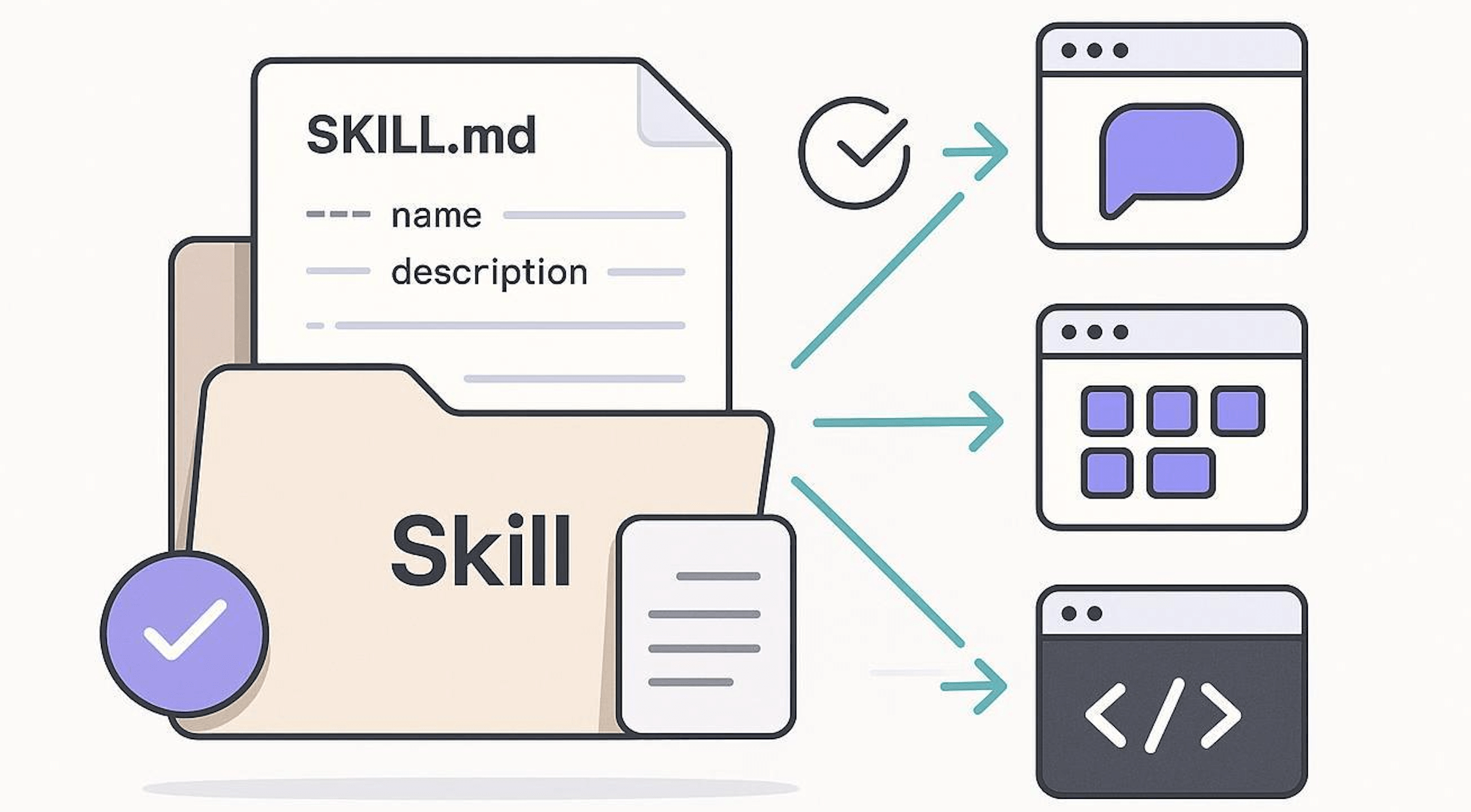
How Agent Skills Work
The key to Agent Skills is progressive disclosure, loaded in three layers:
- Layer 1: Skill Discovery-- AI first reads the metadata (name and description) of all skills to determine whether the task is relevant. This metadata is always in the system prompt.
- Layer 2: Load Core Instructions-- If relevant, the AI automatically reads the body content of SKILL.md to obtain detailed guidance.
- Layer 3: Load Resource Files-- Read additional files (such as scripts, examples) only when needed, or execute scripts via tools.
Supported Tools and Environments
Currently supported:
- Claude(Anthropic):Claude.ai、Claude Code、Agent SDK。
- VS Code + GitHub Copilot: project-level (.github/skills/) or personal-level skills.
- Cursor: project-level (.cursor/skills/) or global skills, supports installation from GitHub.
- Others: being expanded, open standard athttps://github.com/agentskills/agentskills。
Why Do We Need Skills? What Problems Do They Solve?
Ordinary AI agents (such as Claude or Copilot) are smart, but they are prone to errors when lacking specific context. For example:
- The team has its own coding standards, but the AI has to be manually reminded every time.
- For complex processes such as processing PDF forms or debugging GitHub Actions, the AI may not know the best practices.
Agent Skills solves these problems:
- Automatic triggering: The AI automatically loads relevant skills based on the task, eliminating the need to manually enter long prompts.
- Reusable & shareable: Created once, used by the whole team or community, supports Git version control.
- Efficient use of context: Adopt progressive disclosure, loading only the needed parts to avoid overflowing the context window.
- Cross-platform: The same Skill can be used in tools such as Claude, VS Code Copilot, Cursor, etc.
Quick Understanding of Core Concepts
| Concept | Metaphor | Function |
|---|---|---|
| Skill | An independent Swiss Army knife tool or cooking recipe | A complete suite for accomplishing a specific task (e.g., writing emails, analyzing data). |
| Instruction | The tool's instruction manual or the steps of a recipe | Tells Claude specifically what to do, how to think, and what format to output. |
| Knowledge | The tool's parts list or background information on recipe ingredients | Upload files (e.g., product manuals, API documentation) as the Skill's dedicated knowledge base. |
| Tool | Special accessory on the tool (e.g., a bottle opener) | Defines external APIs or functions that the Skill can call to fetch data or perform operations. |
Skill Execution Flow
Starting from the user instruction, first perform Skill intent recognition to decide whether to enter a controlled execution path.
After the Skill is matched, the system loads SKILL.md, establishes tool permissions and behavior boundaries, and then reasons with the context.
Only call permitted external tools when truly necessary; otherwise, complete the logic within the rules.
The final result is output after constraint integration, and the user's next input triggers a new round of the full flow.
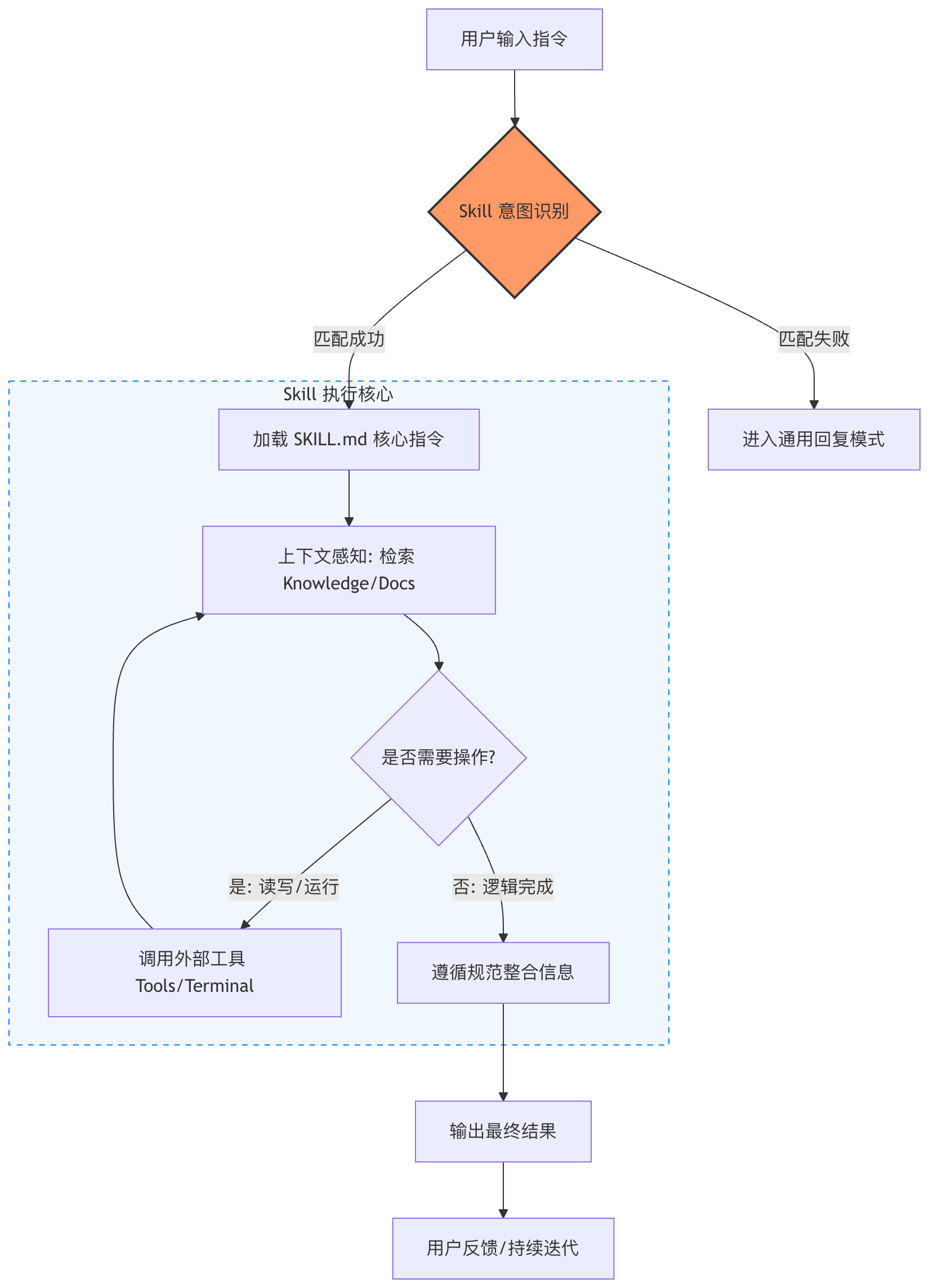
Minimal Structure of a Skill
my-skill/
└── SKILL.md   (唯一必需)
Basic SKILL.md template:
---
name: your-skill-name
description: What it does and when Claude should use it
---

# Skill Title

## Instructions
Clear, concrete, actionable rules.

## Examples
- Example usage 1
- Example usage 2

## Guidelines
- Guideline 1
- Guideline 2
Metadata fields:
| Field | Required | Description |
|---|---|---|
| name | no | Skill display name; defaults to the directory name; only lowercase letters, numbers, and hyphens are supported (max 64 characters) |
| description | Recommended | The skill's purpose and usage scenarios; Claude uses it to decide whether to apply automatically |
| argument-hint | no | Parameter hints displayed during autocomplete, such as[issue-number]、[filename] [format] |
| disable-model-invocation | no | Set totrueProhibit Claude from automatically triggering; manual only/nameinvocation (default false) |
| user-invocable | no | Set tofalsefrom/Hidden from menu, used as a background enhancement capability (default true) |
| allowed-tools | no | Tools Claude can use without authorization when the Skill is active |
| model | no | Model used when the Skill is active |
| context | no | Set toforkruns in a subagent context when set |
| agent | no | Subagent type (used with context: fork) |
| hooks | no | Skill lifecycle hook configuration |
Skills support inserting dynamic variables in content:
| Variable | Description |
|---|---|
$ARGUMENTS |
All parameters passed when calling the Skill |
$ARGUMENTS[N] |
Access parameters by index, e.g.,$ARGUMENTS[0] |
$N |
Shorthand notation, e.g.,$0Indicates the first parameter |
${CLAUDE_SESSION_ID} |
Current session ID, used for logs, temporary files, and associated output |
For example:
---
name: session-logger
description: 记录当前会话活动
---

请将以下内容写入日志文件:

logs/${CLAUDE_SESSION_ID}.log

$ARGUMENTS
Invocation:
/session-logger 用户登录成功
It will actually generate session-specific log records.
Core Components of the SKILL.md File
Take Claude's PDF document editing skill as an example: Claude can natively parse PDFs but cannot directly manipulate them (e.g., filling in forms). This skill fills that gap.
- Core form:A directory containing SKILL.md
- Required metadata:The YAML block at the beginning of SKILL.md must include name and description; it is preloaded into the system prompt at startup.
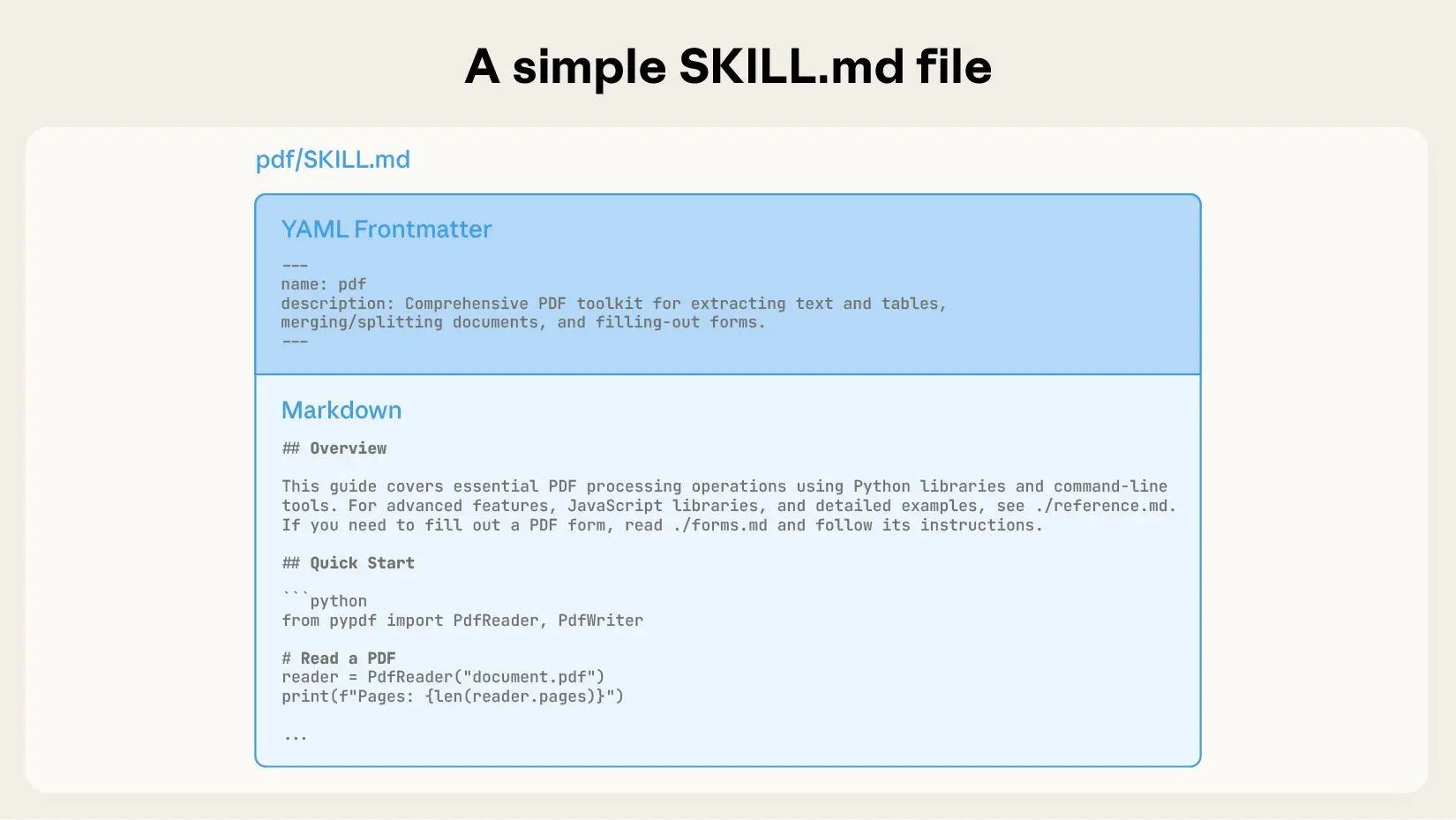
Multi-file Skill (Progressive Disclosure)
Progressive disclosure mechanism
- Layer 1: Metadata → lets Claude judge the applicable scenarios for the skill without loading all content.
- Layer 2: SKILL.md body → after relevance is determined, load the full context.
- Layer 3+: Attached files (e.g., forms.md) → referenced on demand to keep the core file compact.
The following diagram shows how the context window changes when a user message triggers the skill:
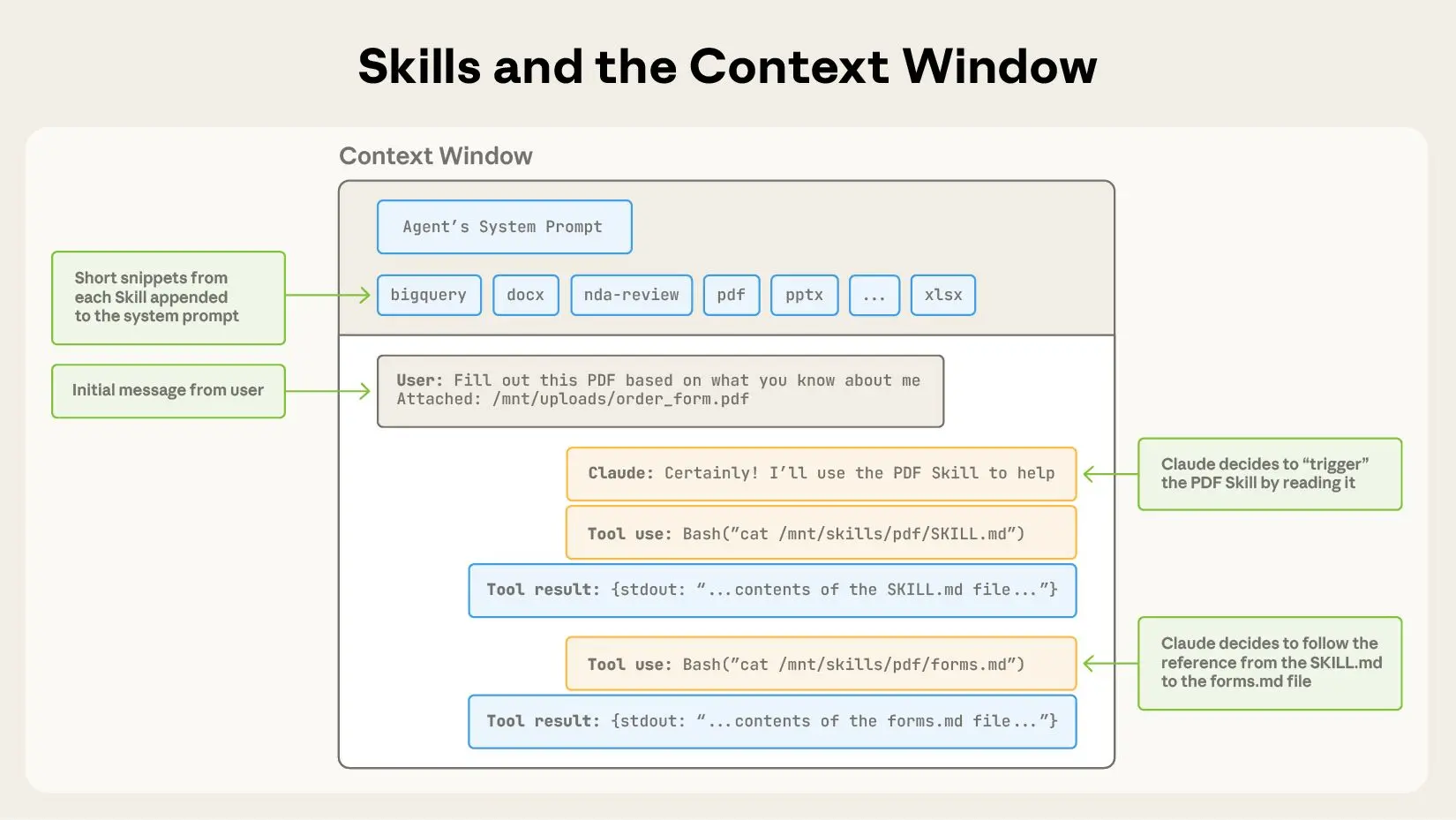
- Initial state: the context window contains the system prompt, skill metadata, and user instruction.
- Call the Bash tool to read the target SKILL.md and trigger the corresponding skill.
- Load auxiliary files as needed (e.g., forms.md).
- Execute the user's task after loading is complete.
Recommended Directory Structure
To avoid context bloat:
- Core rules →
SKILL.md - Detailed materials → separate files
- Practical logic → script execution (not loaded)
Recommended structure:
my-skill/
├── SKILL.md
├── reference.md
├── examples.md    # 存放示例文件
└── scripts/
    └── helper.py
Your First Skill
Let's temporarily forget the complex creation process and start withusing a ready-made Skillto experience the convenience it brings.
Create a Skill Directory
Skills are stored in~/.claude/skills/(personal global) or in the project directory.claude/skills/(project-specific).
In this chapter, we test under the project directory. First, create a directory claude-test:
mkdir claude-test
Enter that directory, create the skills directory and files:
mkdir -p .claude/skills/python-naming-standard
Write the Configuration File SKILL.md
Create SKILL.md in the directory. This is the brain of the Skill, telling Claude when to use it.
---
name: Python 内部命名规范技能
description: 当用户要求重构、审查或编写 Python 代码时,请参考此规范。
---

## 指令
1. 所有的内部辅助函数必须以 `_internal_` 前缀命名。
2. 如果发现不符合此规则的代码,请自动提出修改建议。
3. 在执行 `claude commit` 前,必须检查此规范。

## 参考示例
- 正确:`def _internal_calculate_risk():`
- 错误:`def _calculate_risk():`
Field requirements:
- name: Must use only lowercase letters, numbers, and hyphens (max 64 characters)
- description: Brief description of the Skill and when to use it (max 1024 characters)
After creation, the file structure is as follows:
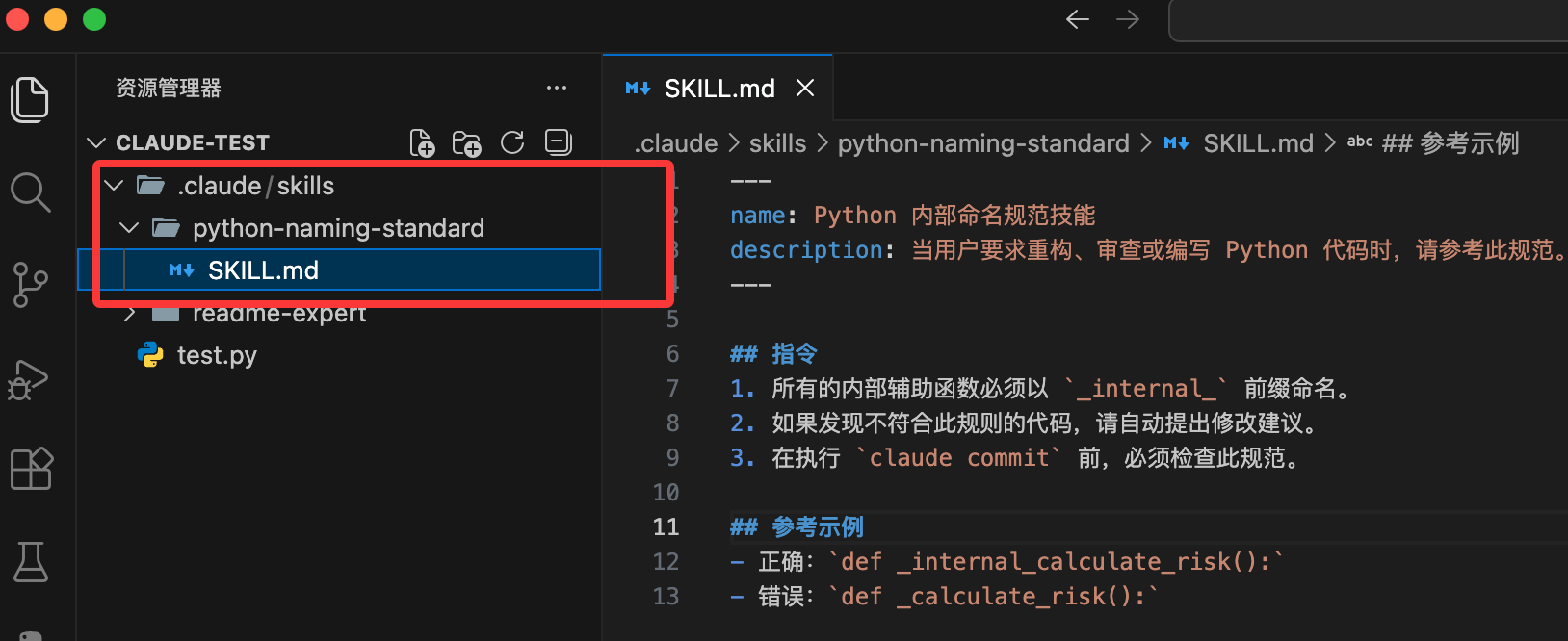
Your project should now look like this:
my-project/
├─ src/
│  └─ test.py              # 项目源码
├─ .claude/
│  ├─ skills/
│  │  └─ hello-world/
│  │     ├─ skill.md       # Skill 定义(YAML + Instructions,机器可执行)
│  │     └─ README.md      # Skill 说明(人类阅读,可选)
│  └─ config.yml           # Claude 项目级配置(可选)
├─ .gitignore
└─ README.md               # 项目整体说明
Next, run the following command in the terminal to launch Claude Code:
claude
Enter the task:
Help me write a function that calculates user discounts.
Claude will scan the installed Skills, find that your request involves "Python code writing", and match python-naming-standard.
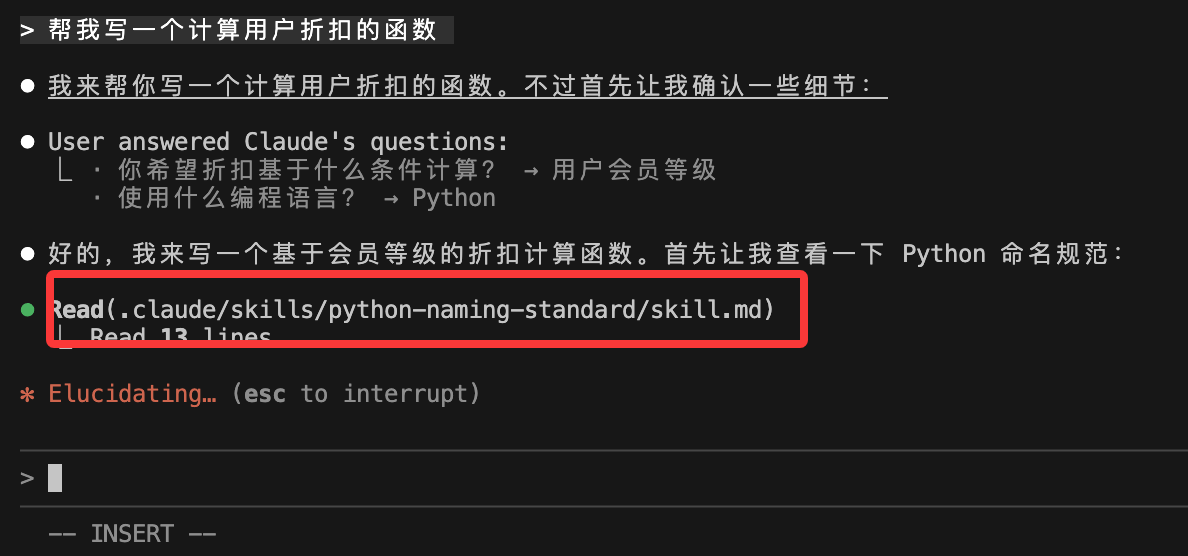
It will generate the following code according to the requirements in SKILL.md:
def _internal_get_discount(user_score):
    # 计算逻辑...
    return discount
Add Resource Files (Optional)
Additionally, we can.claude/skills/add the following directories below:
In the same folder, add:
examples/: stores example files.references/: stores reference documents.scripts/: stores executable scripts (e.g., Python for processing PDFs).
Then reference them in SKILL.md:
查看示例 commit:./examples/good-commit.txt
运行脚本:使用工具执行 ./scripts/process.py
Official Marketplace
Besides writing your own, you can also take advantage of the Agent Skills open standard released in late 2025:
- Official Marketplace: visithttps://github.com/anthropics/skillsthe repository to download preset skills (e.g., React optimizer, SQL tuning tools).
- Skill Creator: You can say to Claude: "Help me summarize the Docker configuration logic I just taught you into a Skill," and it will automatically generate files for you in the corresponding directory.
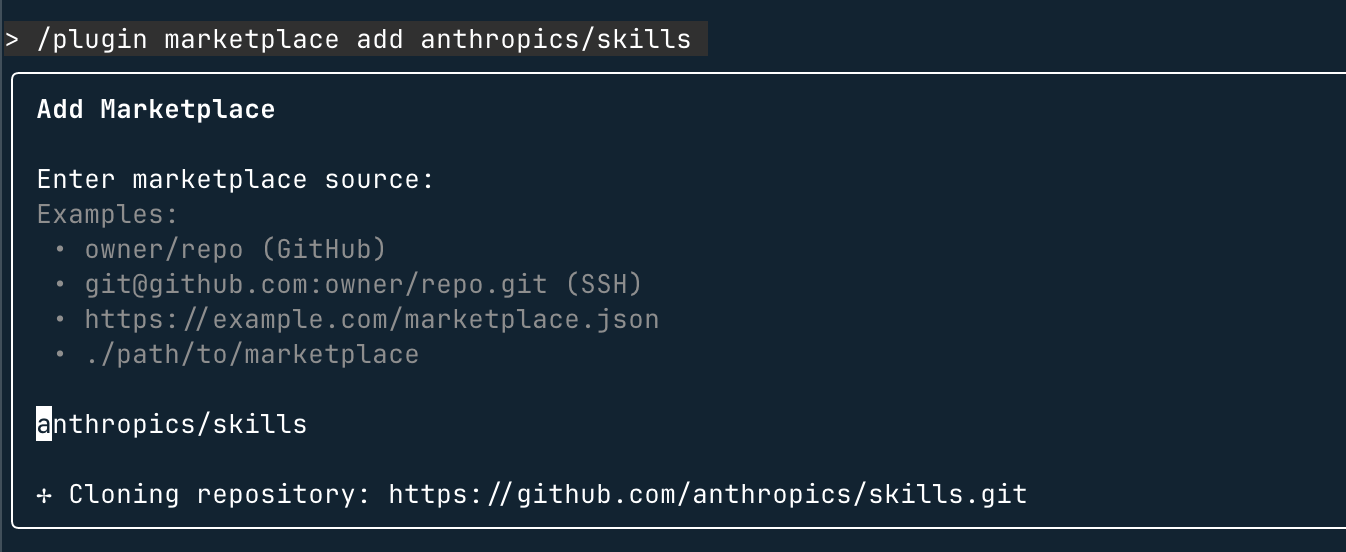
We can register this repository as a plugin marketplace for Claude Code by simply executing the following command in Claude Code:
/plugin marketplace add anthropics/skills
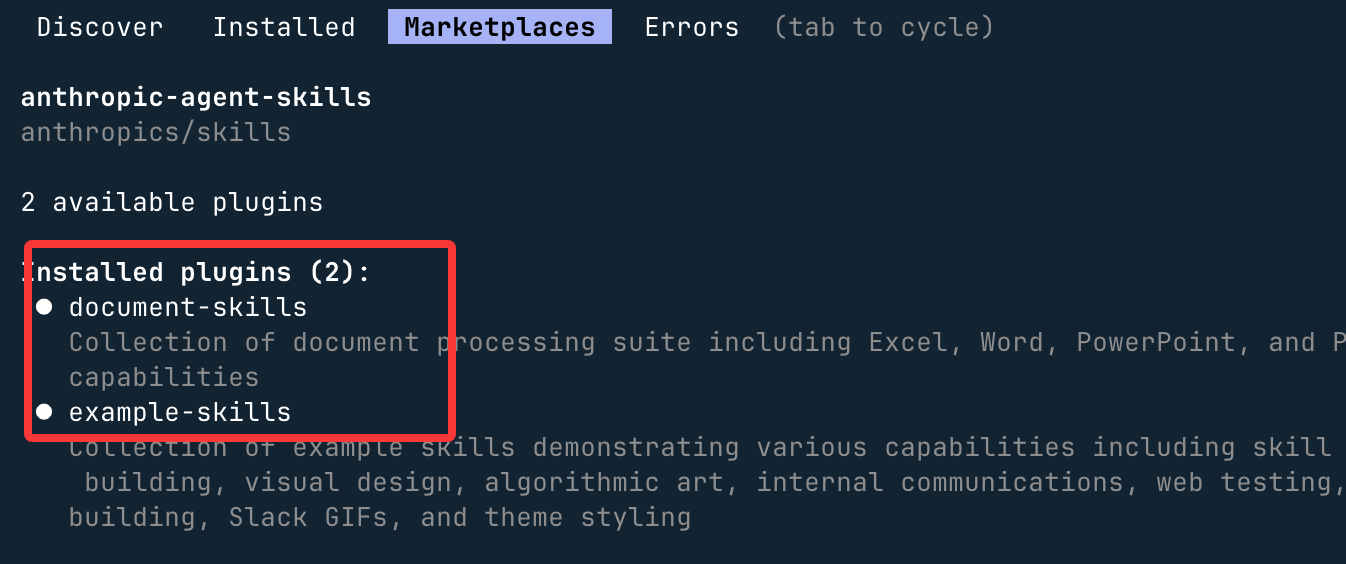
Then you can use/plugin to view:
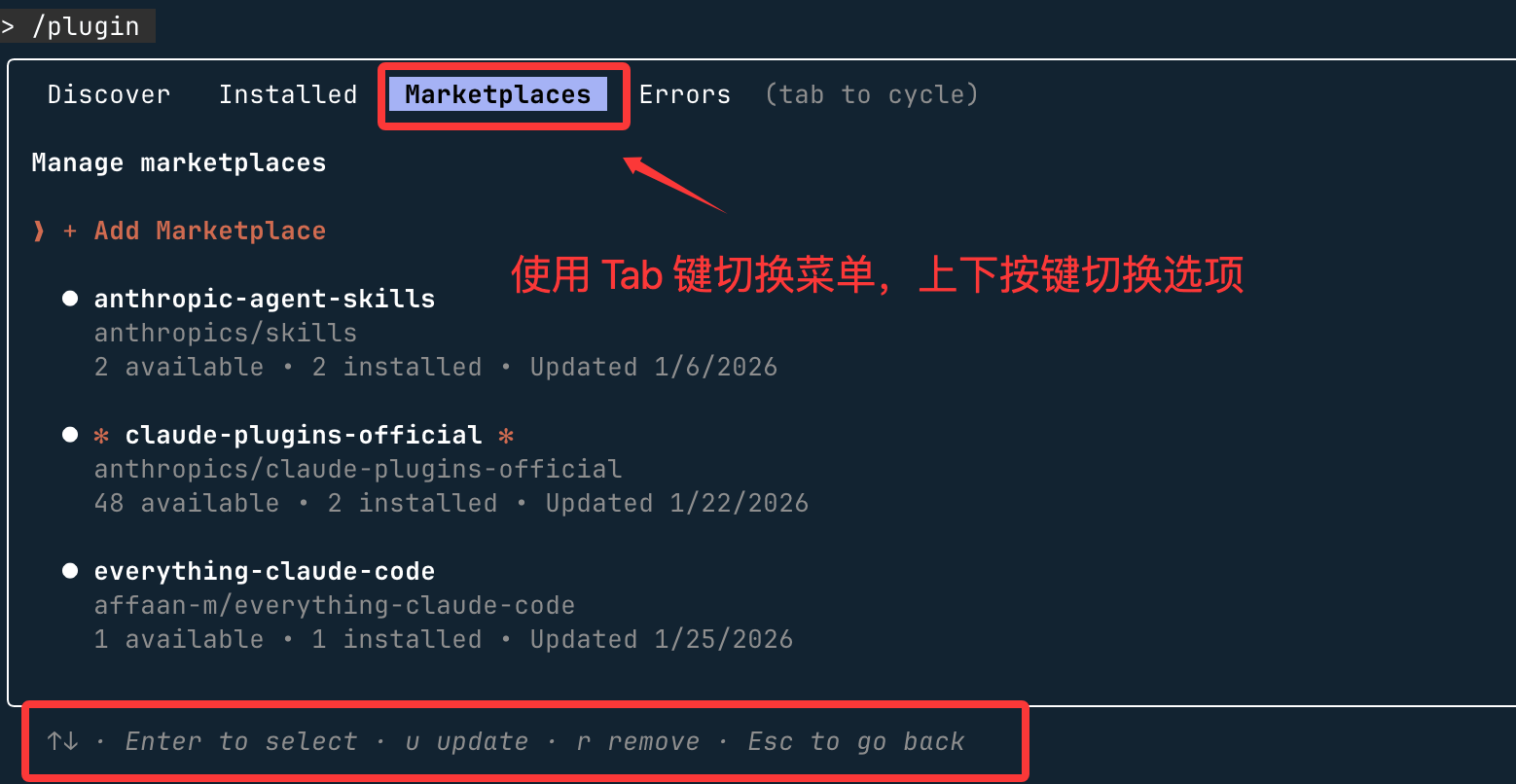
Steps to install a specific skill set:
- Browse and install plugins
-
Select the anthropic-agent-skills plugin source
Select document-skills (document skills) or example-skills (example skills)
-
Click "Install now"
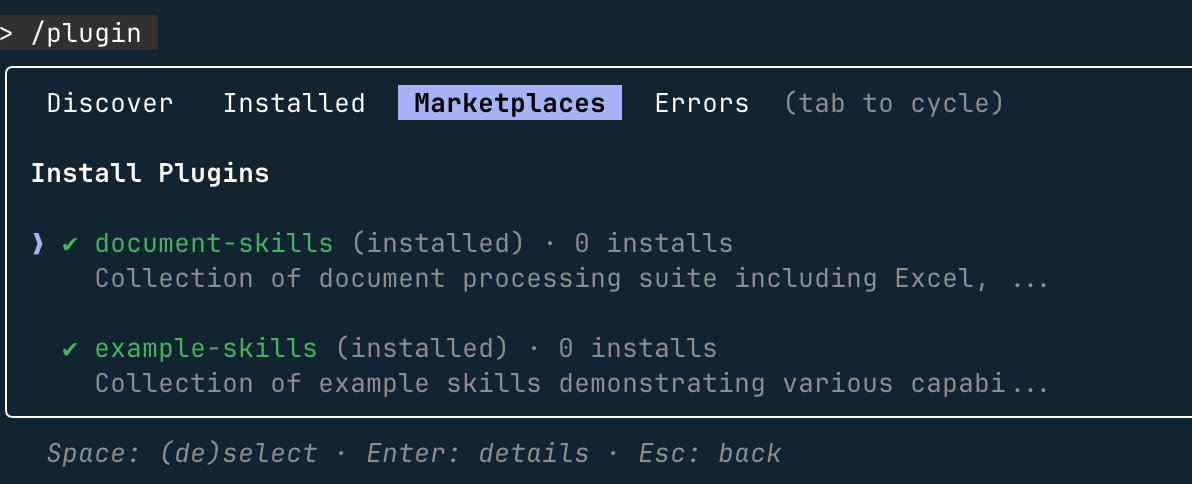
We can also directly install the above two types of plugins via commands:
/plugin install document-skills@anthropic-agent-skills
/plugin install example-skills@anthropic-agent-skills
Note:The skills directory installed via plugins is located~/claude/plugins/marketplaces/under.
After the plugin installation is complete, you need to restart Claude Code.
When using it, you only need to mention the skill name in the instruction to invoke it. For example, after installing the document-skills plugin, you can give Claude Code the following instruction:
使用 PDF 技能提取 path/to/some-file.pdf 文件中的表单字段
Or create a PPT:
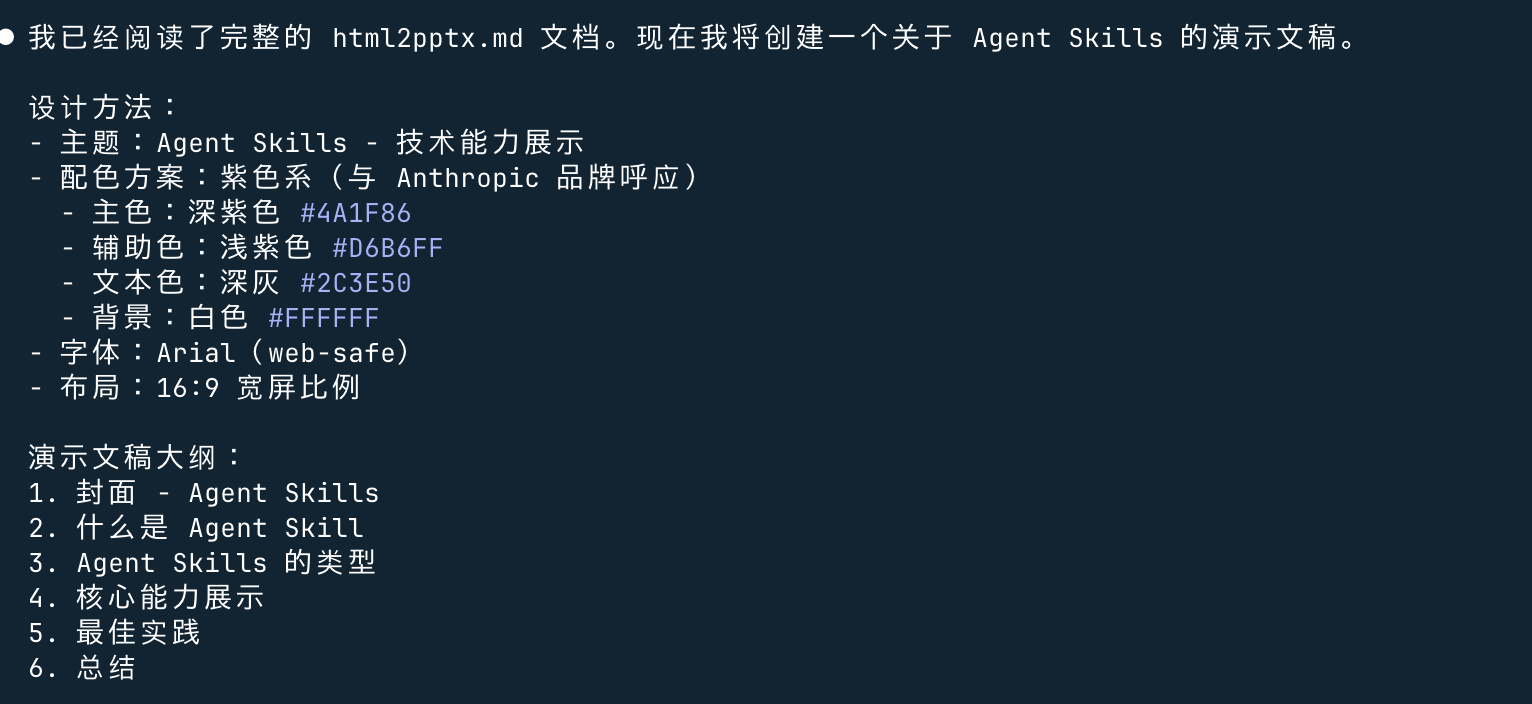
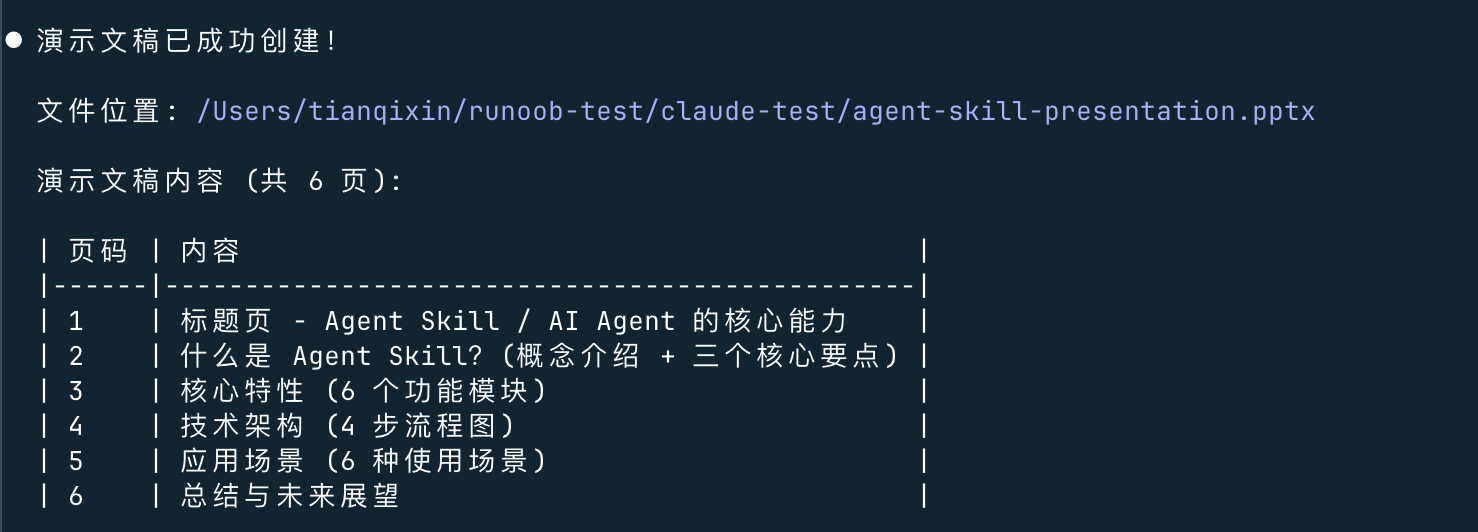
创建一个 Agent Skill 的演示文稿
You can see that it invoked/document-skills:pptx:
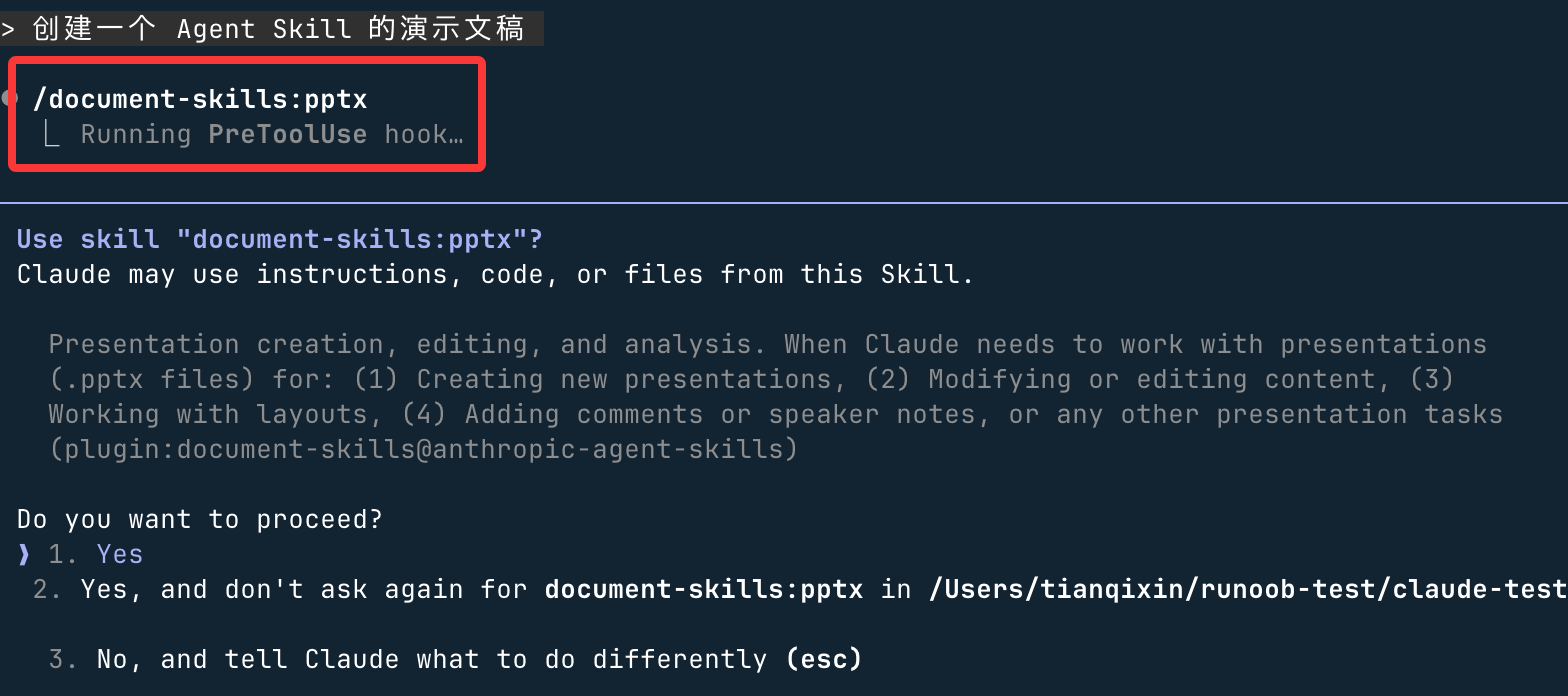
began generating:
Agent Skills Related Resources
| Resource description | Link |
|---|---|
| Skill aggregation entry point | https://skills.sh/ |
| Skills marketplace (Chinese interface) | https://skillsmp.com/zh |
| Agent Skills official standard site | https://agentskills.io |
| Anthropic Official Engineering Article (Agent Skills Practical Concepts) | https://www.anthropic.com/engineering/equipping-agents-for-the-real-world-with-agent-skills |
| VS Code Copilot Agent Skills Documentation | https://code.visualstudio.com/docs/copilot/customization/agent-skills |
| Anthropic Official Skills GitHub Repository | https://github.com/anthropics/skills |
| Claude Skills Selected List (Awesome Series) | https://github.com/ComposioHQ/awesome-claude-skills |
| Software Development Automation Workflow Skills Collection | https://github.com/obra/superpowers |
| Skill that Automatically Generates Skills (Official Example) | https://github.com/anthropics/skills/tree/main/skills/skill-creator |